Best TV Stands 2026: 5 Media Consoles for Any Room Size
WriterPickly Editorial
Updated 2026-06-13
A TV stand is one of those pieces of furniture you look at every day and rarely think about until it breaks, runs out of storage, or looks wrong against a new sofa. The right media console hides your cable chaos, holds your components without sagging, and doesn't make the room feel smaller than it is. These five cover everything from IKEA's modular system for renters to Article's solid-wood console for a permanent living room.
Quick answer
West Elm's Tower Media Console is built for 65-75 inch screens, with a footprint wide enough to avoid overhang, mixed open and closed storage, and cable cutouts at the rear of every shelf. CB2's walnut console is the mid-century pick with tapered solid legs and magnetic latches, IKEA's BESTA is fully configurable into a built-in media wall at flat-pack prices, Wayfair's Trent is the budget mid-range, and Article's Cado pairs solid legs with engineered wood below West Elm money.
📋How we compared
Each TV stand was assessed on storage capacity, cable management features, weight capacity and shelf sag resistance, assembly quality, and dimensional accuracy for common TV sizes (50-75 inches).
Best for Large TVs: West Elm's Tower Media Console is built for the 65-75 inch TV generation — the wide footprint provides the proportional support these large screens need, and the storage configuration (open lower shelf plus cabinet with adjustable shelving) handles a full AV setup. The angled wood grain details on the cabinet doors are a distinctive design element that elevates it above generic flat-front consoles.
Top picks ↓This button opens Amazon search results, not a specific product page.
Related articles


1★ Best PickA+Best for Large TVsWest Elm Tower Media Console

West Elm's Tower Media Console is built for the 65-75 inch TV generation — the wide footprint provides the proportional support these large screens need, and the storage configuration (open lower shelf plus cabinet with adjustable shelving) handles a full AV setup. The angled wood grain details on the cabinet doors are a distinctive design element that elevates it above generic flat-front consoles. Cable management cutouts are present at the rear of each shelf. The assembly is more involved than flat-pack alternatives, but the result is a piece that looks more substantial than its price.
Pros
- ✓Wide enough to properly support 65-75 inch TVs without overhang
- ✓Mixed open and closed storage handles components and display items
- ✓Cable cutouts at rear of each shelf — proper cable management built in
Cons
- ✗Assembly takes 2+ hours and requires two people
- ✗Mango wood finish shows fingerprints more than darker alternatives
2ABest Mid-Century DesignCB2 Dark Walnut Media Console

CB2's walnut media console is a clean mid-century modern design with tapered solid wood legs and flat-front walnut veneer doors that close with magnetic latches. The silhouette is low and horizontal, which suits contemporary rooms that don't want the furniture fighting for visual attention with the TV. Two doors with adjustable interior shelving handle most component configurations. The walnut veneer is properly finished — it doesn't look like printed paper grain. For rooms with a Scandinavian or mid-century aesthetic, this is the most coherent choice in the group.
Pros
- ✓Walnut veneer and tapered solid wood legs are genuinely attractive
- ✓Low-profile horizontal silhouette recedes visually in modern rooms
- ✓Magnetic door latches provide clean close without visible hardware
Cons
- ✗Veneer (not solid wood) is susceptible to moisture damage at edges
- ✗Fixed interior shelf height limits taller component storage
3ABest Modular SystemIKEA BESTÅ TV Storage Unit

IKEA's BESTÅ system is different from every other option here: it's a configurable platform where you select base units, doors, and top panels to create a custom layout. The result can look designed and intentional — glossy white push-to-open doors, or wood-grain with metal handles — at a price point well below comparable designed pieces. The trade-off is planning time: you need to measure carefully and configure your cart correctly before ordering. But for a living room where you want a built-in-looking media wall without the built-in price, BESTÅ is the standard answer. Assembly is straightforward for anyone with flat-pack experience.
Pros
- ✓Fully configurable — customize width, door style, and interior layout
- ✓Can create a built-in media wall appearance at flat-pack prices
- ✓Wide range of door finishes from gloss white to wood grain
Cons
- ✗Requires significant planning before ordering — easy to misconfigure
- ✗Assembly of multi-unit systems takes 3-4 hours
Subscribe to our newsletter
Occasional updates and new releases — no spam.
4B+Best Budget Mid-RangeWayfair Trent Austin Design TV Stand
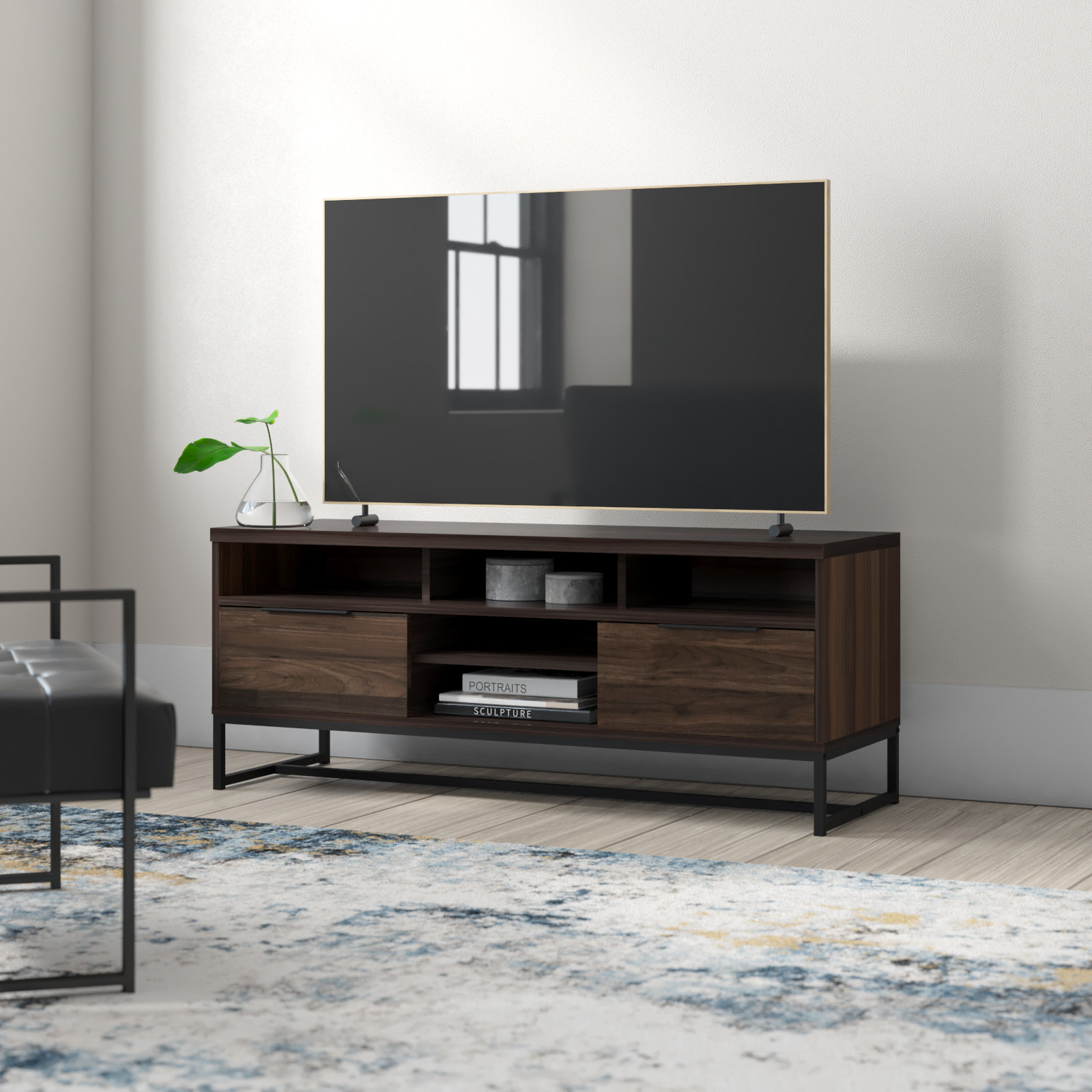
Wayfair's Trent TV stand occupies the budget mid-range — it looks more expensive than its price, the construction is sound, and the storage configuration works for a standard living room setup. The wood-look finish is convincing at normal viewing distance. Adjustable shelves inside the cabinets add flexibility. The assembly is straightforward with clear instructions. Nothing about the Trent is exceptional, but nothing is wrong either — it's the reliable option when you don't want to spend West Elm money but want something better than bare-minimum construction.
Pros
- ✓Solid construction for the price — shelves don't sag under component weight
- ✓Adjustable interior shelving accommodates various component heights
- ✓Clean mid-century aesthetic that works in most living room contexts
Cons
- ✗Printed wood-look finish rather than real veneer — visible close up
- ✗Hardware quality is basic — hinges work but aren't smooth
5B+Best Solid ConstructionArticle Cado TV Unit

Article's Cado TV unit uses solid walnut-stained legs and engineered wood carcass construction — a step up from pure MDF at a price below comparable West Elm pieces. The design is clean and minimal: two doors with visible grain, tapered legs, and a proportional silhouette that works in both modern and transitional rooms. Article ships directly from warehouses and the packaging is excellent — arrives without damage routinely. For a permanent home setup where you want something that reads as quality furniture rather than flat-pack, the Cado delivers that without the high-end retail markup.
Pros
- ✓Solid wood legs give genuine furniture weight and quality feel
- ✓Direct-to-consumer pricing is competitive with similar quality pieces
- ✓Clean minimal design ages well — not a trend-specific piece
Cons
- ✗Returns require scheduling a pickup — less convenient than local store returns
- ✗Limited finish options compared to IKEA or West Elm
What to Look for in a TV Stand
TV stands fail in a few specific ways: shelves sag under component weight, cable management is inadequate, or the width doesn't match the TV. Checking these before buying prevents most returns.
Width and TV Compatibility
The TV stand should be at least as wide as the TV's base (not the screen width — the stand footprint). For a 65-inch TV, the stand legs are typically 50-55 inches apart. A media console that's narrower than the TV's base means the TV overhangs the edges, which looks proportionally wrong and creates a tipping risk. A console 6-12 inches wider than the TV base is the ideal range.
Storage Configuration
Cable boxes, game consoles, streaming devices, sound bars, and receivers all need to live somewhere. An open-shelf console requires everything to look good on display — a reality most component collections can't meet. Cabinets with doors hide the mess but require ventilation (components overheat in enclosed spaces). Mesh or perforated cabinet backs allow airflow. Cable cutouts at the back of each shelf are essential — without them, you're routing cables over the top of every shelf.
Construction and Weight Rating
Solid wood and plywood construction holds up under component weight. MDF (medium-density fiberboard) is common in flat-pack furniture — acceptable for lighter components but can sag over time under heavy gear. Check the shelf weight rating; most media console shelves should handle 30-50 lbs per shelf without deforming. Particleboard is the lowest quality option — it deflects under load and doesn't hold screws well after assembly.
Height and Viewing Angle
The center of your TV screen should be at seated eye level, which is roughly 42-48 inches from the floor. A standard 16-18 inch tall console puts a large TV at the correct height. Consoles taller than 24 inches push a large TV too high for comfortable viewing from a sofa. Low-profile consoles (under 14 inches) are only appropriate for wall-mounted TVs or floor-level seating.
How These Five Stack Up
IKEA's BESTÅ system is in a completely different category from the others — it's a modular framework you configure yourself. You choose the base units, doors, and shelves. The result can look custom-designed at flat-pack prices. The trade-off is assembly time and the need to plan your configuration before ordering. Article's Cado console is the opposite: a complete, designed piece with solid wood legs and a minimalist walnut aesthetic that requires no configuration decisions.
West Elm's Tower Media Console handles the widest TVs — it's built for 70-80 inch screens. CB2's Dark Walnut console is a cleaner mid-century design that photographs well. Wayfair's Trent is the honest budget value: good construction at a price that makes it accessible without looking cheap.
Bottom Line
IKEA BESTÅ for anyone who wants a custom look at a manageable price and has patience for assembly planning. Article Cado for a permanent living room where you want something that looks like real furniture. West Elm for large TVs that need proportional support. CB2 for mid-century rooms. Wayfair Trent when budget is the primary constraint but you don't want to sacrifice durability. For the piece that sits between the sofa and the TV stand, see our coffee table picks.
Frequently asked questions
How wide should a TV stand be for a 65-inch TV?▼
Do TV stands need ventilation for components?▼
Can I mount a TV on a TV stand instead of the wall?▼
How do I manage cables on a TV stand?▼
What's the difference between a TV stand and a media console?▼
Check the details of the products in this article
This button opens Amazon search results, not a specific product page.
- IKEA BESTÅ TV Storage Unit$149〜599Reference price
- Wayfair Trent Austin Design TV Stand$279〜449Reference price
- Article Cado TV Unit$599〜849Reference price
Prices change. Check the retailer for the current price.
Comments & questions
Discussion happens on nattzy, our community forum. Sign in with Google to post — it takes a second.
View the discussion thread on nattzy ↗
Still deciding? Ask the community your own question — Post a question on nattzy ↗
Related articles
Best sofas 2026: comfort, durability, and cushion sag

Best Floor Lamps 2026: Brightech vs Dyson vs IKEA

Best Storage Ottomans 2026: Lid, Weight & Storage

Best Coffee Tables 2026: 5 Picks From IKEA to CB2
Best Accent Chairs 2026: 5 Chairs That Actually Get Used

Best Area Rugs 2026: Ruggable vs Safavieh vs nuLOOM