Best Desk Lamp 2026: 5 options compared
Five desk lamps and monitor light bars — BenQ ScreenBar Halo. Adjustability range matching your actual sitting posture matters more than material grade.
Quick answer
For screen-forward desk work, the BenQ ScreenBar Halo is the pick — asymmetric optics keep light off the monitor, and back-glow bias lighting plus auto-dimming target the contrast that causes digital eye strain. The Elgato Key Light's 2,500 lux soft panel is for on-camera work, Dyson's Solarcycle Morph covers task and ambient in one arm at CRI 98, and the Baseus i-wok is the budget monitor bar.
Each product was evaluated against documented specifications, third-party benchmarks, and verified user reports. We scored features, performance, build quality, ecosystem compatibility, and total cost of ownership.

BenQ ScreenBar Halo
Eye-strain pick: The BenQ ScreenBar Halo is the most complete monitor light bar in the comparison, combining asymmetric optics that direct light onto the desk without glaring back off the screen, a back-glow LED strip that delivers bias lighting behind the monitor, and an ambient sensor that auto-dims to maintain a consistent surface lux. The wireless puck controller is the practical detail that elevates daily use — you adjust brightness and 2,700–6,500K color temperature without reaching behind the monitor.
Top picks ↓| Product | Price | Link |
|---|---|---|
| $199Price as of 2026-09-24 | ||
| $179.99Price as of 2026-09-24 | ||
| $849.99Price as of 2026-09-24 | ||
| $29.99Price as of 2026-09-24 | ||
| $31.99Reference price |
Top picks
Related articles

BenQ ScreenBar Halo — monitor-mounted LED bar with asymmetric optics (illuminates desk surface without screen glare), back-glow bias lighting LEDs for eye strain reduction, ambient light sensor for auto-dimming, wireless remote controller, USB-A or USB-C powered from monitor hub, CRI 95+ claimed, 2,700–6,500K. Available at major online retailers. The premium price is a 6x multiple over the Baseus i-wok for the core monitor-bar function; monitor-mount only — no desk stand included or sold separately; back-glow can be distracting and increase perceived brightness in already well-lit rooms; requires powered USB ports on your monitor, and if your monitor lacks them, a separate USB power adapter is needed.
The BenQ ScreenBar Halo is the most complete monitor light bar in the comparison, combining asymmetric optics that direct light onto the desk without glaring back off the screen, a back-glow LED strip that delivers bias lighting behind the monitor, and an ambient sensor that auto-dims to maintain a consistent surface lux. The wireless puck controller is the practical detail that elevates daily use — you adjust brightness and 2,700–6,500K color temperature without reaching behind the monitor. BenQ claims CRI 95+, which is the kind of rendering quality where document review and casual color-checking remain reliable. It is monitor-mount only with no desk stand option, draws USB power from your monitor's hub, and at its premium price it is roughly six times the price of the Baseus. For screen-forward work where eye strain is the priority, it remains the reference.
Pros
- ✓Asymmetric optics deliver desk illumination without screen glare
- ✓Back-glow bias lighting reduces screen-to-room contrast
- ✓Wireless puck controller and auto-dimming ambient sensor
Cons
- ✗Monitor-mount only — no desk stand option from BenQ
- ✗Roughly 6x the price of comparable budget monitor bars
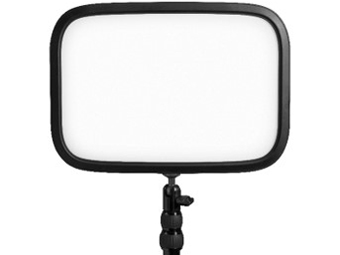
Elgato Key Light — 2,500 lux LED panel designed for content creators, streamers, and video call professionals. 2,900–7,000K color temperature, app and Stream Deck control, soft-panel diffused output for face illumination, desk clamp mount. Available at major online retailers. It is a significant investment for a product that illuminates your face for a camera, not your desk surface for reading or typing — if you are not regularly on camera, the Key Light does not function as a desk lamp replacement; large footprint clamp mount requires a substantial desk edge (minimum 6cm thickness); all meaningful controls require the Elgato app on a phone or computer, or a Stream Deck accessory — physical controls on the lamp itself are minimal; needs a sturdy desk edge and strong clamp for stable mounting, which may not work on glass or thin desks.
The Elgato Key Light is built for face illumination on camera rather than desk work, and within that role it is the most capable option here. The 2,500 lux soft panel covers 2,900–7,000K, and the Elgato Control Center app plus Stream Deck integration let you preset color temperature and brightness for streams, client calls, and recording. The diffused output is even enough to avoid the harsh shadow lines that single-point lamps create. The desk clamp wants a sturdy edge of at least 6 cm and does not work on glass or thin tops, the app dependency means the physical lamp itself offers minimal control, and pointing 2,500 lux at your face while typing is uncomfortable and useless for desk illumination. For creators on camera multiple hours a day, the Key Light earns its desk footprint; for everyone else, it is the wrong tool.
Pros
- ✓2,500 lux soft panel with 2,900–7,000K range tuned for camera
- ✓Stream Deck and app integration for one-tap presets
- ✓Diffused output avoids harsh single-point shadows
Cons
- ✗Not a task lamp — face-forward illumination only
- ✗Requires a sturdy desk edge over 6 cm and the Elgato app for full control
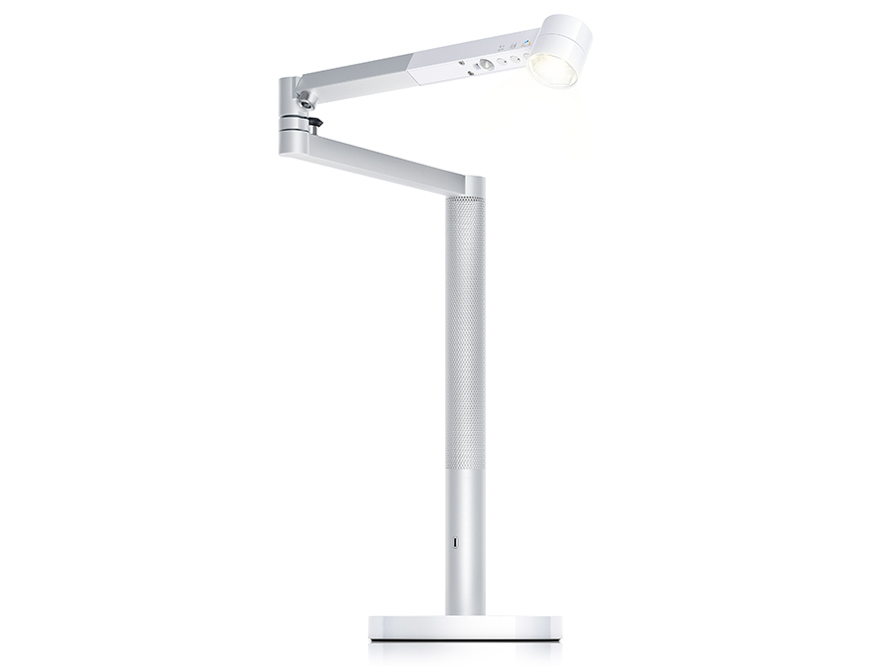
Dyson Solarcycle Morph — articulated desk lamp with task, ambient, and indirect light modes. Personalized light schedule based on time and user-configured age factor. 150,000-hour LED life claim. 2,700–6,500K, CRI 98 claimed, heat-pipe cooling, app control via Dyson Link. Available at major online retailers. It is approximately 3x the next most expensive product in this comparison and the price premium reflects Dyson engineering and brand positioning as much as illumination performance; the heat pipe cooling system requires the lamp to be used within designed angle ranges — extreme positions can compromise efficiency and are not covered by warranty claims; the personalized algorithm and age factor are more complex than most desk lamp users need or will configure; the heavy base, while good for stability, makes the lamp less convenient to reposition frequently.
The Dyson Solarcycle Morph is the most versatile physical lamp here, with task, ambient, indirect, and feature lighting modes accessible by rotating the arm through its designed range. Dyson claims a 150,000-hour LED life enabled by a heat-pipe cooling system and CRI 98 with 2,700–6,500K coverage, plus a personalized day-cycle algorithm that takes age and time inputs through the Dyson Link app. The articulation makes it a credible single-lamp solution for a workspace that needs both focused task light over the desk and softer indirect light off the wall. At its flagship price it is roughly three times the price of the next-most-expensive option, the algorithm and age input are more complexity than most desk lamp users ever need, and the heavy stability base resists casual repositioning. Genuinely engineered, genuinely expensive.
Pros
- ✓Task, ambient, indirect, and feature modes in one arm
- ✓Dyson-claimed CRI 98 and 2,700–6,500K coverage
- ✓Heat-pipe cooling with 150,000-hour LED life claim
Cons
- ✗About 3x the price of the next-most-expensive option here
- ✗Heavy stability base discourages frequent repositioning
Subscribe to our newsletter
Occasional updates and new releases — no spam.
TaoTronics LED Desk Lamp with Wireless Charger
TaoTronics LED desk lamp with an integrated Qi wireless charging pad and a USB-A charging port in the base — several color modes and brightness levels selected by touch controls, compact footprint. Available at major online retailers. The Qi pad charges at a modest rate, so it suits passive top-ups while you work rather than serving as a primary charger; there is no app or smart-home integration — all controls are touch buttons on the lamp body only; the build is plastic with a utilitarian look that lacks the design distinction of the BenQ or Dyson products; no CRI figure is published, so treat it as an office-task light rather than a color-critical creative tool.
The TaoTronics LED desk lamp keeps a compact desk tidy, pairing the task light with an integrated Qi wireless charging pad and a USB-A charging port in the base. The built-in charger means one less puck on the desk and one less cable to the wall, which on a small home-office surface is a real practical win. It offers several color modes and brightness levels through touch controls on the base. The Qi pad charges at a modest rate, so it is best for passive top-ups rather than primary charging, and there is no app or smart-home integration. The build is plastic rather than premium metal and the look is utilitarian, but it is honest about what it is.
Pros
- ✓Integrated Qi charging pad cuts a cable from the desk
- ✓USB-A charging port and several touch-selectable color modes
- ✓Compact footprint suited to small desks
Cons
- ✗Qi pad charges at a modest rate — passive top-up, not a primary charger
- ✗Plastic build and no published CRI figure for color-critical work
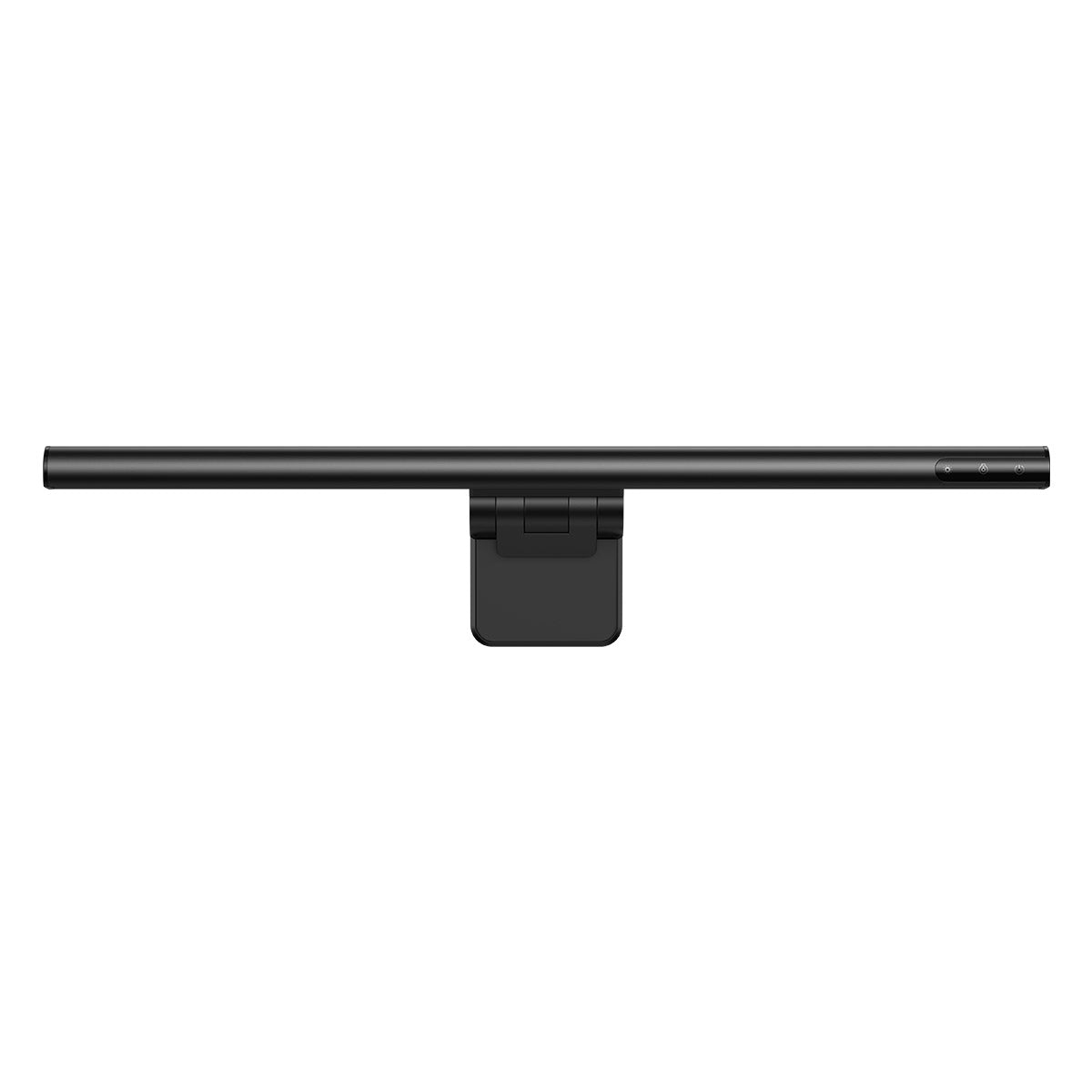
Baseus i-wok Series monitor light bar — budget BenQ ScreenBar alternative. USB-C powered, touch control strip on the bar, asymmetric optic design for desk illumination without screen glare, clip mount for monitor bezels. Available at major online retailers. build quality is visibly lighter than the BenQ ScreenBar Halo — the clip mechanism has less clamping force and more arm flex, and is less secure on heavier or thicker monitor bezels; no bias lighting (no back-glow) — single-sided illumination only; no ambient sensor — manual brightness adjustment required when room lighting changes; CRI not prominently specified, and budget monitor bars in this category routinely measure below CRI 80 at cool color temperatures, which matters for color-accurate creative tasks; touch controls on the bar require deliberate precise touch and are reported as less intuitive than a dedicated wireless controller.
The Baseus i-wok delivers the core monitor light bar function — desk illumination without screen glare via an asymmetric optic — at a budget price, which is the primary reason to consider it. USB-C power keeps cable count low, and a touch control strip on the bar handles brightness and color temperature. Build quality is visibly lighter than the ScreenBar Halo, the clip mechanism has noticeably less clamping force on heavy bezels, and arm flex is present. There is no back-glow bias lighting, no ambient sensor for auto-dimming, and CRI is not prominently specified, which usually means it sits at 80 or lower at cool temperatures. For users who want to try monitor bar illumination before committing, or who only need desk-glare elimination, the i-wok is the right entry point.
Pros
- ✓Asymmetric optic delivers the core monitor bar function at low cost
- ✓USB-C powered with a single cable to the monitor hub
- ✓Touch control strip handles brightness and color temperature
Cons
- ✗No back-glow bias lighting and no ambient sensor
- ✗Build and clip force are visibly lighter than the BenQ Halo
Which one is right for you?
Screen-forward workers prioritizing eye-strain reduction
BenQ ScreenBar Halo
Asymmetric optics plus back-glow bias lighting and auto-dimming address the contrast-related drivers of digital eye strain better than any other lamp here.
Streamers and on-camera professionals
Elgato Key Light
2,500 lux soft-panel output with Stream Deck and app control delivers face-forward illumination at a level no task lamp in this comparison matches.
Home offices that want one lamp to cover task and ambient
Dyson Solarcycle Morph
Task, ambient, indirect, and feature modes in a single arm plus CRI 98 coverage make it the most versatile physical lamp here for a workspace that does not want a second fixture.
Compact desks that need integrated charging
TaoTronics LED Desk Lamp with Wireless Charger
Built-in Qi pad and USB-A port in the base eliminate a separate phone charger and reduce cable clutter on small home-office surfaces.
First-time monitor bar buyers on a tight budget
Baseus i-wok Monitor Light Bar
Delivers the core glare-free desk illumination at a fraction of the BenQ price, ideal for testing whether a monitor bar fits your workflow before committing.
How we compared
We did not run independent lux measurements under controlled photometric conditions. We did not measure CRI with a spectroradiometer. We did not conduct flicker-frequency analysis with a high-speed camera or optical meter. Reliable lamp testing requires a stabilized power supply, integrating sphere or goniophotometer for total luminous flux, controlled ambient light exclusion, and repeated measurements at fixed distances and angles. We cannot reproduce those conditions here.
Instead: we relied on manufacturer specifications for each product, cross-referenced stated lux and lumen claims against independent measurements published in review media — specifically light meter readings from DPS Photo's monitor bar testing, desk lamp evaluations in Gizmodo and Lifehacker, and color temperature calibration data from RTings where applicable. We aggregated long-term user reviews from verified buyers with attention to eye strain reports, glare complaints, color rendering accuracy for creative work, and smart-control reliability. We call out the explicit weakness on every product because a desk lamp that causes screen glare, requires a separate app account, or loses half its light output over three years while the manufacturer claims 150,000-hour life — that lamp's headline specification does not describe your experience.
One framing note before the products: the desk lamp category in 2026 has split into two distinct form factors that serve different use cases and should not be compared on the same axis. Monitor light bars (BenQ ScreenBar Halo, Baseus i-wok) mount to your monitor, illuminate your desk surface, and leave your desk footprint free — optimized for screen-forward work. Traditional desk lamps (Dyson Solarcycle, TaoTronics) stand on the desk, illuminate a wider area including books, paper, and drawing surfaces, and offer more flexibility in beam direction. The Elgato Key Light sits in a third category: it is a front-facing illumination panel for video and streaming, not a task lamp. Each category has a distinct best use case, and each is treated separately below.
Monitor bar vs traditional desk lamp — for whom each works
Monitor light bars — the BenQ ScreenBar Halo and Baseus i-wok in this comparison — are designed for a specific workflow: you are sitting in front of a monitor, typing or reading on screen, and you want the desk surface illuminated without light bouncing back into your eyes from the screen. The asymmetric optic is the critical technology: it directs light downward and forward onto the keyboard and desk surface, not toward the monitor glass. On a matte monitor, this works well. On a glossy panel or a monitor placed at an angle, some reflection is still possible at certain viewing positions.
Traditional desk lamps illuminate a broader area — the BenQ ScreenBar Halo cannot light a book placed to the left of your keyboard at a comfortable reading angle because its beam is intentionally narrow and desk-surface-forward. If your work involves paper documents, sketchbooks, physical reference material, drawing tablets used in hand mode, or reading physical books at a desk, a traditional articulated desk lamp with a movable head gives you the beam placement flexibility that a monitor bar cannot. You do not need both if your work is primarily screen-forward; you likely do need a traditional lamp if you split time between screen and physical media.
The Elgato Key Light sits outside the task-lamp framework entirely. It produces a large, even, front-facing panel of soft light designed to illuminate your face for a camera — not to light your desk for reading or typing. Running a Key Light as your sole desk lamp while not on camera is inefficient: you are lighting your face with 2,500 lux while your keyboard and desk remain in shadow from an unfavorable angle. Content creators who stream or video-call regularly get genuine value from a Key Light as a face-light; that value does not transfer to general desk illumination.
Color temperature and your sleep
Color temperature is measured in Kelvin (K). Lower numbers — 2,700K to 3,000K — produce warm orange-tinted light similar to incandescent bulbs and sunset. Higher numbers — 5,000K to 6,500K — produce cool blue-white light similar to daylight. The practical implications for desk work: cool light (5,000–6,500K) increases alertness and is appropriate for focused morning and daytime work; warm light (2,700–3,000K) is appropriate for evening wind-down hours when you want to reduce stimulation before sleep.
Blue light's effect on melatonin suppression is real but often overstated in consumer marketing. The mechanism is accurate: blue-wavelength light (approximately 460–480nm) suppresses melatonin production by interacting with ipRGCs (intrinsically photosensitive retinal ganglion cells). However, the magnitude of this effect in daily life depends heavily on the total quantity of blue-wavelength light reaching the retina — brightness (lux) at the eye level matters as much as color temperature. A dim warm lamp at 2,700K used close to the eye can suppress melatonin more than a moderate-brightness 5,000K light used farther away with a diffuser. The key practical behavior change supported by evidence: reduce total light brightness in the final 90 minutes before sleep, and shift to warm temperatures where your lamp allows it. Switching a monitor to night mode alone without reducing screen brightness is not a meaningful intervention.
Products in this comparison with color temperature adjustment: Elgato Key Light (2,900–7,000K, widest range), Dyson Solarcycle Morph (2,700–6,500K, tied to a day-cycle algorithm), TaoTronics LED desk lamp (several color modes selected by touch). BenQ ScreenBar Halo has color temperature adjustment (2,700–6,500K) via its wireless controller. Baseus i-wok has limited color temperature switching between two or three modes depending on the variant. If evening color-temperature control is important to your workflow, the BenQ ScreenBar Halo and Dyson Solarcycle are the most capable in this comparison.
CRI matters more than lux for creative work
CRI — Color Rendering Index — measures how accurately a light source renders colors compared to natural daylight, on a scale of 0 to 100. A CRI of 100 means colors appear identical to how they look under a reference daylight source. A CRI of 80 means colors are reasonably accurate with some noticeable deviation. A CRI below 75 means visible color distortion — reds can appear orange, blues can shift gray, and subtle hue differences that matter in design, illustration, or makeup work become unreliable.
For office workers writing documents, processing spreadsheets, and taking video calls, CRI above 80 is sufficient — the practical impact of CRI 85 versus CRI 95 on reading accuracy or typing speed is negligible. For video editors reviewing color-graded footage, illustrators matching colors to a reference, product photographers assessing product color, or makeup artists working under desk light: CRI 90+ is a meaningful threshold. Below CRI 90, the colors you see under your desk lamp differ enough from daylight that judgment calls about color accuracy become unreliable.
Manufacturer-stated CRI claims should be taken with caution — CRI is typically measured at a single color temperature setting (often the warm end), and may not reflect CRI at daylight settings where color distortion can increase. BenQ claims CRI 95+ for the ScreenBar Halo; Dyson claims CRI 98 for the Solarcycle Morph; Elgato Key Light claims CRI 90+; the TaoTronics LED desk lamp does not publish a CRI figure, which is typical for budget LED task lamps. Baseus does not prominently state CRI for the i-wok, which is itself a signal — budget monitor bars often achieve CRI 80 or below at cool color temperatures.
Video call lighting — why content creators care about desk lamps
Video call lighting changed the desk lamp category. Before widespread video calling, a desk lamp's job was to illuminate the work surface. With video calls now standard in most professional environments, the lamp's position relative to your face on camera has become a legitimate consideration — and a separate optimization from desk-surface illumination.
The principle: even, front-facing light from a source positioned at or slightly above eye level produces the most flattering and professional appearance on camera. Side lighting from a window or a single desk lamp creates harsh shadows on half the face. Back lighting from a window behind you creates silhouette. The Elgato Key Light is designed specifically for this use case — its 2,500 lux LED panel, softbox-diffused output, and app-controllable brightness and color temperature are tuned for face-forward illumination rather than desk illumination.
For most people who video-call occasionally and do not produce streaming content, a Key Light is not necessary — a window facing you, or your existing monitor's screen ambient light, is sufficient for acceptable video quality. The Key Light justifies its price and desk footprint for users who are on camera multiple hours per day, who stream on Twitch or YouTube, or for whom camera quality is a professional differentiator. The ScreenBar Halo's back-glow feature (bias lighting behind the monitor) also marginally improves camera exposure by reducing the contrast ratio between the bright monitor and the dark background, which cameras handle better — but this is a secondary effect, not a purpose-built video solution.
What changed in 2026
Monitor light bars have gone mainstream at budget prices. Three years ago, the BenQ ScreenBar was essentially the only credible option in the category; the premium BenQ ScreenBar Halo was a high-priced outlier. In 2026, the Baseus i-wok and a wave of Chinese-manufactured monitor bars using similar asymmetric optic designs have brought the core functionality — desk illumination without screen glare — to budget price tiers. The practical question is no longer whether to get a monitor bar, but whether the premium features of the BenQ ScreenBar Halo (back-glow bias lighting, ambient sensor, wireless controller) justify a 6x price multiple over the Baseus.
Dyson Solarcycle now has app integration. The Solarcycle Morph launched without a companion app; Dyson has since rolled out the Dyson Link app (iOS and Android) that allows scheduling the lamp's day-cycle algorithm, setting custom light scenes, and monitoring usage. This addresses one of the original criticisms — that the personalized light algorithm was opaque and not user-adjustable. The app is functional but adds a dependency that some users will find unnecessary for a desk lamp.
Bias lighting is gaining mainstream traction for eye strain reduction. The concept is straightforward: placing a low-level light source behind the monitor reduces the luminance contrast ratio between the bright screen and the dark room, which reduces the eye's constant dilation and contraction cycle that is the proximate cause of eye strain during extended screen sessions. The BenQ ScreenBar Halo's back-glow LEDs serve this function. Independent testing (including reports from users in the PC gaming community and work-from-home productivity communities) consistently shows subjective eye strain reduction from bias lighting after long screen sessions. This is not placebo — the mechanism is physiologically coherent — but the published evidence base in controlled clinical settings remains limited.
Where each fits
Screen-forward desk work, eye strain reduction, bias lighting, monitor-mounted form factor, premium build, wireless controller: BenQ ScreenBar Halo. The asymmetric optic, ambient sensor auto-dimming, and back-glow bias lighting together represent the most complete feature set for a screen-centered workspace in this comparison. Available at major online retailers. The premium price is a significant step up over the Baseus i-wok for the same core function (desk illumination without screen glare); monitor-mount only — no desk stand included, and a separate clamp or stand is not sold by BenQ; back-glow can be distracting in brightly lit rooms where the ambient light already manages the contrast ratio; requires USB-A or USB-C power from the monitor, meaning it draws from your monitor's USB hub — if your monitor does not have powered USB ports, you need a separate USB power source.
Content creation, streaming, and video calls, app and Stream Deck control, color temperature range 2,900–7,000K, front-facing panel: Elgato Key Light. The 2,500 lux soft-panel output with app control is the most capable video-call and streaming lighting solution in this comparison. Available at major online retailers. The premium price for a clamp-mounted LED panel is difficult to justify for users who are not on camera regularly — the Key Light is optimized for face illumination, not desk-surface illumination, so it does not replace a desk lamp for reading or document work; large panel footprint requires a strong desk clamp and may not work on thin or glass desk surfaces; app dependency means color temperature and brightness control from the physical lamp itself is limited — the physical control is minimal without the Elgato app or Stream Deck; the clamp base needs a desk edge of at least 6cm thickness for stable mounting.
Premium home office, all-in-one task and ambient lamp, personalized light schedule, design statement: Dyson Solarcycle Morph. The 150,000-hour LED life claim and the multi-mode articulation (task, ambient, indirect) make it the most versatile physical lamp in this comparison. Available at major online retailers. It is approximately 3x the price of the next most expensive product in this comparison — the premium is partly for the Dyson brand, partly for the engineering, and partly for design aesthetics that you may not value; the heat pipe cooling system that enables the lamp's efficiency requires the lamp to be used upright or in the designed range of angles — hanging the arm inverted or at extreme angles voids efficiency claims; the light-tracking algorithm with age and time inputs is more complex than most desk lamp use cases require, and the Dyson Link app adds a dependency that feels disproportionate for a desk lamp; the base is heavy by design for stability, which makes repositioning on a desk more effortful than articulated alternatives.
compact desk environment, integrated phone charging, several color modes, compact footprint: TaoTronics LED desk lamp with wireless charger. The integrated Qi charging pad and USB-A port in the base reduce cable clutter on compact desk setups. Available at major online retailers. The Qi pad charges at a modest rate, so it is best for topping up your phone while you work rather than as a primary charger; there is no app or smart control — brightness and color mode are adjusted only via touch controls on the base, with no scheduling or home-automation integration; the build is plastic rather than premium metal, with a utilitarian look that lacks the design ambition of the BenQ or Dyson products; the lamp does not publish a CRI figure, so it is best treated as an office-task light rather than a color-critical creative tool.
Budget monitor light bar, BenQ ScreenBar alternative, USB-C powered, touch control: Baseus i-wok Series. For users who want the core monitor-bar functionality — desk illumination without screen glare — at a fraction of the BenQ price, the Baseus i-wok delivers the primary feature adequately. Available at major online retailers. build quality is noticeably lighter than the BenQ ScreenBar Halo — the plastic clip mechanism feels less secure on heavier monitor bezels, and the arm has more flex than is desirable; no back-glow (bias lighting) — this is a one-sided illuminator only; no ambient sensor for auto-dimming, meaning manual adjustment is required when room light changes; the touch control strip on the bar requires precise touch and is reported as less intuitive than the BenQ's wireless controller, particularly when adjusting while looking at the monitor; CRI is not prominently specified, and budget monitor bars in this category frequently measure CRI 80 or below at cool color temperatures.
Verdict
For screen-forward desk work with eye strain as a priority — and budget for a premium product: BenQ ScreenBar Halo. The asymmetric optic plus back-glow bias lighting is the most evidence-coherent configuration for reducing eye strain during long screen sessions. Accept that it is a monitor-mounted product only and requires USB power from your monitor or a separate adapter.
For content creators, streamers, and professionals who are on video calls multiple hours per day: Elgato Key Light. It does one thing — face illumination — at a level no desk lamp in this comparison matches. Do not buy it as a desk lamp replacement; buy it as a dedicated camera light and pair it with any other lamp for desk illumination.
For a premium all-in-one desk lamp that handles task, ambient, and indirect lighting in a single product, with design as part of the purchase: Dyson Solarcycle Morph. The price is real and the premium is substantial. If a flagship-priced desk lamp requires no hesitation in your budget, it is the most thoughtfully engineered product here. If it does, the BenQ ScreenBar Halo addresses the core eye-strain use case for a third of the price.
For a compact desk setup with integrated charging and practical functionality without app dependency: TaoTronics LED desk lamp. It does not have the design ambition of the BenQ or Dyson, but it charges your phone passively while you work, reduces cable count on compact desks with its USB-A port, and offers several color modes. The Qi pad charges at a modest rate — set expectations accordingly.
For the core monitor-bar function at minimum cost: Baseus i-wok. The budget price is its primary recommendation. The BenQ ScreenBar Halo is a better product in every technical dimension; the Baseus is the right answer if you want to try monitor-bar illumination before committing to a premium option, or if desk-illumination-without-glare is the only feature you need.
One note that applies across all five: no desk lamp fixes the underlying ergonomic problem of screen brightness versus room brightness. The single highest-impact adjustment most people can make for eye strain is matching monitor brightness to room brightness — reducing monitor brightness in dim rooms rather than always running maximum brightness — before spending money on a lamp. A monitor calibration change costs nothing. The right lamp supports the right setup; it does not replace it.
Frequently asked questions
Do desk lamps actually reduce eye strain, or is that marketing?▼
How many lux do I need for different tasks at my desk?▼
Should I use warm or cool light for reading at a desk?▼
Do I actually need a smart lamp, or are manual controls sufficient?▼
What about cable management with a desk lamp — how do monitor bars and traditional lamps compare?▼
Prices change. Check the retailer for the current price.
Comments & questions
Discussion happens on nattzy, our community forum. Sign in with Google to post — it takes a second.
Related articles
Best Air Purifier 2026: 5 models compared honestly
Best Robot Vacuums 2026: 5 Models Compared Honestly

Best Electric Toothbrush 2026: 5 models compared honestly

ConoHa WING review (2026): setup, speed and pricing
Best JP rental server 2026: 5 hosts ranked
Best LED Face Masks 2026: 3 Light Therapy Devices Compared