Best Webcam 2026: 5 options compared
Five webcams — the Logitech Brio 505, Anker PowerConf C200, Elgato Facecam Pro, Logitech C920x HD Pro and Microsoft LifeCam Studio — compared on resolution and frame rate that actually matters on a call, how real the AI framing features are, microphone quality, and which connector each one needs.
Quick answer
The Logitech Brio 505 is the most feature-complete webcam here, pairing AI auto-framing that pans and zooms to keep you centered with Show Mode, which tilts the camera onto your desk for documents mid-call, over USB-C at 1080p 60 fps with dual omnidirectional mics. The Anker PowerConf C200 is the value 2K pick with dual noise-cancelling mics, the Elgato Facecam Pro brings a Sony STARVIS 2 sensor and 4K60 for streamers, the Logitech C920x is plug-and-play basics, and the Microsoft LifeCam Studio suits Teams households.
Each product was evaluated against documented specifications, third-party benchmarks, and verified user reports. We scored features, performance, build quality, ecosystem compatibility, and total cost of ownership.
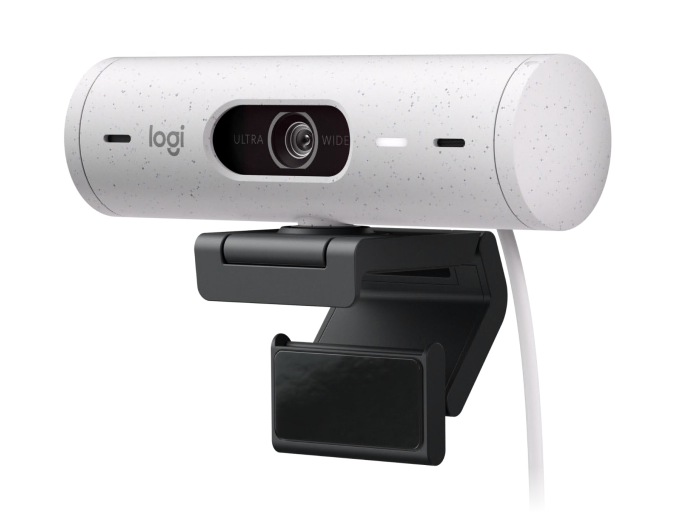
Logitech Brio 505
AI hybrid office: The Logitech Brio 505 is the most feature-complete webcam for hybrid home office use in this comparison, with AI auto-framing that pans and zooms the crop to keep your face centered, Show Mode that tilts the camera onto your desk to display documents and products mid-call, USB-C, 1080p at 60 fps, and dual omnidirectional microphones. AI framing handles deliberate desk movements smoothly and degrades gracefully on quick turns, where it produces visible judder rather than failing outright.
Top picks ↓| Product | Price | Link |
|---|---|---|
| $129.99Price as of 2026-09-24 | ||
| — | ||
| — | ||
| $279.96Price as of 2026-09-24 | ||
| $77.80Price as of 2026-09-24 |
Top picks
Related articles


Logitech Brio 505 — 1080p 60fps, AI auto-framing (face tracking pans and zooms the crop), Show Mode for document display by tilting the camera downward, USB-C, dual omnidirectional microphones. Available at major online retailers. Its price for 1080p resolution is a premium when cheaper 2K alternatives exist — the price premium buys AI features and USB-C, not resolution headroom; AI framing produces visible judder and lag when moving quickly or turning sharply, which can distract call participants; Show Mode requires a specific camera mounting angle that not all monitor stands or mounts can achieve without additional accessories; full AI feature access requires Logi Capture or G HUB software installation — basic UVC function works without software but AI framing and Show Mode do not.
The Logitech Brio 505 is the most feature-complete webcam for hybrid home office use in this comparison, with AI auto-framing that pans and zooms the crop to keep your face centered, Show Mode that tilts the camera onto your desk to display documents and products mid-call, USB-C, 1080p at 60 fps, and dual omnidirectional microphones. AI framing handles deliberate desk movements smoothly and degrades gracefully on quick turns, where it produces visible judder rather than failing outright. Show Mode is a genuine differentiator for teachers, consultants, and demo-heavy roles that nothing else here matches. It costs more than 2K rivals, full AI access requires Logi Capture or G HUB software, and the mounting angle for Show Mode is fussy on some monitor stands. For mixed talking-head and document-display workflows, it earns the price.
Pros
- ✓AI auto-framing keeps your face centered during deliberate movement
- ✓Show Mode tilts the camera onto your desk for document display
- ✓USB-C and 1080p 60 fps for smoother motion than the 30 fps baseline
Cons
- ✗1080p at this price looks premium next to cheaper 2K options
- ✗Show Mode requires a specific mount angle that not all setups support
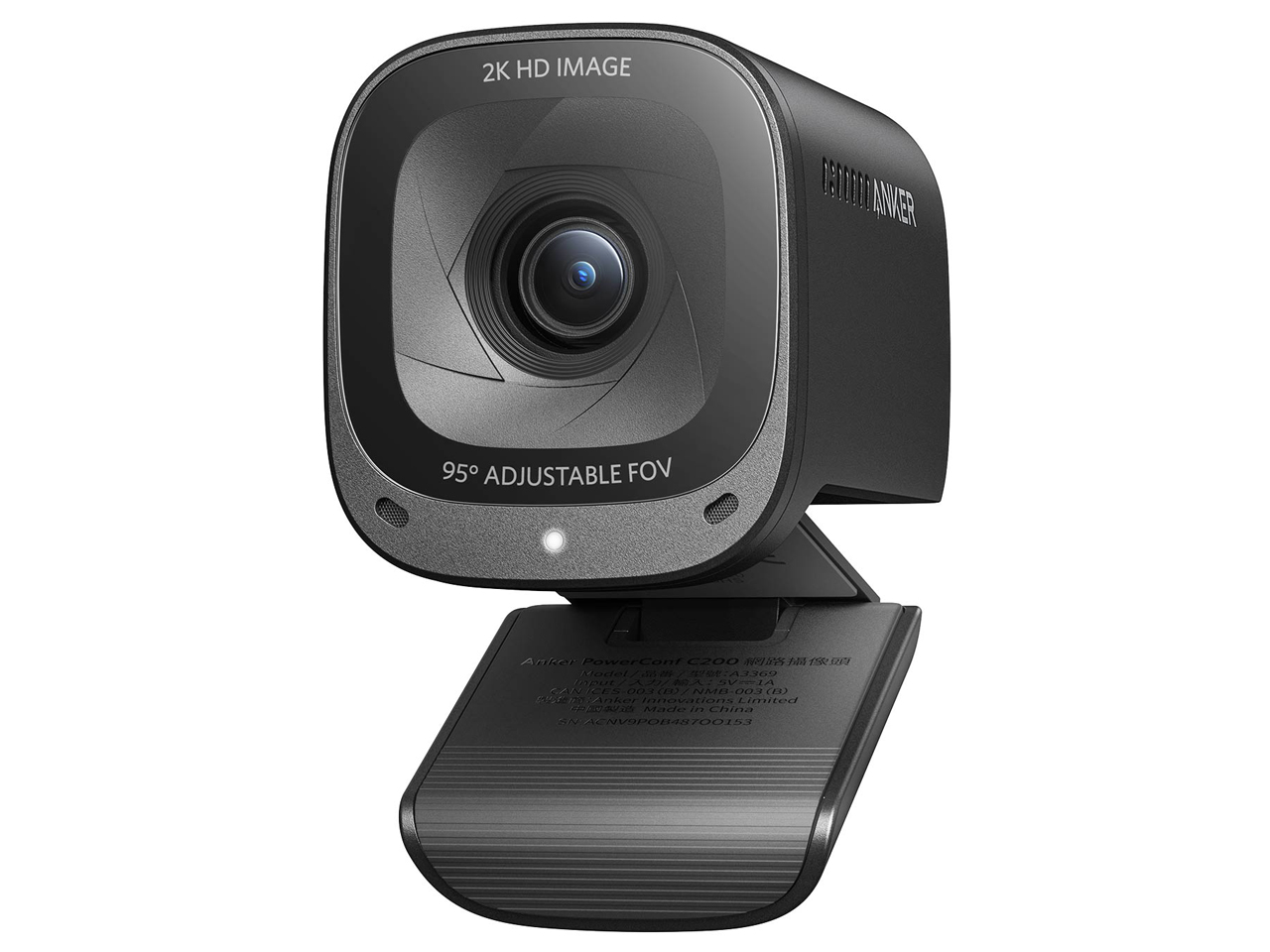
Anker PowerConf C200 — 2K 30fps, dual microphone with noise cancellation, autofocus, USB-A, compact form factor. Available at major online retailers. 30fps only with no 60fps option, which limits smoothness during hand gesture demonstrations and product shows; no AI auto-framing; the USB-A cable is non-detachable and fixed at 1.5m, which constrains desk cable routing for users with specific cable management setups; noise cancellation is meaningfully better than entry-level webcam mics but still constrained by monitor-height microphone positioning — it cancels machine noise better than room reflections; the software feature set is minimal with no significant camera parameter adjustment tools.
The Anker PowerConf C200 is the practical value pick for 2026 video calls, a budget option with a 2K sensor that gives the autofocus and software-side framing more pixels to work with than 1080p, dual noise-cancelling microphones that benefit from Anker's conference speaker acoustic background, autofocus, and a compact USB-A body. The mic performs well above the entry-level webcam tier in residential environments where HVAC hum and thin-wall ambient noise dominate, though the monitor-height geometry still favors a dedicated desktop mic for serious audio. There is no 60 fps option, no AI auto-framing, and the USB-A cable is non-detachable and fixed at about 1.5 m. Software features are minimal. If you do not need 60 fps or AI framing, nothing here beats the price-to-output ratio.
Pros
- ✓Budget-priced 2K sensor for strong price-to-resolution ratio
- ✓Dual noise-cancelling mics outperform typical built-in implementations
- ✓Reliable autofocus and compact form factor
Cons
- ✗30 fps only — no 60 fps option for smooth motion
- ✗Non-detachable USB-A cable fixed at about 1.5 m
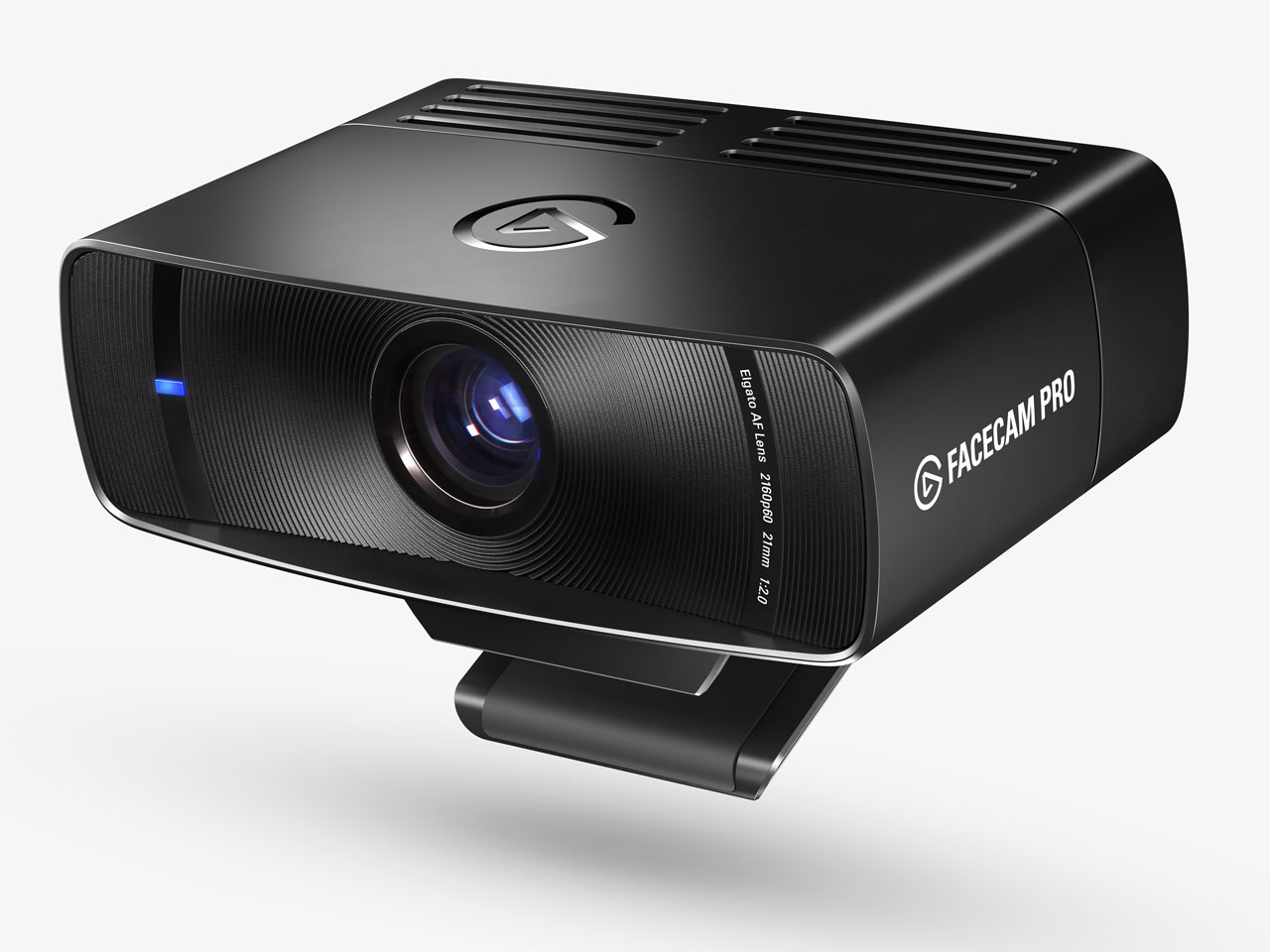
Elgato Facecam Pro — 4K 60fps, Sony STARVIS 2 sensor with f/2.0 large aperture, manual focus ring for precise focus control, no built-in microphone (deliberate design choice for streamer pairing with dedicated mics), Elgato Hub integration, Camera Hub software for stream parameter control. Available at major online retailers. It is approximately six times the cost of the Anker PowerConf C200 for functionally equivalent output in a standard Zoom or Teams call that caps at 1080p encoding; the deliberate absence of a built-in microphone requires a separate dedicated microphone purchase adding to the total setup cost; 4K 60fps streaming requires 20+ Mbps sustained upload bandwidth that is not reliably available on many residential broadband connections under peak-hours load; Camera Hub software provides the full feature set but is Elgato ecosystem only and does not natively integrate with all streaming or recording platforms.
The Elgato Facecam Pro is the consumer USB streaming flagship, with a Sony STARVIS 2 sensor, an f/2.0 large aperture for genuinely low-light-capable output, 4K at 60 fps over USB-C, a manual focus ring for precise control, and Camera Hub software for stream parameter tuning. The deliberate omission of a built-in microphone reflects the design assumption that serious streamers will pair it with a dedicated mic, which is the right call for production-grade audio. It is roughly six times the cost of the PowerConf C200 for functionally equivalent output inside a Zoom or Teams call that caps at 1080p encoding, the no-mic policy adds the cost of a dedicated microphone, and 4K 60 fps streaming wants 20+ Mbps sustained upload that residential connections do not always provide at peak hours. For YouTube and Twitch production, it is the only realistic pick here.
Pros
- ✓Sony STARVIS 2 sensor with f/2.0 aperture for genuine low-light capability
- ✓4K at 60 fps over USB-C with a manual focus ring
- ✓Camera Hub software for full stream parameter control
Cons
- ✗Flagship-priced — overkill for standard Zoom/Teams use
- ✗No built-in microphone — requires a separate mic purchase
Subscribe to our newsletter
Occasional updates and new releases — no spam.
Logitech C920x HD Pro Webcam — 1080p 30fps, built-in dual microphone, autofocus, automatic light correction, USB-A plug-and-play, UVC compliant, compatible with video call software including Zoom, Teams, and Google Meet. Widely available worldwide. 30fps 1080p is the baseline functional tier for a 2026 webcam — the specification is adequate but represents no competitive advantage in any image quality, frame rate, or AI feature dimension; no AI auto-framing, no 4K, no 60fps; sensor size and optics at this budget price tier produce image quality that degrades noticeably in low-light or mixed-lighting conditions compared to higher-tier sensors, though automatic light correction mitigates this in everyday rooms; its long market presence means extensive setup guides and an active troubleshooting community.
The Logitech C920x HD Pro Webcam is the friction-free entry pick for anyone who wants a camera that simply works across every major video call app. 1080p at 30 fps, USB-A plug-and-play, a built-in dual microphone, autofocus, and a budget price cover the baseline functional webcam tier without any setup ritual. Spec-wise it is the floor of the 2026 webcam market — no AI auto-framing, no 4K, no 60 fps option, and the small sensor and entry-tier optics show their limits in mixed or backlit lighting, though the automatic light correction helps in everyday rooms. As one of the most widely sold webcams ever, it has a deep pool of setup guides and community support. As a reliable, broadly compatible video call tool at the lowest price here, it covers the brief.
Pros
- ✓USB-A plug-and-play that works with every major video call app
- ✓Built-in dual mic and autofocus at the lowest price in the comparison
- ✓Huge installed base means abundant setup guides and troubleshooting help
Cons
- ✗Baseline 1080p 30 fps with no AI, 4K, or 60 fps option
- ✗Image quality drops noticeably in low or mixed lighting
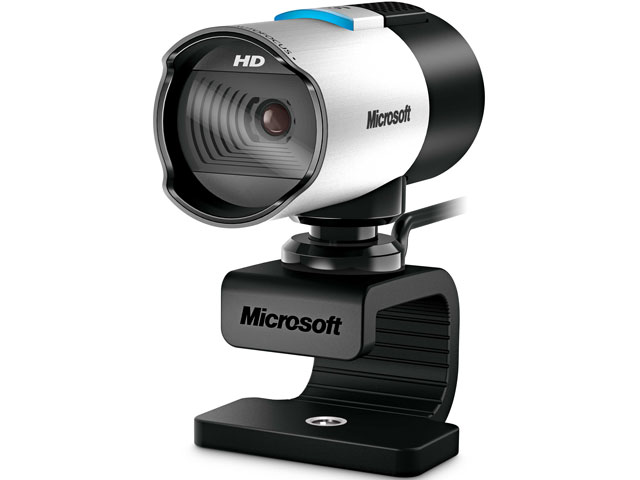
Microsoft LifeCam Studio — 1080p, True Color Technology for Microsoft's own color processing, autofocus, USB-A, designed for Teams and Office 365 integration, Microsoft video processing pipeline for Teams calls. Available at major online retailers. the LifeCam Studio product line has not received a significant hardware update as of 2026, making it an aging product at a price point where 2K alternatives with newer sensors are available; no 60fps option and no AI auto-framing; Microsoft ecosystem integration benefits are Windows and Teams specific — on Mac or non-Teams platforms, the camera functions as a standard UVC device without the Microsoft-specific pipeline advantages; its price is moderately elevated for 1080p 30fps in 2026, representing a brand premium for the Microsoft integration rather than specification leadership.
The Microsoft LifeCam Studio is the natural pick for Windows and Teams-centric corporate workflows, with True Color Technology for Microsoft's own color processing, autofocus, USB-A, and tight integration with the Teams video pipeline. For Microsoft 365 households where the rest of the stack is already aligned, it delivers a reliable default without the setup friction of third-party software. Its price is moderately elevated for a 1080p 30 fps camera in a 2026 market where 2K alternatives exist at similar prices, the product line has not seen a significant hardware refresh, there is no 60 fps option, and on Mac or non-Teams platforms it behaves as a standard UVC webcam without the Microsoft-specific advantages. As a Teams call default, it remains trustworthy; as a 2026 hardware upgrade, it is showing its age.
Pros
- ✓Tight integration with the Teams video processing pipeline
- ✓True Color Technology and reliable autofocus for talking-head calls
- ✓Plug-and-play USB-A with broad Windows compatibility
Cons
- ✗Aging product line with no recent significant hardware refresh
- ✗Higher price than 2K alternatives with newer sensors
Which one is right for you?
Hybrid workers who show documents in calls
Logitech Brio 505
Show Mode plus AI auto-framing covers both talking-head video calls and physical document or product demos in a single camera, which nothing else here matches.
Value-first buyers upgrading from a laptop webcam
Anker PowerConf C200
A budget-priced 2K sensor with dual noise-cancelling mics delivers the strongest price-to-output ratio for typical residential Zoom and Teams calls.
Streamers and content creators
Elgato Facecam Pro
Sony STARVIS 2 sensor with f/2.0 aperture and 4K 60 fps over USB-C is the only camera here that delivers true broadcast-grade output when paired with a dedicated microphone.
Users who want a no-fuss camera that just works
Logitech C920x HD Pro Webcam
USB-A plug-and-play, broad compatibility with every major video call app, and a huge support community make it the friction-free pick at the lowest price in the comparison.
Microsoft 365 households who live in Teams
Microsoft LifeCam Studio
True Color Technology and tight integration with the Teams video pipeline deliver a reliable default for Windows and Teams-centric workflows.
How we compared
We did not run independent sensor measurements under controlled lighting conditions. We did not perform calibrated low-light sensitivity tests with lux meters or in measured lux environments. We did not measure microphone frequency response, SNR, or noise floor with audio analysis tools. Rigorous webcam testing requires a controlled lighting rig with calibrated light sources, a color reference chart, audio test equipment for microphone measurements, and a stable capture environment — none of which are available here.
Instead, we relied on manufacturer specifications and published sensor information — specifically Logitech's published specifications for the Brio 505 sensor and AI processing pipeline, Elgato's published information about the Sony STARVIS 2 sensor in the Facecam Pro, Anker's published 2K sensor specifications for the PowerConf C200, and Microsoft's published specifications for the LifeCam Studio. We cross-referenced these with independent reviews and user testing from tech media, as well as international webcam benchmarks from The Wirecutter, Tom's Guide, and RTings. We aggregated long-term user reviews from verified buyers with particular attention to video call quality reports, AI framing behavior descriptions, microphone quality assessments in real call environments, and durability issues.
One framing point before the products: the difference between a webcam's resolution specification and its actual image quality is larger than in most product categories. A 4K sensor with poor glass, a small aperture, and no image signal processor can produce worse output than a well-implemented 1080p sensor. This comparison is explicit where marketing resolution numbers diverge from practical image quality.
Resolution and frame rate — 1080p vs 2K vs 4K in practice
Resolution numbers on webcam specs describe the raw sensor output, not what your video call or stream recipient sees. In a typical Zoom or Teams call, video quality is capped by the platform's encoding bitrate — Zoom's default 720p HD or 1080p Full HD tier, Teams' encoding pipeline — and your upload bandwidth. Sending a 4K webcam signal into a Zoom call that caps at 1080p output means the extra resolution is discarded at the encoder. The Elgato Facecam Pro's 4K sensor is useful only when the downstream platform, your upload speed, and your recipient's download speed all support the full resolution — a realistic scenario for dedicated streaming to YouTube or Twitch with 20+ Mbps upload, not a corporate Zoom meeting on a shared office connection.
Frame rate affects perceived smoothness of motion. 30fps is the baseline standard for video calls and is what most webcam software defaults to. 60fps — available on the Logitech Brio 505 at 1080p and the Elgato Facecam Pro at 4K — produces noticeably smoother motion during hand gestures, head turns, and any physical demonstration. For standard sit-down talking-head video calls, 30fps versus 60fps is not a meaningful differentiation. For product demos, teaching content, or any application where you move your hands or reference physical objects, 60fps reduces motion blur and improves clarity. The Anker PowerConf C200's 2K 30fps is a practical middle ground that delivers more pixel density than 1080p at a price point where 60fps is not offered.
Practical image quality in typical home office or meeting room conditions is constrained more by lighting than by sensor resolution. A 1080p sensor in a room with a window behind you produces a worse image than a 1080p sensor with a ring light or monitor light bar regardless of spec sheet resolution. The biggest image quality improvement available to most users is not a camera upgrade — it is adding a desk-facing light source. This applies to all five cameras in this comparison.
AI features — auto-framing, background blur, face tracking
AI auto-framing is now a standard marketing claim on mid-range and premium webcams. The Logitech Brio 505 is the primary AI-feature camera in this comparison, implementing AI-based face tracking that pans and zooms the crop to keep your face centered when you move. In practice, AI framing performs well for slow, deliberate movements — leaning back, turning slightly, standing up gradually. It produces visible judder and crop lag when you move quickly, turn sharply, or if multiple people enter the frame. The algorithm's correction speed and smoothness vary by software version. Users who give presentations while moving around a room, or who frequently gesture widely, report that the AI framing can be distracting in its correction movements rather than invisible.
Show Mode, unique to the Logitech Brio 505, tilts the camera to point downward at a desk surface to display documents, products, or handwriting during video calls. It is a genuine differentiator for teachers, consultants, or anyone who regularly shows physical materials in calls. Its limitations: it requires a specific desk angle and camera mounting position that not every monitor or mount configuration can achieve; the image quality in Show Mode is the same 1080p sensor, not a separate overhead sensor; and the mode switching requires manual repositioning.
Background blur is a software feature available in Zoom, Teams, and Google Meet independent of the camera hardware. Most modern video call platforms implement background blur and virtual backgrounds using CPU or GPU processing on the user's computer rather than camera-side AI. The Elgato Camera Hub software provides additional processing options for stream use, but for standard video calls, background blur quality depends more on your platform and PC performance than on the webcam you choose. This means the background blur marketing often attached to camera specs is misleading — you get equivalent background blur from platform software regardless of which camera you buy.
Microphone quality — built-in vs external
All five webcams except the Elgato Facecam Pro include built-in microphones. The Elgato Facecam Pro deliberately omits a built-in mic on the grounds that serious streamers use dedicated microphones, and a built-in mic on a camera positioned at monitor height — picking up keyboard noise, fan noise, and room reflections — is worse than a properly positioned dedicated mic in most streaming environments.
Built-in webcam microphones are a convenience tier that works adequately for casual video calls in a quiet room. Their fundamental limitations: the microphone capsule is physically located at monitor or top-of-monitor height, pointing roughly toward the room rather than directly at your mouth — pick-up distance is longer, room reflections are higher, and the signal-to-noise ratio is worse than a desktop or boom mic positioned 15–30cm from your mouth. Keyboard noise, fan noise, and ambient room noise are all more present in webcam mic recordings than in dedicated mic recordings at equivalent sensitivity settings. The Anker PowerConf C200's dual noise-cancellation microphones perform well above entry-level for a built-in implementation — Anker's acoustic design history from their conference speaker products contributes here — but the fundamental geometry constraints still apply.
For Zoom and Teams calls, built-in webcam mics are acceptable in quiet rooms and are the easiest path for users who want zero additional hardware. For content creation, streaming, online teaching, or any situation where audio quality matters to the audience, a dedicated USB microphone or XLR mic through an interface produces clearly superior results regardless of which webcam you pair it with. The hierarchy is not subtle: a budget dedicated condenser USB mic outperforms the built-in microphone in any camera on this list for recording-quality voice capture.
Video call vs streaming — different requirements
Video calls and streaming place different demands on a webcam, and a camera optimized for one can be mismatched for the other. Video calls — Zoom, Teams, Google Meet, Webex — compress and transmit video in real time at bitrates constrained by both the platform and available bandwidth. The display resolution for recipients is typically capped at 1080p on most platforms and often rendered at 720p for many participants depending on the call's bandwidth allocation. Color accuracy, dynamic range, and low-light performance matter more than raw resolution in this context because they affect how your face looks to recipients on their compressed feed. Autofocus speed matters for anyone who moves during calls. USB reliability and plug-and-play compatibility matter for corporate IT environments.
Streaming to YouTube Live or Twitch operates differently: you control the bitrate you send (limited by your upload connection), the platform stores or delivers it at that bitrate, and your audience's display resolution is bounded by what you send and their connection speed. At 20+ Mbps upload, 4K 60fps streaming from the Elgato Facecam Pro produces a genuinely different output to Twitch at 4K or YouTube at 4K than any 1080p webcam can match. The Sony STARVIS 2 sensor's large aperture and low-light capability matter for streamers who want cinematic-looking video without studio lighting. The manual focus ring matters for users who want precise focus control.
The Logitech C920x HD Pro Webcam and Microsoft LifeCam Studio are video call tools. Their specifications — 1080p 30fps, built-in mic, USB-A plug-and-play — are calibrated for the corporate and home office video call use case. Asking either camera to replace an Elgato Facecam Pro for streaming is unrealistic. Conversely, spending flagship money on the Elgato Facecam Pro for Zoom meetings is allocating budget to features that Zoom will encode away at its compression ceiling.
What changed in 2026
AI auto-framing has moved from a premium feature to a mainstream differentiator in the mid-range webcam tier. Two years ago, AI face tracking required a dedicated processor or was limited to flagship enterprise conference room systems. In 2026, the Logitech Brio 505 delivers AI framing at a mid-range price with acceptable performance for most desk-based use cases. The feature's practical limitation — visible judder during fast movement — has not been fully resolved by any consumer webcam as of 2026, but slow-movement framing is now smooth enough to be useful rather than distracting.
4K over USB-C has become the standard for premium streaming cameras, with USB-C's bandwidth advantage over USB-A enabling the full data throughput required for uncompressed or lightly compressed 4K 60fps capture. The Elgato Facecam Pro is the representative of this tier in this comparison. The implication for buyers: if your use case requires genuine 4K output, USB-C is now the expected interface, and older USB-A 4K webcams delivered degraded quality due to bandwidth constraints that USB-C resolves.
Video call platform AI features have reduced the hardware differentiation for casual users. Background blur, face beautification, and automatic lighting correction are now available in Zoom, Teams, and Google Meet as platform-side software features that run on your computer's GPU or NPU regardless of camera choice. This means a budget Logitech C920x webcam with adequate optics benefits from the same platform background blur as a flagship Elgato camera when used in those call platforms. The hardware differentiation that remains meaningful is low-light sensor performance, frame rate, and AI framing accuracy — features that platform software cannot replicate.
Where each fits
Mid-range hybrid home office webcam, AI auto-framing for desk use, Show Mode for document display, USB-C, 60fps, acceptable 1080p quality: Logitech Brio 505. For remote workers who frequently show physical documents or products in video calls, Show Mode is a genuine differentiator not available on any other camera in this comparison. AI framing helps in calls where you shift position or gesticulate. Available at major online retailers. The price for 1080p — not 4K — is a premium for the resolution delivered; AI framing produces visible judder when moving quickly; Show Mode requires precise mounting angle that not all monitor setups can achieve; the AI processing requires Logi Capture or G HUB software for full feature access, which adds a software dependency.
Budget value webcam for video calls, 2K for more pixel density than 1080p, built-in noise-cancelling dual mic: Anker PowerConf C200. At a budget price, it delivers more resolution than most 1080p competitors and Anker's microphone acoustic work produces better built-in audio than cameras at similar price points. Available at major online retailers. 30fps only — no 60fps option; no AI auto-framing; USB-A cable is non-detachable, which matters for desk cable management; noise cancellation is better than entry-level but still constrained by the geometry of a monitor-mounted mic position; software features are minimal.
Streaming and content creation, 4K 60fps, Sony STARVIS 2 low-light sensor, manual control, dedicated microphone setup: Elgato Facecam Pro. For streamers, YouTubers, or online educators who need the best image quality available in a consumer USB webcam and are pairing the camera with a dedicated microphone, the Facecam Pro is the only option in this comparison that delivers genuinely broadcast-quality output. Available at major online retailers. It is roughly six times the cost of the Anker PowerConf C200 for the same functional output in a standard Zoom or Teams call; no built-in microphone — requires a separate mic purchase adding to total cost; 4K 60fps streaming requires 20+ Mbps upload bandwidth that many residential connections do not sustain reliably; Camera Hub software is Elgato ecosystem only and does not integrate natively with all streaming platforms.
Entry-level plug-and-play video calls, dependable build, minimal software complexity: Logitech C920x HD Pro Webcam. For users who want zero configuration and a camera that simply works across every major app, the C920x is the most frictionless option in this comparison. Widely available worldwide. 30fps 1080p is baseline for 2026 — the spec represents the standard functional webcam tier, not a competitive differentiator; no AI auto-framing; no 4K or 60fps option; image quality in mixed or challenging lighting is limited by the smaller sensor typical of this price tier, though the built-in automatic light correction helps in everyday rooms; its long market presence means a deep pool of setup guides and community troubleshooting.
Microsoft Teams and Office ecosystem, True Color Technology, autofocus, USB-A, Windows-first workflow: Microsoft LifeCam Studio. For users deeply integrated into the Microsoft 365 ecosystem — Teams, Outlook, SharePoint — the LifeCam Studio's integration with Microsoft's own video processing pipeline and Teams optimizations provides a reliable default. Available at major online retailers. the LifeCam Studio product line has not received a significant hardware refresh as of 2026; 1080p with no 60fps option places it below current-standard value competitors; software features are tied to the Windows and Teams ecosystem, offering limited cross-platform value; its pricing is slightly elevated for a 1080p 30fps webcam in a market where 2K alternatives exist at the same price point.
Verdict
For a remote worker who wants AI auto-framing and occasionally needs to show documents or physical objects in video calls, and for whom USB-C is the preferred interface: Logitech Brio 505. Accept that the price buys you 1080p with AI features, not 4K. The Show Mode is unique and genuinely useful if document display is part of your workflow. The AI framing works well for deliberate desk movements and fails gracefully enough that it doesn't actively hurt your call quality.
For the most practical value in a 2026 video call webcam — more pixel density than 1080p, decent built-in audio, reliable autofocus, at the lowest price in this comparison: Anker PowerConf C200. At its budget price, it outperforms its price position consistently. If you don't need 60fps, AI framing, or are willing to use a separate microphone, nothing in this comparison touches its value proposition.
For streaming, content creation, or any use case where maximum image quality from a consumer USB webcam is the requirement: Elgato Facecam Pro. Budget separately for a dedicated microphone — the Facecam Pro is designed to be paired with one. The flagship price is appropriate if streaming production value is your primary purchase criterion. It is inappropriate if your primary use is video calls.
For a low-friction entry-level webcam that works out of the box with every major video call app and needs no extra software: Logitech C920x HD Pro Webcam. The spec is baseline 2026 standard but the plug-and-play reliability and broad app compatibility are genuine advantages in the specific context.
For a Windows and Teams-centric corporate workflow where Microsoft ecosystem integration is a priority and hardware refresh currency is not a concern: Microsoft LifeCam Studio. Acknowledge the product age and position it accordingly — it is a reliable Teams call tool, not a 2026 hardware advancement.
One note across all five: no webcam compensates for poor lighting. A ring light or monitor light bar — an inexpensive accessory — delivers a more visible image quality improvement in video calls than upgrading from a budget webcam to a flagship one in the same lighting conditions. Upgrade lighting before upgrading camera hardware if call image quality is the goal.
Frequently asked questions
Is 1080p sufficient for video calls in 2026, or do I need 2K or 4K?▼
Can I rely on a webcam's built-in microphone, or do I need a separate mic?▼
How important is lighting compared to camera quality?▼
Is background blur a camera feature or a software feature in 2026?▼
Are these webcams compatible with both Mac and Windows?▼
Which webcam works best for Zoom in a home or office environment?▼
Prices change. Check the retailer for the current price.
Comments & questions
Discussion happens on nattzy, our community forum. Sign in with Google to post — it takes a second.
Related articles
Best Smart Watch 2026: 5 Fitness & Lifestyle Watches

Best Tablet Stand 2026: 5 Compared

Best LED Face Masks 2026: 3 Light Therapy Devices Compared
Best Robot Vacuums 2026: 5 Models Compared Honestly
Best Hair Dryers 2026: 5 high-end models compared honestly
Food
Best Rice Cookers 2026: 5 Top Models Compared
Best Rice Cookers 2026: 5 Top Models Compared