Tech
Best SD Cards 2026: 5 microSD Cards Compared
WriterPickly Editorial
Updated 2026-11-03
A microSD card is easy to buy wrongly: the headline speed is a maximum read figure, while the letters and numbers such as U1, U3, V30 and A2 say more about what the card is meant for. This comparison puts five 128GB cards side by side on those details.
Quick answer
The Kingston Canvas Select Plus is the cheapest at $23.99 on Amazon US on November 3, 2026, and the SanDisk Ultra is a Chromebook-listed card at $28.93. The Lexar E-Series is a V30 card with an adapter at $39.99, the SanDisk Extreme aims at action cams and drones at $41.99, and the Samsung EVO Plus comes with an SD adapter and a 10-year warranty at $52.69.
📋How we compared
We did not put these cards in a camera, phone or card reader, and speed claims cannot be checked without the same host device and a benchmark. This comparison is built from the product titles and feature lists on the Amazon US listings, retrieved through the Amazon Creators API on November 3, 2026, and general knowledge of microSD speed classes. Speeds, durability claims, warranties and every other specification are the sellers' own claims, and some listings disagree with themselves, as noted below. Prices change often, so check the retailer.

🏠 Everyday storage: The SanDisk Ultra is a 128GB microSDXC rated up to 140 MB/s in the title, with C10, U1 and A1 classes. The listing says it is tested and certified to work with Chromebooks and describes capacities up to 512GB.
Top picks ↓- 2
 SanDisk Extreme 128GB microSD + Adapter (SDSQXH9)🎥 For action cams and drones$41.99Price as of 2026-11-05
Related articles


1★ Best Pick🏠 Everyday storageSanDisk Ultra 128GB microSDXC (SDSQUAB)
Confirm the 128GB size and model SDSQUAB, and that your device accepts microSDXC.
The SanDisk Ultra is a 128GB microSDXC rated up to 140 MB/s in the title, with C10, U1 and A1 classes. The listing says it is tested and certified to work with Chromebooks and describes capacities up to 512GB. On Amazon US it was $28.93 on November 3, 2026.
Pros
- ✓Listed as tested and certified for Chromebooks
- ✓Low price for a name-brand card
- ✓A1 app performance class
Cons
- ✗U1 class, lower than the V30 cards here
- ✗Title and text give different speeds
2🎥 For action cams and dronesSanDisk Extreme 128GB microSD + Adapter (SDSQXH9)
Confirm the 128GB size, since the higher write speed is listed for 256GB and larger.
The SanDisk Extreme is a 128GB card with an adapter, listed with reads up to 245 MB/s and U3, V30 and A2 classes for 4K and 5K video. The title gives writes up to 120 MB/s, while the text says up to 170 MB/s for 256GB and larger. On Amazon US it was $41.99 on November 3, 2026.
Pros
- ✓U3, V30 and A2 classes
- ✓Adapter included
- ✓Highest listed read speed of the five
Cons
- ✗128GB write speed is lower than the larger sizes, per the listing
- ✗Costs more than the Ultra and Kingston
3🛡️ Longest warrantySamsung EVO Plus 128GB microSDXC (MB-MC128SA)

Check the model MB-MC128SA, since the title and features describe different classes.
The Samsung EVO Plus is a 128GB microSDXC with an SD adapter, listed at up to 160 MB/s with C10, U3 and V10 in the title. It carries a 10-year limited warranty per the listing, and the text mentions six protections. On Amazon US it was $52.69 on November 3, 2026, the highest price here.
Pros
- ✓SD adapter included
- ✓10-year limited warranty per the listing
- ✓U3 class
Cons
- ✗Highest price of the five
- ✗Title and features disagree on A3, A2 and V10, V30
Subscribe to our newsletter
Occasional updates and new releases — no spam.
4💰 Cheapest cardKingston Canvas Select Plus 128GB microSD (SDCS3)

Check the model SDCS3 and whether an adapter is included, as the listing does not say.
The Kingston Canvas Select Plus is a 128GB card rated up to 150 MB/s, with Class 10, UHS-I, U1, V10 and A1 in the title. The feature list mentions a U3 and V10 rating and says it suits Android devices and cameras. On Amazon US it was $23.99 on November 3, 2026.
Pros
- ✓Lowest price of the five
- ✓A1 app performance class
- ✓Listed for Android devices and cameras
Cons
- ✗Title says U1, features say U3
- ✗No adapter or warranty stated in the listing
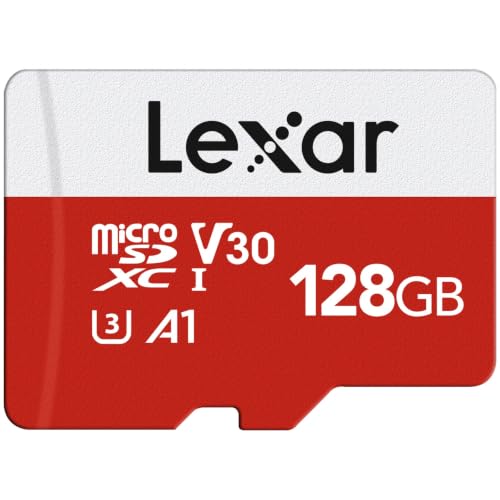
5📹 V30 on a budgetLexar E-Series 128GB microSDXC with Adapter
Confirm the single-card 128GB listing, as Lexar also sells 2-packs of this card.
The Lexar E-Series is a 128GB microSDXC with an adapter, rated up to 100 MB/s with C10, U3, A1 and V30. The listing estimates up to 6 hours of 4K video and gives a 10-year warranty on the card and 1 year on the adapter. On Amazon US it was $39.99 on November 3, 2026.
Pros
- ✓U3 and V30 with an adapter
- ✓10-year card warranty per the listing
- ✓Lists security cameras and dash cams as uses
Cons
- ✗Lowest maximum read speed of the five
- ✗Lexar notes speeds come from its own test setup
Speed figures and speed classes
The headline numbers are maximum reads: up to 245 MB/s (SanDisk Extreme), 160 (Samsung), 150 (Kingston), 140 (SanDisk Ultra) and 100 (Lexar). Real speed depends on the device, so the speed class is a more useful guide.
U3 and V30 are the classes usually asked for in 4K video. The Extreme and Lexar listings give U3 and V30, the Samsung title gives U3 and V10, and the Ultra and Kingston titles give U1 and V10, which suit photos and Full HD better.
Where the listings disagree
The Kingston title says U1, while its feature list says a U3 and V10 rating. The Samsung title says A3, but its features mention A2, V30 and the name EVO Select. The SanDisk Ultra title says up to 140 MB/s and its text says 150. The Extreme title gives writes up to 120 MB/s, while its text says up to 170 MB/s for 256GB and larger.
When a listing contradicts itself, confirm the exact model number on the card's packaging or the seller's page before relying on any one figure.
Adapter, warranty and use
The Extreme, Samsung and Lexar listings include a full-size SD adapter; the Kingston and Ultra listings here do not mention one. Samsung lists a 10-year limited warranty, and Lexar lists 10 years on the card and 1 year on the adapter.
SanDisk and Samsung list protections such as temperature, water and shock resistance, and Lexar lists similar claims. These are the sellers' statements, not something we verified. The Ultra is listed as tested and certified for Chromebooks, and the Extreme is aimed at action cams and drones.
Frequently asked questions
Is a faster headline speed always better?▼
What do U1, U3, V30 and A2 mean?▼
Do I need the SD adapter?▼
Check the details of the products in this article
- SanDisk Ultra 128GB microSDXC (SDSQUAB)$29.70Price as of 2026-11-05
- SanDisk Extreme 128GB microSD + Adapter (SDSQXH9)$41.99Price as of 2026-11-05
- Samsung EVO Plus 128GB microSDXC (MB-MC128SA)$52.69Price as of 2026-11-05
- Kingston Canvas Select Plus 128GB microSD (SDCS3)$23.99Price as of 2026-11-05
- Lexar E-Series 128GB microSDXC with Adapter$39.99Price as of 2026-11-05
Prices change. Check the retailer for the current price.
Comments & questions
Discussion happens on nattzy, our community forum. Sign in with Google to post — it takes a second.
Still deciding? Ask the community your own question — Post a question on nattzy ↗