Лучшие USB-хабы 2026: сравнение 5 вариантов
WriterРедакция Pickly
Обновлено 2026-05-17
Пять USB-хабов и док-станций — от CalDigit TS4, профессионального эталона среди док-станций Thunderbolt 4, до хаба Elecom, который можно купить онлайн уже сегодня, и Anker 564, который закрывает 90% потребностей за малую долю цены. Разница между хабом и док-станцией важнее количества портов.
Коротко
CalDigit TS4 — профессиональный эталон: 18 портов, включая 2,5-гигабитный Ethernet, три USB-A на 10 Гбит/с, нисходящий Thunderbolt 4, DisplayPort 1.4 и кардридер SD, а зарядка хоста мощностью 98 Вт обеспечивает питание 16-дюймового MacBook Pro при длительной нагрузке. Anker 564 — компактный адаптер 7-в-1 с питанием от шины для поездок, Satechi V3 сочетает сквозную зарядку 100 Вт с HDMI 4K 60 Гц, Elecom U3HC-A430BBK — бюджетный хаб USB-A, а Plugable UD-6950Z подключает два 4K-дисплея без Thunderbolt.
📋Как мы сравнивали
Каждый продукт оценивался по задокументированным характеристикам, сторонним тестам производительности и подтверждённым отзывам пользователей. Оценка учитывала количество и разнообразие портов, пропускную способность USB-C (USB 3.2 Gen2 против Thunderbolt 4), мощность сквозной зарядки Power Delivery, возможности вывода изображения и доступность в продаже.
Лучший в целом: CalDigit TS4 — профессиональный эталон среди док-станций Thunderbolt 4: 18 портов, зарядка хоста 98 Вт, 2,5-гигабитный Ethernet, 3× USB-A 10 Гбит/с, 2× USB-C 10 Гбит/с, нисходящий Thunderbolt 4, DisplayPort 1.4, кардридер SD и пара передних портов USB-A и USB-C для удобного подключения периферии. Один кабель Thunderbolt 4 к ноутбуку одновременно передаёт данные, заряжает и выводит изображение.
Доступно в США
Доступно в США
Не продаётся в вашей стране
Доступно в США
Не продаётся в вашей стране
Доступно в США
Кому подойдёт?
Похожие статьи

1★ Best PickA+Лучший в целомCalDigit TS4 Thunderbolt 4 Dock
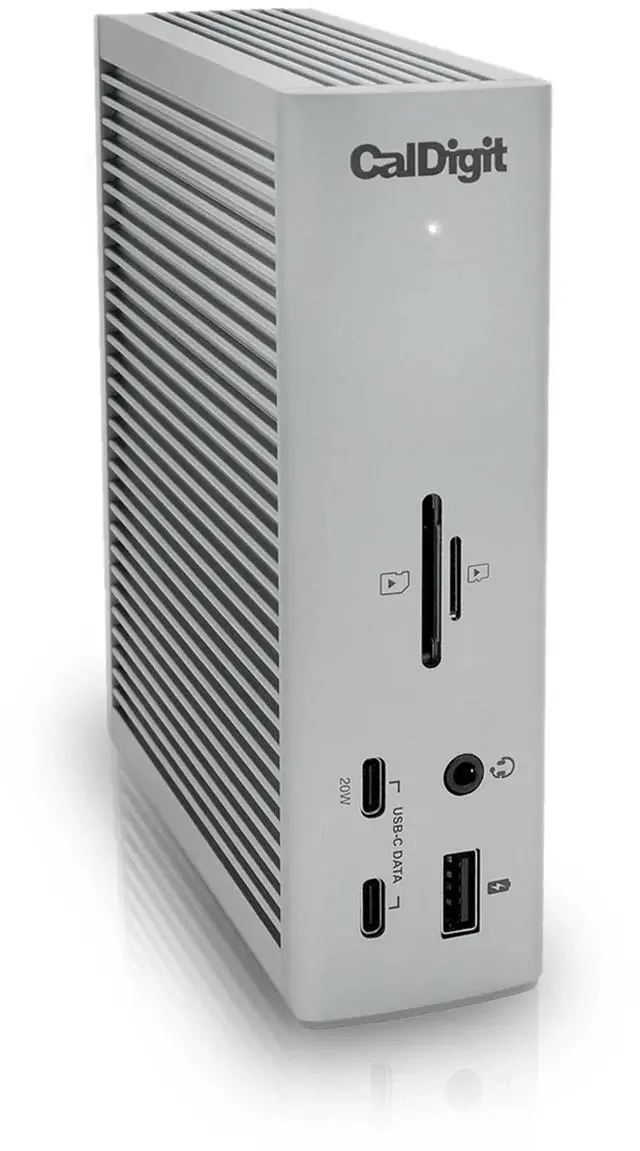
CalDigit TS4 — профессиональный эталон среди док-станций Thunderbolt 4: 18 портов, зарядка хоста 98 Вт, 2,5-гигабитный Ethernet, 3× USB-A 10 Гбит/с, 2× USB-C 10 Гбит/с, нисходящий Thunderbolt 4, DisplayPort 1.4, кардридер SD и пара передних портов USB-A и USB-C для удобного подключения периферии. Один кабель Thunderbolt 4 к ноутбуку одновременно передаёт данные, заряжает и выводит изображение. Это самый дорогой вариант в этом сравнении. Честные слабые стороны: цена оправдана, только если используется большинство из 18 портов; для полной пропускной способности нужен порт Thunderbolt 4 на хосте; большой физический размер (вертикальный корпус 175 мм) для постоянного рабочего места — не портативный вариант.
Плюсы
- ✓18 портов, включая 2,5GbE, 3× USB-A 10 Гбит/с, нисходящий Thunderbolt 4, SD-карту
- ✓Зарядка хоста 98 Вт — обеспечивает 16-дюймовый MacBook Pro при длительной нагрузке на процессор
- ✓Один кабель Thunderbolt 4 одновременно передаёт данные, изображение и заряжает
- ✓2,5-гигабитный Ethernet быстрее стандартного гигабитного в поддерживающих сетях
Минусы
- ✗Высокая цена оправдана, только если использовать большинство портов
- ✗Большой вертикальный корпус 175 мм — только для постоянного рабочего места
Детали оценки
- Подключение
- Thunderbolt 4 (40 Гбит/с)
- Зарядка хоста
- Power Delivery 98 Вт
- Ethernet
- 2,5 Гбит/с
- Порты USB-A
- 3× USB-A 10 Гбит/с + 1× передний USB-A 10 Гбит/с
- Вывод изображения
- DisplayPort 1.4 + последовательное подключение дисплеев Thunderbolt
Доступно в США
2AЛучший для поездокAnker 564 USB-C Hub (7-in-1)
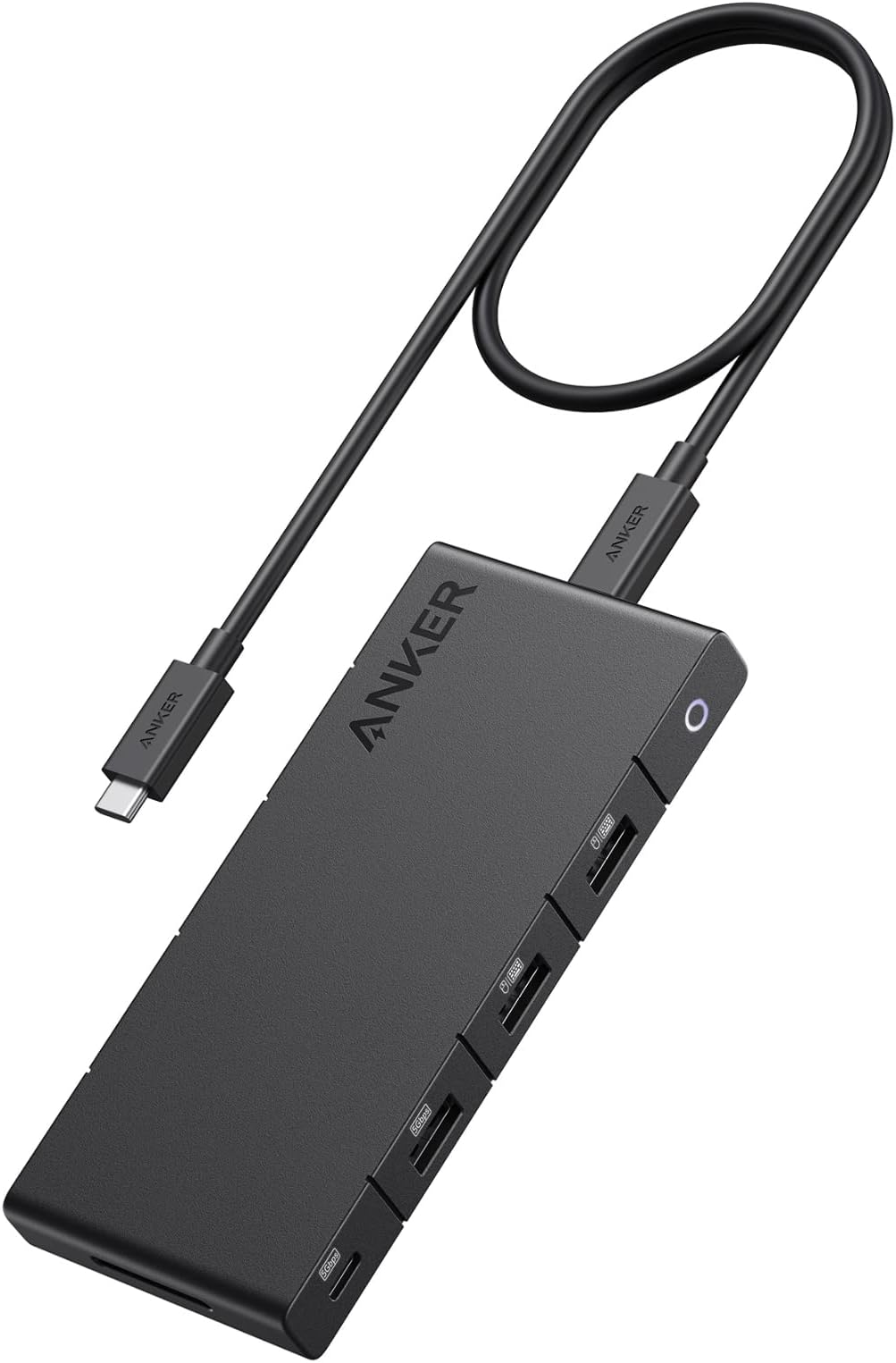
USB-C-хаб Anker 564 — хаб 7-в-1 с питанием от шины для пользователей, которым нужны один дисплей и расширение USB-A в портативном корпусе. Порт данных USB-C 10 Гбит/с, выход 4K HDMI, сквозная зарядка PD 85 Вт, два порта USB-A 3.0, кардридеры SD и microSD. Питание от шины — для самого хаба не нужен дополнительный сетевой адаптер или кабель. Это второй по дешевизне вариант в этом сравнении. Честные слабые стороны: PD 85 Вт достаточно для MacBook Air, но впритык для 14-дюймового MacBook Pro при длительной нагрузке; в зависимости от USB-C-контроллера на некоторых конфигурациях хоста выход HDMI может быть ограничен 4K 30 Гц вместо 60 Гц; питание от шины означает, что пропускная способность USB делится между всеми портами одновременно.
Плюсы
- ✓Питание от шины — дополнительный сетевой адаптер не нужен
- ✓7 портов: USB-C 10 Гбит/с, HDMI, PD 85 Вт, 2× USB-A 3.0, SD, microSD
- ✓Доступная цена — отличная ценность для портативного хаба «всё в одном»
- ✓Компактный корпус помещается в боковой карман сумки для ноутбука
Минусы
- ✗PD 85 Вт впритык для 14-дюймового MacBook Pro при длительной нагрузке
- ✗HDMI ограничен 4K 30 Гц на некоторых конфигурациях USB-C-контроллера хоста
Детали оценки
- Подключение
- USB-C (USB 3.2 Gen 2, 10 Гбит/с)
- Зарядка хоста
- Сквозная Power Delivery 85 Вт
- Вывод изображения
- 4K HDMI
- Порты USB-A
- 2× USB-A 3.0
- Кардридеры
- SD + microSD
Не продаётся в вашей стране
3AЛучший для аккуратного рабочего столаSatechi V3 Multi-Port Adapter

Многопортовый адаптер Satechi V3 обеспечивает сквозную зарядку PD 100 Вт, HDMI 4K 60 Гц, гигабитный Ethernet, кардридеры SD/microSD и USB-A 3.0 в тонком алюминиевом корпусе, созданном в цвет вариантов MacBook Pro и MacBook Air. С PD 100 Вт это единственный многопортовый адаптер с питанием от шины в этом сравнении, который обеспечивает 16-дюймовый MacBook Pro под нагрузкой. Гигабитный Ethernet — важное преимущество перед Anker 564 для пользователей проводных сетей. Цена средняя. Честные слабые стороны: в некоторых регионах реже встречается в обычных магазинах электроники; питание от шины с разделением пропускной способности при интенсивном одновременном использовании; один выход HDMI.
Плюсы
- ✓Сквозная зарядка PD 100 Вт — обеспечивает 16-дюймовый MacBook Pro при длительной нагрузке
- ✓Выход HDMI 4K 60 Гц + гигабитный Ethernet в адаптере с питанием от шины
- ✓Тонкий алюминиевый корпус в цвет MacBook Pro и Air
- ✓SD/microSD + порты USB-A 3.0 в одном адаптере
Минусы
- ✗В некоторых регионах реже встречается в обычных магазинах электроники
- ✗Разделение пропускной способности при питании от шины и одновременной интенсивной нагрузке на порты
Детали оценки
- Подключение
- USB-C (USB 3.2 Gen 2, 10 Гбит/с)
- Зарядка хоста
- Сквозная Power Delivery 100 Вт
- Вывод изображения
- HDMI 4K 60 Гц
- Ethernet
- Гигабитный
- Кардридеры
- SD + microSD
Доступно в США
Подпишитесь на рассылку
Иногда — новости и новинки. Без спама.
4BЛучший недорогой хаб USB-AElecom USB-C Hub U3HC-A430BBK (Japan)

Elecom U3HC-A430BBK — прагматичный недорогой USB-хаб: 4 порта USB-A 3.1 Gen1 по 5 Гбит/с каждый, сквозная зарядка USB-C PD 60 Вт, алюминиевый корпус, широко представлен в крупных онлайн-магазинах. Для пользователей, которым нужны расширение USB-A и зарядка ноутбука без вывода изображения и Ethernet, он закрывает задачу по бюджетной цене и с широкой доступностью в продаже. Честные слабые стороны: нет HDMI, нет Ethernet, нет кардридера SD; PD 60 Вт недостаточно для 16-дюймового MacBook Pro при полной нагрузке на процессор; порты USB-A на 5 Гбит/с (USB 3.1 Gen1), а не 10 Гбит/с (Gen2), как у премиальных альтернатив.
Плюсы
- ✓Широко доступен в крупных онлайн-магазинах
- ✓4× USB-A 3.1 Gen1 (по 5 Гбит/с) + USB-C PD 60 Вт в одном хабе
- ✓Алюминиевый корпус компактного форм-фактора
- ✓Бюджетная цена — самый недорогой вариант в сравнении
Минусы
- ✗Нет HDMI, нет Ethernet, нет кардридера SD — только расширение USB-A
- ✗PD 60 Вт недостаточно для 16-дюймового MacBook Pro при полной нагрузке на процессор
Детали оценки
- Подключение
- USB-C
- Зарядка хоста
- Сквозная Power Delivery 60 Вт
- Порты USB-A
- 4× USB-A 3.1 Gen1 (5 Гбит/с)
- Вывод изображения
- Нет
- Доступность в продаже
- Крупные онлайн-магазины
5B+Лучший для двух дисплеев (без Thunderbolt)Plugable UD-6950Z USB-C DisplayLink Dock

Plugable UD-6950Z использует технологию DisplayLink 6950Z, чтобы подключать два дисплея 4K 60 Гц к любому порту USB-C или USB-A 3.0 без Thunderbolt, — это делает его единственным решением для двух дисплеев в этом сравнении, доступным для MacBook Air (без Thunderbolt 4) или компьютеров с Windows без Thunderbolt. Дополнительно он обеспечивает зарядку хоста PD 100 Вт, гигабитный Ethernet, 6 портов USB-A и передачу данных USB-C 10 Гбит/с. Требуется установка драйвера DisplayLink на macOS и Windows. Это второй по дороговизне вариант в этом сравнении. Честные слабые стороны: драйвер DisplayLink добавляет 5–10% нагрузки на процессор при активном использовании двух дисплеев; обновления драйвера иногда вызывают проблемы совместимости, и приходится ждать следующего выпуска; плавность подходит для офиса, но не идеальна для монтажа видео или игр.
Плюсы
- ✓Два дисплея 4K 60 Гц от любого порта USB-C или USB-A — Thunderbolt не нужен
- ✓Зарядка хоста PD 100 Вт + гигабитный Ethernet + 6× USB-A + USB-C 10 Гбит/с
- ✓Работает с MacBook Air, ноутбуками с Windows без Thunderbolt и хостами с USB-A
- ✓Чип DisplayLink 6950Z — улучшен по сравнению с прежними поколениями DisplayLink
Минусы
- ✗Требуется установка драйвера DisplayLink — добавляет 5–10% нагрузки на процессор
- ✗Обновления драйвера иногда вызывают проблемы совместимости
Детали оценки
- Подключение
- USB-C или USB-A 3.0
- Вывод изображения
- Два 4K 60 Гц (DisplayLink)
- Зарядка хоста
- Power Delivery 100 Вт
- Ethernet
- Гигабитный
- Порты USB-A
- 6× USB-A
Доступно в США
| Продукт | Ethernet | Кардридеры | Доступность в продаже | ||||
|---|---|---|---|---|---|---|---|
| CalDigit TS4 Thunderbolt 4 Dock | Thunderbolt 4 (40 Гбит/с) | Power Delivery 98 Вт | 2,5 Гбит/с | 3× USB-A 10 Гбит/с + 1× передний USB-A 10 Гбит/с | DisplayPort 1.4 + последовательное подключение дисплеев Thunderbolt | — | — |
| Anker 564 USB-C Hub (7-in-1) | USB-C (USB 3.2 Gen 2, 10 Гбит/с) | Сквозная Power Delivery 85 Вт | — | 2× USB-A 3.0 | 4K HDMI | SD + microSD | — |
| Satechi V3 Multi-Port Adapter | USB-C (USB 3.2 Gen 2, 10 Гбит/с) | Сквозная Power Delivery 100 Вт | Гигабитный | — | HDMI 4K 60 Гц | SD + microSD | — |
| Elecom USB-C Hub U3HC-A430BBK (Japan) | USB-C | Сквозная Power Delivery 60 Вт | — | 4× USB-A 3.1 Gen1 (5 Гбит/с) | Нет | — | Крупные онлайн-магазины |
| Plugable UD-6950Z USB-C DisplayLink Dock | USB-C или USB-A 3.0 | Power Delivery 100 Вт | Гигабитный | 6× USB-A | Два 4K 60 Гц (DisplayLink) | — | — |
Как мы сравнивали
Мы не проводили собственных замеров скорости передачи данных по USB со стандартными файлами для всех пяти продуктов и не измеряли точность мощности зарядки под нагрузкой. Строгое тестирование USB-хабов требует анализатора протокола USB, чтобы измерить реальную пропускную способность в сравнении с заявленной, и точного ваттметра, чтобы проверить заявленную мощность PD при длительной зарядке, — ни то ни другое здесь не воспроизводилось.
Вместо этого мы изучили характеристики производителей: количество портов, поколение USB, мощность Power Delivery и возможности вывода изображения. Мы сверили их с опубликованными тестами Ars Technica, The Verge и технических изданий (Gigazine, PC Watch) там, где есть независимые замеры скорости передачи. Мы собрали подтверждённые долгосрочные отзывы покупателей и международные источники, специально выискивая сообщения о проблемах с разделением пропускной способности USB, сбоях зарядки PD, перегреве хабов при длительной нагрузке и проблемах совместимости Thunderbolt с конкретными ноутбуками.
Для этого сравнения важно различие между хабом и док-станцией. USB-хаб увеличивает количество портов без собственного питания — он получает питание от хоста через USB-подключение и не даёт хосту сколько-нибудь значимой зарядки. Многопортовый адаптер добавляет вывод изображения и кардридеры, обычно со сквозной зарядкой Power Delivery для хоста. Док-станция имеет собственный блок питания, заряжает хост и может независимо управлять несколькими дисплеями. CalDigit TS4 — док-станция. Anker 564 и Satechi V3 — многопортовые адаптеры. Elecom и Plugable UD-6950Z занимают промежуточное положение — хабы с питанием и возможностью вывода изображения. Если до покупки понять, какая категория вам нужна, не придётся оформлять возврат.
Что изменилось в 2026 году
Появились продукты USB4 Version 2 (80 Гбит/с), но по разумным ценам они пока не стали массовыми. Thunderbolt 4 со скоростью 40 Гбит/с остаётся практическим максимумом для потребительских док-станций в этом сравнении, а USB4 80 Гбит/с ограничен премиальными продуктами для высокопроизводительных рабочих станций. Для большинства пользователей MacBook Pro или ноутбуков с Windows с портами Thunderbolt 4 потолок 40 Гбит/с не становится узким местом для современных внешних NVMe-накопителей или конфигураций дисплеев.
Сквозная зарядка Power Delivery мощностью 100 Вт стала стандартом в среднем сегменте и выше. В 2024 году в среднем сегменте были распространены 65 и 85 Вт. К 2026 году 100 Вт — ожидаемый уровень для любого адаптера или док-станции среднего и премиального класса. Почему это важно: 16-дюймовому MacBook Pro при полной нагрузке на процессор требуется примерно 96 Вт — док-станция всего с 65 Вт PD будет питать ноутбук, но при высокой нагрузке батарея будет медленно разряжаться. 100 Вт обеспечивают 16-дюймовый MacBook Pro при длительной нагрузке без разряда батареи.
DisplayLink стал рабочим решением для двух дисплеев на компьютерах Mac без Thunderbolt и на машинах с Windows. Эта технология, которая кодирует вывод изображения как данные USB, а не как видеосигнал, раньше страдала от задержек и недостаточной плавности видео. К 2026 году поддержка чипа DisplayLink 6950Z улучшилась настолько, что 4K 60 Гц на двух дисплеях через DisplayLink работает плавно для офисной и творческой работы, хотя для монтажа видео и игр не рекомендуется. Plugable UD-6950Z использует этот чипсет и является доступным решением для двух дисплеев на MacBook Air или компьютерах с Windows без Thunderbolt.
Кому что подходит
Док-станция Thunderbolt 4, 18 портов, зарядка хоста 98 Вт, 2,5GbE, 3× USB-A 10 Гбит/с, 2× USB-C 10 Гбит/с, DisplayPort, SD-карта: CalDigit TS4. TS4 — профессиональный эталон среди док-станций Thunderbolt 4. Её 18 портов включают 2,5-гигабитный Ethernet (быстрее стандартного гигабитного в сетях, которые его поддерживают), три порта USB-A 3.2 Gen 2 по 10 Гбит/с каждый, два порта USB-C 3.2 Gen 2, DisplayPort 1.4 и кардридер SD. Она выдаёт 98 Вт для зарядки 16-дюймового MacBook Pro под нагрузкой. Это самый дорогой вариант в сравнении со значительным отрывом. Честные компромиссы: цена оправдана, только если вы используете большинство из 18 портов; на хосте нужен порт Thunderbolt 4 или USB4 — ноутбуки с USB 3.2 получат подключение USB-C, но не полную пропускную способность 40 Гбит/с; она большая (около 175 мм в высоту) и лучше подходит для постоянного рабочего места, чем для дорожного набора.
Многопортовый адаптер 7-в-1 с питанием от шины, передача данных USB-C 10 Гбит/с, 4K HDMI, PD 85 Вт, USB-A 3.0, кардридер SD, компактный: USB-C-хаб Anker 564. Anker 564 — ответ для пользователей, которым нужны один HDMI-дисплей, расширение USB-A, доступ к SD-картам и сквозная зарядка Power Delivery в портативном корпусе без собственного блока питания. Питание от шины означает, что он берёт энергию от ноутбука — для самого хаба не нужен дополнительный кабель или сетевой адаптер. Сквозной зарядки PD 85 Вт достаточно для MacBook Air и большинства 13-дюймовых ноутбуков при обычной нагрузке (14-дюймовому MacBook Pro при длительной нагрузке требуется 96 Вт, поэтому он будет заряжаться медленно). Это вариант с лучшей ценой для поездок в этом сравнении. Честные компромиссы: передача данных по USB-C — 10 Гбит/с, но эта скорость делится между всеми портами — одновременное использование нескольких портов USB-A 3.0 снижает пропускную способность каждого; нет Ethernet; при некоторых конфигурациях хоста HDMI ограничен 4K 30 Гц вместо 60 Гц.
USB-C 10 Гбит/с, HDMI 4K 60 Гц, сквозная зарядка PD 100 Вт, гигабитный Ethernet, SD/microSD, USB-A 3.0, тонкий алюминиевый корпус: многопортовый адаптер Satechi V3. Satechi V3 — многопортовый адаптер для аккуратного рабочего стола: тонкий алюминий в стиле MacBook, сквозная зарядка PD 100 Вт (обеспечивает 16-дюймовый MacBook Pro под нагрузкой), HDMI 4K 60 Гц, гигабитный Ethernet и кардридеры в корпусе с питанием от шины. Цена средняя. Честные компромиссы: в некоторых регионах Satechi реже встречается в обычных магазинах электроники; питание от шины означает, что он работает через USB-C-контроллер хоста и при одновременной интенсивной нагрузке на все порты может возникать конкуренция за пропускную способность; только один выход HDMI.
Недорогой, 4× USB-A 3.1 Gen1 (по 5 Гбит/с каждый), сквозная зарядка USB-C PD 60 Вт, алюминий, широко представлен в продаже: Elecom U3HC-A430BBK. Хаб Elecom — прагматичный ответ для пользователей, которым нужно расширение USB-A и сквозная зарядка без вывода изображения. Четыре порта USB-A по 5 Гбит/с справляются с большинством периферии, включая внешние накопители, клавиатуры и кардридеры. Сквозная зарядка PD 60 Вт заряжает MacBook Air и большинство 13-дюймовых ноутбуков на полной скорости. Это второй по дешевизне вариант в этом сравнении. Продаётся в крупных онлайн-магазинах. Честные компромиссы: нет HDMI, нет Ethernet, нет кардридера SD — хаб Elecom — это расширение USB-A плюс зарядка, ничего больше; PD 60 Вт недостаточно для 16-дюймового MacBook Pro при полной нагрузке.
DisplayLink для двух 4K-дисплеев, совместимость с USB-C и USB-A, PD 100 Вт, гигабитный Ethernet, 6× USB-A, Windows + macOS: Plugable UD-6950Z. Plugable UD-6950Z использует чип DisplayLink 6950Z, чтобы подключать два дисплея 4K 60 Гц к любому порту USB-C или USB-A 3.0 — без Thunderbolt. Это делает его единственным решением для двух дисплеев в этом сравнении, которое работает на MacBook Air (у которого в старых поколениях нет порта Thunderbolt 4), на компьютерах с Windows только с USB 3.2 и на MacBook Pro, когда вторая док-станция на базе Thunderbolt недоступна. Требуется установка драйвера DisplayLink (доступен для macOS и Windows). Для док-станции без Thunderbolt он дорогой. Честные компромиссы: DisplayLink требует установки драйвера и добавляет нагрузку на процессор (примерно 5–10% для двух 4K-дисплеев на 60 Гц); задержки и плавность подходят для офиса, но не для игр или монтажа видео с высокой частотой кадров; обновления драйвера иногда вызывают проблемы с отображением, и приходится ждать следующего выпуска.
Вердикт
Для продвинутого пользователя 16-дюймового MacBook Pro с портом Thunderbolt 4, которому нужно всё через один кабель: CalDigit TS4. Зарядка хоста 98 Вт, 2,5GbE и 18 портов оправдывают высокую цену, если вы регулярно одновременно используете внешние NVMe-накопители, несколько USB-устройств и дисплей. Если вы регулярно используете меньше 8 портов, есть более дешёвые решения.
Для поездок или простого рабочего места, где нужны один дисплей, USB-A и кардридер: USB-C-хаб Anker 564. Питание от шины, доступная цена, помещается в карман куртки. Смиритесь с потолком PD 85 Вт для пользователей MacBook Air и с разделением пропускной способности при интенсивном одновременном использовании.
Для стационарного рабочего места с MacBook, где важна аккуратность кабелей и нужен Ethernet: Satechi V3. PD 100 Вт и HDMI 4K 60 Гц того стоят, если для вас важен тонкий алюминиевый корпус в цвет вашего MacBook.
Для быстрой покупки сегодня без необходимости вывода изображения: Elecom U3HC-A430BBK. Закажите онлайн. Самый дешёвый вариант здесь. Четыре порта USB-A плюс PD 60 Вт. Для пользователей MacBook Air или всех, кому нужно только расширение USB-A, это исчерпывающий ответ.
Для двух дисплеев с MacBook Air или ноутбука с Windows без Thunderbolt: Plugable UD-6950Z. Установите драйвер DisplayLink, смиритесь с дополнительной нагрузкой на процессор 5–10%, и вы получите два 4K-монитора от порта USB-C без Thunderbolt. В 2026 году это единственный надёжный способ сделать это без Thunderbolt.
Частые вопросы
Чем отличаются USB-хаб, многопортовый адаптер и док-станция?▼
Нужен ли моему ноутбуку Thunderbolt, чтобы эти хабы работали?▼
Сколько мощности Power Delivery на самом деле нужно моему ноутбуку?▼
Подробнее о товарах из этой статьи
Доступно в США
Не продаётся в вашей стране
Доступно в США
Не продаётся в вашей стране
Доступно в США
Комментарии и вопросы
Обсуждение идёт на нашем форуме nattzy. Войдите через Google, чтобы ответить.
Посмотреть обсуждение на nattzy ↗
Всё ещё сомневаетесь? Задайте свой вопрос сообществу — Спросить на nattzy ↗
Похожие статьи

Лучшие портативные мониторы 2026: ASUS, espresso, Lepow
Лучшие графические планшеты 2026: Wacom, XP-Pen и Huion
Лучшая подставка под монитор 2026: 5 моделей

Лучшие настольные коврики 2026 года: сравнение 5 вариантов
Лучшие mesh-системы Wi-Fi 2026: eero, TP-Link Deco и Orbi

Лучший внешний SSD 2026: сравнение 5 вариантов