Best Smart Locks 2026: 5 Picks for Homeowners & Renters
WriterPickly Editorial
Updated 2026-10-03
The promise of a smart lock is never fumbling for keys again — unlocking with your phone, a code, or a tap, and letting in a dog walker remotely. The decisions that actually matter are hidden: whether you can keep your existing keys, whether it needs a hub, and how it behaves when the batteries die.
Quick answer
The Schlage Encode Plus is the pick for most doors, pairing the highest residential security ratings and a strong anti-pick, anti-bump cylinder with built-in Wi-Fi and Apple Home Key that needs no hub. The August Wi-Fi Smart Lock retrofits only the interior thumb-turn in about ten minutes so renters keep their keys and exterior, the Yale Assure Lock 2 has swappable Wi-Fi and Matter modules, the Level Lock+ hides all electronics inside the deadbolt, and the eufy C220 adds a sub-second fingerprint reader for less.
📋How we compared
We compared each smart lock on physical security rating, retrofit versus full-replacement installation, connectivity (Wi-Fi, Bluetooth, Apple Home Key, Matter), keypad and access options, ecosystem support, battery life and backup methods, and price. Specifications were checked against independent reviews and long-term owner reports, weighting security and reliable everyday access.

Best Overall: The Schlage Encode Plus is the best smart lock for most people because it pairs a genuinely secure deadbolt — Schlage's highest residential security ratings with strong anti-pick and anti-bump protection — with built-in Wi-Fi and Apple Home Key, no hub required. Unlike app-first locks it doesn't trade physical security for convenience.
Top picks ↓Which one is right for you?
Related articles


1★ Best PickA+Best OverallSchlage Encode Plus
The best overall — a Grade AAA secure deadbolt with built-in Wi-Fi (no hub) and Apple Home Key tap-to-unlock, plus a backlit code keypad and support for Siri, Alexa, and Google. A full replacement that doesn't trade security for convenience.
The Schlage Encode Plus is the best smart lock for most people because it pairs a genuinely secure deadbolt — Schlage's highest residential security ratings with strong anti-pick and anti-bump protection — with built-in Wi-Fi and Apple Home Key, no hub required. Unlike app-first locks it doesn't trade physical security for convenience. Home Key lets you unlock by tapping your iPhone or Apple Watch (working even when the phone's battery looks dead), and it adds a backlit code keypad, Siri/Alexa/Google support, and time-limited guest codes. It's a full deadbolt replacement, so it's less suited to renters, and it carries a premium price, but for a secure, hub-free, tap-to-unlock lock you own, it's the default.
Pros
- ✓Highest residential security ratings
- ✓Built-in Wi-Fi with no hub, plus Apple Home Key
- ✓Backlit keypad and time-limited guest codes
- ✓Works with Siri, Alexa, and Google
Cons
- ✗Full replacement — not renter-friendly
- ✗Premium price; Home Key is Apple-only
- Install
- Full deadbolt replacement
- Unlock methods
- Keypad, Apple Home Key, app, key
- Connectivity
- Built-in Wi-Fi (2.4 GHz), Bluetooth
- Apple Home Key
- Yes
- Matter
- No
- Batteries
- 4 AA (up to 6 months)
- Security rating
- BHMA A156.40 Grade AAA
- Door thickness
- 1-3/8 to 1-3/4 in
2ABest for RentersAugust Wifi Smart Lock

The best for renters — a retrofit lock that replaces only the interior thumb-turn, keeps your existing keys and exterior, and installs in ten minutes with a screwdriver. Built-in Wi-Fi, auto-unlock, and DoorSense; no keypad of its own.
The August Wi-Fi Smart Lock is the renter's pick because it's a retrofit — it replaces only the interior thumb-turn of your existing deadbolt, so your keys still work, the exterior is unchanged (landlord- and HOA-safe), and it installs in about ten minutes with no drilling. Despite the simple install it's fully featured: built-in Wi-Fi with no separate bridge, auto-lock and auto-unlock as you arrive, remote guest access, and DoorSense to confirm the door is actually closed. It works with Alexa, Google, and Siri, and you keep your physical key as a reliable backup. It's bulkier on the interior than purpose-built locks and has no keypad of its own, but for keeping your keyway and a ten-minute install, nothing beats it.
Pros
- ✓Retrofit — keeps your existing keys and exterior
- ✓Ten-minute, drill-free, renter-safe install
- ✓Built-in Wi-Fi, auto-unlock, and DoorSense
- ✓Physical key retained as backup
Cons
- ✗Bulky interior unit
- ✗Keypad is a separate unit, not built into the lock (included in the linked bundle)
- Install
- Retrofit over your existing deadbolt
- Unlock methods
- App, Auto-Unlock, your existing key; separate keypad in the linked bundle
- Connectivity
- Built-in Wi-Fi, Bluetooth
- Apple Home Key
- Not listed by August
- Matter
- Not listed by August
- Batteries
- 2 CR123 (up to 3 months)
- Security rating
- Depends on your existing deadbolt
3ABest KeypadYale Assure Lock 2
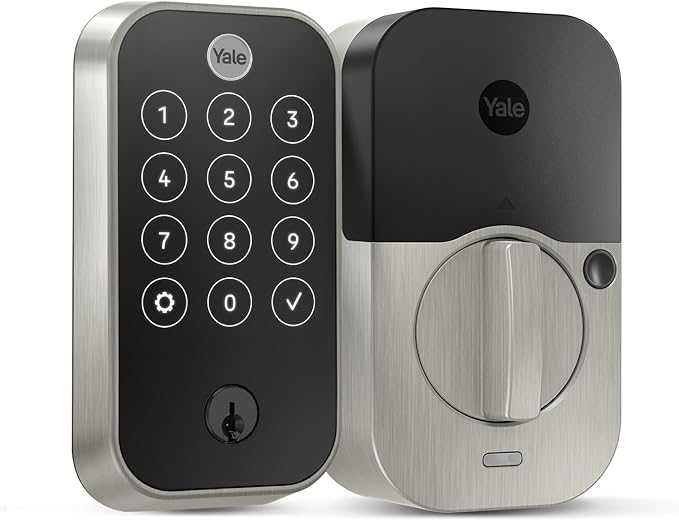
The keypad and future-proof pick — a sleek touchscreen keypad, key-free and keyed formats, and swappable smart modules so you can add Wi-Fi or Matter later without replacing the lock. Clean integration across all major platforms.
The Yale Assure Lock 2 is the most configurable mainstream lock and a keypad standout. It comes in key-free and keyed versions and several styles, and its swappable smart modules let you buy Wi-Fi now or start with Bluetooth/Matter and add connectivity later by changing a small module instead of the whole lock — genuinely future-proof. Its sleek touchscreen keypad is among the best for code entry, it can add Matter with a separate module for clean integration across Apple Home, Google, Alexa, and SmartThings, and the key-free models look modern and clean. It's a full replacement rather than a retrofit, so it's not for renters who can't change the exterior, but for keypad quality and platform flexibility it's the pick.
Pros
- ✓Excellent touchscreen keypad
- ✓Swappable modules — add Wi-Fi or Matter later
- ✓Key-free and keyed formats and styles
- ✓Matter can be added with a separate module
Cons
- ✗Full replacement — not renter-friendly
- ✗Wi-Fi/connectivity module can be an extra cost
- Install
- Full deadbolt replacement
- Unlock methods
- Touchscreen keypad, app, Auto-Unlock; key on keyed models
- Connectivity
- Bluetooth; Wi-Fi via module
- Apple Home Key
- Plus model only
- Matter
- Via add-on module
- Batteries
- 4 AA
- Security rating
- ANSI/BHMA Grade 2
- Door thickness
- 1-3/8 to 2-1/4 in
Subscribe to our newsletter
Occasional updates and new releases — no spam.
4ABest DesignLevel Lock Plus

The invisible-design pick — all electronics hidden inside the deadbolt so it looks like an ordinary premium lock, with Apple Home Key tap-to-unlock, physical key, and app control. Expensive and Apple-leaning, but nothing else is this stealthy.
The Level Lock+ is the design and stealth pick. Its trick is hiding all the electronics inside the deadbolt itself, so from both sides it looks like an ordinary premium deadbolt — no bulky keypad, no interior box. It supports Apple Home Key tap-to-unlock with your iPhone or Watch, works with a physical key and the app, and is the choice for anyone who wants smart convenience without their door advertising that it's 'smart.' It's expensive and leans heavily toward the Apple ecosystem, and it has no keypad, but nothing else here is this invisible. For minimalist design plus Home Key in a normal-looking lock, it's unmatched.
Pros
- ✓Electronics hidden inside — looks like a normal deadbolt
- ✓Apple Home Key tap-to-unlock
- ✓Physical key and app control retained
- ✓The most discreet smart lock here
Cons
- ✗Expensive and Apple-leaning
- ✗No built-in keypad
- Install
- Full replacement, hidden inside the door
- Unlock methods
- Apple Home Key, touch, app, key card, key
- Connectivity
- Bluetooth, Thread (no Wi-Fi)
- Apple Home Key
- Yes
- Matter
- Yes (earlier units via firmware update)
- Batteries
- 1 CR2
- Security rating
- BHMA AAA
- Door thickness
- 1-3/4 to 2 in
5B+Best Valueeufy Smart Lock C220

The value pick — a fingerprint-reader lock with built-in Wi-Fi, a keypad, and app control that recognises your print in under a second, with local-leaning storage and no mandatory fees. A lot of features for the price, with a bulkier interior.
The eufy Smart Lock C220 is the value pick, packing features that cost more elsewhere — a fast fingerprint reader that recognises your print in under a second, built-in Wi-Fi, a code keypad, and app control, with eufy's no-mandatory-fee approach. The fingerprint entry is genuinely convenient for daily use and great for kids and guests who don't carry phones, and the keypad covers everyone else. The interior unit is bulkier than the sleek premium locks and the build feels a step below Schlage or Level, but for the most access methods — fingerprint, code, app, and key — at the lowest price, it's the smart-value choice for a home you can modify.
Pros
- ✓Fast fingerprint reader plus keypad and app
- ✓Built-in Wi-Fi, no mandatory fees
- ✓Most access methods for the money
- ✓Strong value
Cons
- ✗Bulkier interior and a step below premium build
- ✗Full replacement — not renter-friendly
- Install
- Full deadbolt replacement
- Unlock methods
- Fingerprint, keypad, app, key
- Connectivity
- Built-in Wi-Fi, Bluetooth
- Apple Home Key
- No
- Matter
- No
- Batteries
- 8 AA
- Security rating
- BHMA Grade 3
- Door thickness
- 1-3/8 to 2-1/8 in
| Product | Install | Unlock methods | Connectivity | Apple Home Key | Matter | Door thickness | ||
|---|---|---|---|---|---|---|---|---|
| Schlage Encode Plus | Full deadbolt replacement | Keypad, Apple Home Key, app, key | Built-in Wi-Fi (2.4 GHz), Bluetooth | Yes | No | 4 AA (up to 6 months) | BHMA A156.40 Grade AAA | 1-3/8 to 1-3/4 in |
| August Wifi Smart Lock | Retrofit over your existing deadbolt | App, Auto-Unlock, your existing key; separate keypad in the linked bundle | Built-in Wi-Fi, Bluetooth | Not listed by August | Not listed by August | 2 CR123 (up to 3 months) | Depends on your existing deadbolt | — |
| Yale Assure Lock 2 | Full deadbolt replacement | Touchscreen keypad, app, Auto-Unlock; key on keyed models | Bluetooth; Wi-Fi via module | Plus model only | Via add-on module | 4 AA | ANSI/BHMA Grade 2 | 1-3/8 to 2-1/4 in |
| Level Lock Plus | Full replacement, hidden inside the door | Apple Home Key, touch, app, key card, key | Bluetooth, Thread (no Wi-Fi) | Yes | Yes (earlier units via firmware update) | 1 CR2 | BHMA AAA | 1-3/4 to 2 in |
| eufy Smart Lock C220 | Full deadbolt replacement | Fingerprint, keypad, app, key | Built-in Wi-Fi, Bluetooth | No | No | 8 AA | BHMA Grade 3 | 1-3/8 to 2-1/8 in |
Top pick: Schlage Encode Plus
The Schlage Encode Plus is the best smart lock for most people because it combines a genuinely secure deadbolt with built-in Wi-Fi and Apple Home Key support, with no hub required. Schlage's deadbolts carry the highest residential security ratings (ANSI/BHMA Grade AAA and a strong anti-pick, anti-bump cylinder), so unlike some app-first locks you are not trading physical security for convenience. The built-in Wi-Fi means you control and monitor it from anywhere directly, without buying a separate bridge.
Its headline feature is Apple Home Key: you add the lock to your iPhone or Apple Watch wallet and unlock simply by tapping your phone to the lock — no app to open, no code to type, and it works even if your phone's battery is dead (Home Key reserves power for exactly this). It also has a fingerprint-free backlit keypad for codes, works with Siri, Alexa, and Google, and you can hand out time-limited codes to guests, cleaners, and trades.
The honest caveats: it's a full deadbolt replacement (you remove your existing one), so it's less suited to renters who can't modify the door, and the premium build commands a premium price. It's strongest for Apple households thanks to Home Key, though it works across all the major assistants. For a secure, hub-free, tap-to-unlock lock you own outright, the Encode Plus is the default.
Best for renters: August Wi-Fi Smart Lock
The August Wi-Fi Smart Lock is the pick for renters and anyone who wants to keep their existing keys, because it's a retrofit lock: it replaces only the interior thumb-turn of your existing deadbolt and leaves the exterior — and your keyway — completely untouched. Your old keys still work, the outside of your door looks unchanged (important for landlords and HOAs), and installation takes about ten minutes with a screwdriver and no drilling. It's the least invasive smart lock here by a wide margin.
Despite the simple install, it's fully featured: built-in Wi-Fi (no separate bridge needed in the current generation), auto-lock and auto-unlock as you arrive, remote control and guest access from the app, and DoorSense to tell you whether the door is actually closed, not just locked. It works with Alexa, Google, and Siri, and because the exterior is unchanged, you keep a physical key as a universally reliable backup.
The trade-offs: because it sits on the inside of an existing deadbolt, it's bulkier on the interior than a sleek purpose-built lock, and it has no exterior keypad of its own — entry is by app, key, or auto-unlock, so guests without the app need a physical key unless you use the separate Yale Keypad — included in the bundle we link to — which mounts on the wall or frame beside the door. But for keeping your keyway, satisfying a landlord, and a renter-friendly ten-minute install, nothing beats the August.
Keypad and design picks: Yale Assure Lock 2 and Level Lock+
The Yale Assure Lock 2 is the most configurable mainstream lock and a keypad standout. It comes in key-free and keyed versions and in multiple styles, and crucially it uses swappable smart modules — you can buy the Wi-Fi version now, or start with Bluetooth/Matter and add connectivity later by changing a small module rather than the whole lock. Its sleek touchscreen keypad is one of the best for code entry, it can add Matter with a separate module (so it plugs cleanly into Apple Home, Google, Alexa, and SmartThings), and the key-free models give a clean, modern look.
The Level Lock+ is the design and stealth pick, and the other strong Apple Home Key option. Its trick is that all the electronics are hidden inside the deadbolt itself — from the outside and inside it looks like an ordinary premium deadbolt, with no bulky keypad or interior box. It supports Apple Home Key tap-to-unlock, works with a physical key and the app, and is the choice for anyone who wants smart-lock convenience without their door announcing that it's 'smart.' It's expensive and leans heavily Apple, but nothing else is this invisible.
Choose between them by what you value. The Yale Assure Lock 2 wins on a great keypad, format choice, and Matter-based future-proofing via swappable modules. The Level Lock+ wins on invisible design and Apple Home Key in a package that looks like a normal deadbolt. Both are full replacements rather than retrofits, so neither suits a renter who can't change the exterior.
How to choose: retrofit vs replacement, connectivity, keypads, and backup
Decide retrofit versus full replacement first, because it eliminates options. A retrofit lock (August) replaces only the interior thumb-turn, keeps your existing keyway and keys, and is the only renter- and HOA-safe choice since the door's exterior is untouched. A full replacement (Schlage, Yale, Level) swaps the entire deadbolt for a purpose-built unit — sleeker and often more featured, but it changes your keyway and isn't appropriate if you can't modify the door. If you rent or share a building's keying, retrofit is effectively mandatory.
Match connectivity to how you'll use it. Built-in Wi-Fi (Schlage Encode Plus, August, Yale's Wi-Fi module) lets you lock, unlock, and check status from anywhere with no extra hardware — essential for remote guest access. Bluetooth-only locks are cheaper and have longer battery life but only work within range of your phone unless you add a bridge. Apple Home Key (Schlage Encode Plus, Level Lock+) adds tap-to-unlock with your iPhone or Watch and is the slickest daily experience if you're in the Apple ecosystem; Matter support (Yale) future-proofs you across all platforms.
Weigh keypads and plan for dead batteries. A built-in keypad (Schlage, Yale) lets guests, kids, and trades enter with a code and no phone or app — the most universally convenient access method, and worth prioritising if you hand out access often. The August and Level have no keypad on the lock itself and rely on app, key, or auto-unlock unless you use a separate keypad (the August bundle we link to includes one). Finally, check the battery story: every lock here warns you well before the batteries die, keeps a physical key or external power-jump option as backup, and Apple Home Key reserves enough phone power to unlock even when your iPhone shows empty — but always keep a backup entry method so a dead battery never locks you out.
Frequently asked questions
Will a smart lock let me keep my existing keys?▼
What is Apple Home Key and which locks support it?▼
What happens when a smart lock's batteries die?▼
Can smart locks be hacked?▼
Is a smart lock as secure as a regular deadbolt?▼
How long does it take to install a smart lock, and will it fit my door?▼
Do smart locks still work if the Wi-Fi or the power goes out?▼
Which smart locks need a hub or extra module for remote access?▼
Check the details of the products in this article
- Schlage Encode Plus$284.99Price as of 2026-10-19
- Yale Assure Lock 2$197Price as of 2026-10-19
- Level Lock Plus$200.38Price as of 2026-10-19
- eufy Smart Lock C220$119.99Price as of 2026-10-19
Prices change. Check the retailer for the current price.
Comments & questions
Discussion happens on nattzy, our community forum. Sign in with Google to post — it takes a second.
View the discussion thread on nattzy ↗
Still deciding? Ask the community your own question — Post a question on nattzy ↗