Best Crypto Hardware Wallets 2026: 5 Cold Storage Picks
WriterPickly Editorial
Updated 2026-09-10
A hardware wallet is the single most effective upgrade you can make to your crypto security setup — keeping private keys offline and out of reach from exchange hacks, phishing attacks, and malware. The market has matured significantly: today's devices range from beginner-friendly touchscreen interfaces to air-gapped, open-source setups built for security researchers and paranoid HODLers. Five of the most talked-about wallets are compared here on setup friction, firmware auditability, supported assets, and day-to-day usability.
Quick answer
For most crypto holders, the Ledger Nano X is the pick — a CC EAL5+ secure element plus Bluetooth, so you can sign from your phone. The Trezor Model T is fully open-source with reproducible builds, Coldcard Mk4 is the Bitcoin specialist's air-gapped signer (QR or microSD only), Keystone 3 Pro adds a 4-inch touchscreen to air-gapping, and the BitBox02 Bitcoin Edition is the easiest start.
📋How we compared
This comparison is desk research. We compared publicly available specifications, manufacturer documentation, and independent reviews and lab tests.

Best Overall: The Nano X pairs a CC EAL5+-rated secure element with Bluetooth connectivity, letting you sign transactions from your phone without plugging in — a genuine convenience advantage for active portfolios. Ledger Live supports staking, NFT management, and direct crypto purchases, making it a full ecosystem rather than just a signing device.
Top picks ↓Related articles

1★ Best PickABest OverallLedger Nano X Hardware Wallet
The Nano X pairs a CC EAL5+-rated secure element with Bluetooth connectivity, letting you sign transactions from your phone without plugging in — a genuine convenience advantage for active portfolios. Ledger Live supports staking, NFT management, and direct crypto purchases, making it a full ecosystem rather than just a signing device. Support for 5,500+ assets and deep WalletConnect integration makes it the most versatile option here.
Pros
- ✓Bluetooth enables mobile signing without a cable
- ✓Largest app ecosystem with 5,500+ supported assets
- ✓Ledger Live provides staking and portfolio tracking in one place
Cons
- ✗Firmware partially closed-source due to secure element NDA
- ✗Ledger Recover optional service sparked community controversy around seed phrase custody
2ABest Open-SourceTrezor Model T Hardware Wallet
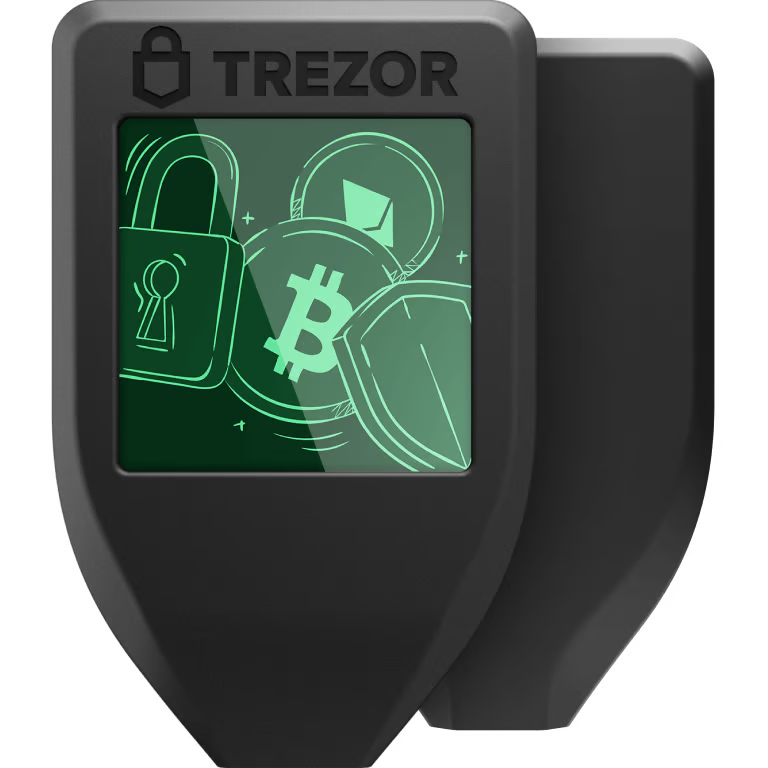
The Model T's fully open-source firmware — including reproducible builds — means any developer can verify what is running on your device, a level of transparency Ledger cannot fully match. The 1.54-inch color touchscreen makes address confirmation comfortable and reduces the chance of approving a wrong address under time pressure. At $179 it is the priciest USB-connected option here, but the combination of open-source integrity and multi-asset breadth (8,000+ coins) justifies the premium for security-conscious generalist holders.
Pros
- ✓Fully open-source firmware with reproducible builds
- ✓Touchscreen makes address verification more reliable
- ✓Supports 8,000+ assets including Ethereum, Solana, and ERC-20 tokens
Cons
- ✗Most expensive non-air-gapped option at $179
- ✗No Bluetooth — USB-only connection
3A-Best for Bitcoin SecurityColdcard Mk4
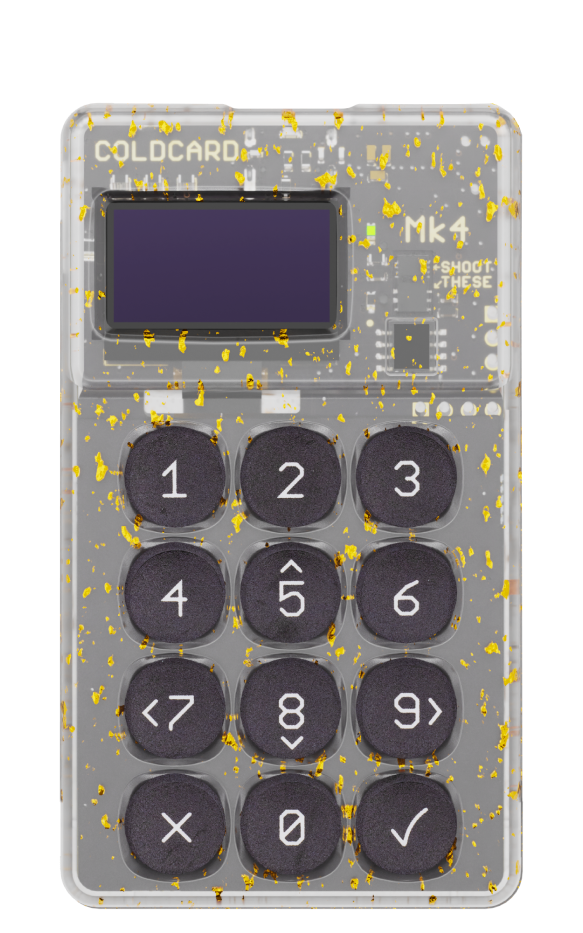
Coldcard Mk4 is the reference device for Bitcoin self-custody specialists: it signs transactions entirely via QR or microSD with no USB data connection, supports native multisig coordination with PSBT, and runs fully open-source firmware on dual secure elements (ATECC608B + the new SE2 chip). The numeric-keypad-only interface is deliberately spartan — this is a deliberate security tool, not a consumer gadget, and it rewards users who take time to learn it.
Pros
- ✓True air-gap via QR or microSD — never connects to the internet
- ✓Industry-leading multisig and PSBT tooling
- ✓Dual secure element design with fully open-source firmware
Cons
- ✗Bitcoin-only — no Ethereum or altcoin support
- ✗Steep learning curve; spartan UI not beginner-friendly
Subscribe to our newsletter
Occasional updates and new releases — no spam.
4A-Best Air-Gap with Modern UXKeystone 3 Pro

Keystone 3 Pro brings a 4-inch touchscreen and a removable 1200mAh battery to the air-gapped wallet category, making it the most approachable offline signing device available. It integrates natively with MetaMask, OKX Wallet, and Solflare via QR-based WalletConnect, covering Ethereum DeFi, Solana, and Bitcoin in a single device. The open-source firmware and fingerprint sensor add meaningful security layers without requiring a terminal or manual hash verification.
Pros
- ✓4-inch touchscreen with battery — the best air-gap UX available
- ✓Native MetaMask and Solflare QR integration for DeFi and Solana
- ✓Open-source firmware with fingerprint authentication
Cons
- ✗Battery adds bulk compared to USB-only devices
- ✗Smaller community and third-party integration ecosystem than Ledger or Trezor
5B+Best for Beginners (Bitcoin)Bitbox02 Hardware Wallet

The BitBox02 Bitcoin Edition packs a complete self-custody stack into a thumb-drive-sized device: ATSAMD51 microcontroller, secure chip, touch sliders for input, and a companion desktop app (BitBoxApp) that consistently wins praise for its clear, step-by-step interface. At $118 it is the most affordable option here, and the Swiss-made, open-source design means you are not cutting corners — you are simply buying a narrowly scoped, exceptionally well-executed tool for Bitcoin holders who want zero complexity.
Pros
- ✓Most beginner-friendly setup flow and companion app
- ✓Lowest price at $118 for a fully open-source device
- ✓Compact thumb-drive form factor with touch-slider input
Cons
- ✗Bitcoin-only (a separate multi-edition adds Ethereum but at higher cost)
- ✗Smaller screen limits address verification comfort compared to Model T or Keystone
What to look for in a hardware wallet
Not all hardware wallets solve the same problem. A casual holder who checks balances weekly has different needs than a DeFi power user or a Bitcoin maximalist running a full node. Here is what actually matters when you are spending $100–$200 on a device that guards potentially life-changing money.
Secure element vs. general microcontroller
Devices built around a certified secure element (SE) chip — like the STMicroelectronics ST33 used in Ledger devices — store private keys in tamper-resistant silicon rated to CC EAL5+. General microcontrollers found in some open-source wallets are easier to audit in software but physically easier to extract keys from with a lab setup. Neither approach is categorically better: the SE trades closed-source silicon for physical hardening, while a fully open MCU lets you verify every line of firmware at the cost of slightly weaker hardware barriers.
Air-gap and communication interfaces
USB-connected wallets are convenient but create a narrow attack surface via the data channel. Air-gapped wallets like the Coldcard and Keystone 3 Pro communicate entirely through QR codes or microSD cards, so your signing device never connects directly to an internet-facing computer. For high-value, infrequently moved funds, air-gap is a meaningful security upgrade — for daily DeFi use, the friction may not be worth it.
Supported coins and DeFi integration
Ledger and Trezor both support thousands of tokens via third-party apps. Coldcard and BitBox02 Bitcoin Edition are intentionally Bitcoin-only — a philosophical choice as much as a technical one. If you hold a diversified portfolio including ERC-20 tokens, Solana, or altcoins, a multi-asset device is non-negotiable. If you are a Bitcoin-only holder, the narrower devices actually reduce attack surface by removing code that handles other chains.
Passphrase and multisig support
BIP-39 passphrase support is table stakes — all five wallets here offer it. What separates advanced setups is native multisig (multi-signature) coordination. Coldcard has the deepest multisig tooling of any consumer wallet, with PSBT (Partially Signed Bitcoin Transaction) support baked in and a dedicated multisig menu. Keystone 3 Pro and Trezor Model T also handle multisig well, making them strong candidates for 2-of-3 cold-storage setups.
Open-source firmware and reproducible builds
Trezor, Coldcard, Keystone, and BitBox02 all publish their firmware source code and support reproducible builds — meaning you can verify that the binary running on your device matches the published source. Ledger's firmware is partially closed-source (the secure element driver layer is under NDA with the chip vendor). This does not mean Ledger is insecure, but it does mean you are trusting their audit process rather than community verification at that layer.
How the five wallets compare day-to-day
On paper, the spec sheets look similar. In practice, the experience of setting up a wallet, signing a transaction under pressure, or recovering from a lost device varies enormously. Ledger's Ledger Live app is polished and integrates staking and NFT management, but the company's 2020 data breach (customer email/address data, not keys) left a trust scar that still colors community sentiment. Trezor's Suite desktop app is clean and the device's large touchscreen makes address confirmation genuinely comfortable — something you will appreciate when double-checking a six-figure withdrawal destination. Coldcard's UX is deliberately spartan: a numeric keypad and small monochrome screen designed for people who treat wallet interaction as a deliberate, focused ritual rather than a quick tap. Keystone 3 Pro brings a 4-inch touchscreen and a detachable battery making it genuinely portable for active DeFi users. BitBox02 Bitcoin Edition is the smallest device here — roughly the size of a USB thumb drive with a side-mounted touch slider — and its companion app Bitbox App is consistently praised for clarity by beginners.
Firmware update processes also differ meaningfully. Trezor and BitBox02 surface updates prominently and walk you through verification steps. Coldcard requires you to manually verify a SHA256 hash against the published value before installing — an extra step that power users appreciate and newcomers sometimes skip, which undermines the intent.
Bottom line
For most people holding a mix of Bitcoin and Ethereum-based assets, the Ledger Nano X remains the most practical choice: broad compatibility, good mobile support via Bluetooth, and a mature ecosystem of integrations with DeFi frontends via WalletConnect. The trust tradeoff around the closed SE firmware is real but manageable — your keys never leave the device regardless.
Security-first Bitcoin holders should seriously consider the Coldcard Mk4 or BitBox02 Bitcoin Edition. Both are fully open-source, both treat multisig as a first-class feature, and neither tries to be a Swiss Army knife. If you want the best air-gapped experience with a modern interface, the Keystone 3 Pro is the easiest recommendation for someone stepping up from a USB wallet. Trezor Model T sits in a strong middle ground — open-source, multi-asset, touchscreen, and backed by a company with a long track record of transparent security disclosures.
Frequently asked questions
Can I lose my crypto if a hardware wallet breaks or is stolen?▼
Is Ledger safe after the 2020 data breach?▼
What is the difference between a hot wallet and a cold wallet?▼
Do hardware wallets work with DeFi protocols like Uniswap or Aave?▼
How many cryptocurrencies does each wallet support?▼
Check the details of the products in this article
- Ledger Nano X Hardware Wallet$149Reference price
- Trezor Model T Hardware Wallet$179Reference price
- Bitbox02 Hardware Wallet$179Price as of 2026-11-05
Prices change. Check the retailer for the current price.
Comments & questions
Discussion happens on nattzy, our community forum. Sign in with Google to post — it takes a second.
View the discussion thread on nattzy ↗
Still deciding? Ask the community your own question — Post a question on nattzy ↗
Related articles
Best ETFs for Beginners 2026: 5 Top Funds Compared

Best Index Funds 2026: 5 Compared on Cost and Coverage

Best Roth IRA Accounts 2026: 5 Providers Compared
Best Stock Trading App 2026: 5 Brokers Compared

Best Robo-Advisors 2026: 4 Top Platforms Compared
Best Crypto Exchange 2026: 5 Compared on Fees & Security