Best Data Recovery Software 2026: 5 Tools Compared
A deleted file usually is not gone yet: the space it used is only marked as free until something new is written over it. Recovery software can find it, but only if you stop using the drive in time and choose a tool that fits your problem and your skill level.
Quick answer
Wondershare Recoverit is the easiest all-round pick for most people: a guided interface for Windows and Mac, support for PCs, SD cards, USB sticks, external drives and NAS, built-in photo and video repair, and a monthly plan if you only need it once. If you want to recover as much as possible for free, EaseUS Data Recovery Wizard's free Windows edition allows up to 2GB. Disk Drill is the best fit if you use both a Mac and a PC, since one licence covers both. Stellar Data Recovery has the lowest-cost lifetime licence among the beginner-friendly tools here, and R-Studio is the choice for experienced users dealing with RAID arrays, unusual file systems or damaged partitions.
We did not run our own recovery tests with any of these programs. A fair test would need identical damaged drives and hundreds of deleted files per tool, and recovery results vary heavily with the drive, the file system and what happened after deletion. Instead, this is a desk comparison: we took features, supported systems, free-version limits and licence terms from each developer's official pages and documentation, checked official US prices in October 2026, read independent reviews, and kept only the complaints that recur across many user reviews rather than one-off reports. Success rates and device counts quoted by vendors are their own claims, and we do not repeat them as facts.
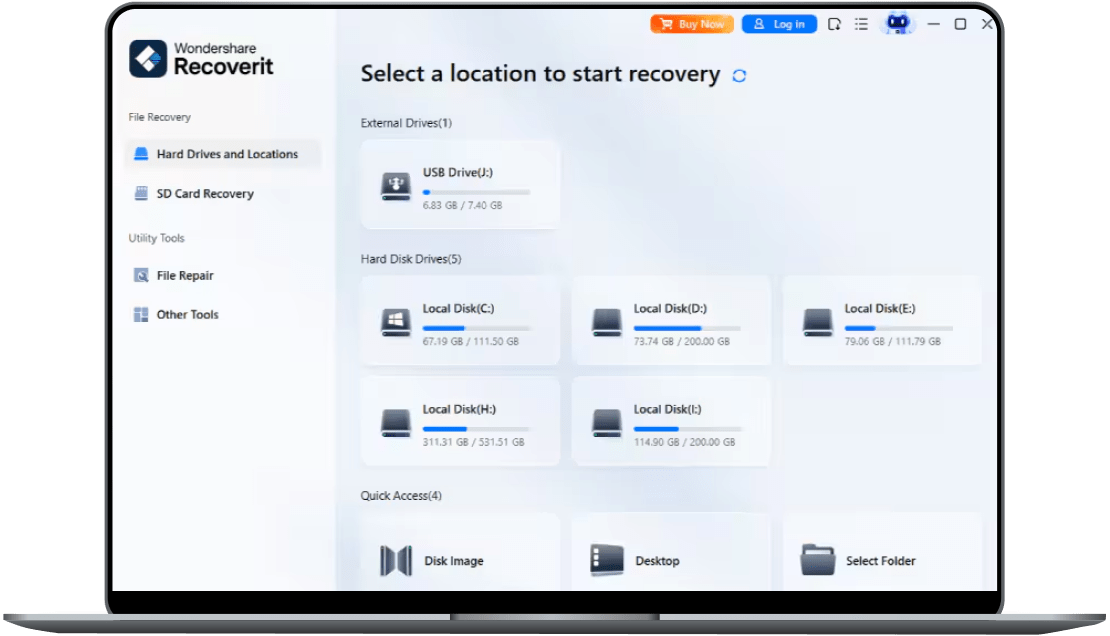
🏆 Best for most people: Recoverit is the easiest all-round choice: a clean, guided interface on Windows and Mac that covers internal drives, SD cards, USB sticks, external drives, NAS and Linux devices, plus a bootable toolkit for a PC that will not start. Built-in repair for corrupted photos, videos and documents helps when recovered files will not open.
Top picks ↓| Product | Price | Link |
|---|---|---|
| $64.99〜$134.99Reference price | ||
| $69.95〜$149.95Reference price | ||
| $89.00〜$89.00Reference price | ||
| $59.99〜$149Reference price | ||
| $49.99〜$79.99Reference price |
Top picks
Related articles
Prices are for Recoverit for Windows on two PCs; the Mac version is priced separately, and the monthly and annual plans renew until you cancel.
Recoverit is the easiest all-round choice: a clean, guided interface on Windows and Mac that covers internal drives, SD cards, USB sticks, external drives, NAS and Linux devices, plus a bootable toolkit for a PC that will not start. Built-in repair for corrupted photos, videos and documents helps when recovered files will not open. The monthly plan suits a one-off accident, and the free Windows version recovers up to 500MB so you can check results first. The catches are that subscriptions renew automatically, the perpetual plan does not include future major versions, and the two activated PCs cannot be changed later.
Pros
- ✓Guided interface for Windows and Mac
- ✓Photo, video and document repair built in
- ✓Monthly plan for one-off recoveries
Cons
- ✗Monthly and annual plans auto-renew
- ✗Perpetual plan excludes future major versions

Choose Windows or Mac on the buy page before paying, as the Mac licences cost more.
EaseUS Data Recovery Wizard has the most generous free edition here, allowing up to 2GB of recovery on Windows, which is enough for many document-only accidents. The three-step process of choosing a location, scanning and previewing is straightforward, you can pause and resume scans, and paid editions add repair for corrupted photos, videos and documents and a bootable USB for crashed PCs. It is also available for Mac. Paid licences cover a single computer, the Mac edition costs more than Windows, and some users say scans of large drives take a long time.
Pros
- ✓Up to 2GB free recovery on Windows
- ✓Simple three-step wizard
- ✓30-day money-back guarantee
Cons
- ✗One licence covers one computer
- ✗Mac edition is more expensive
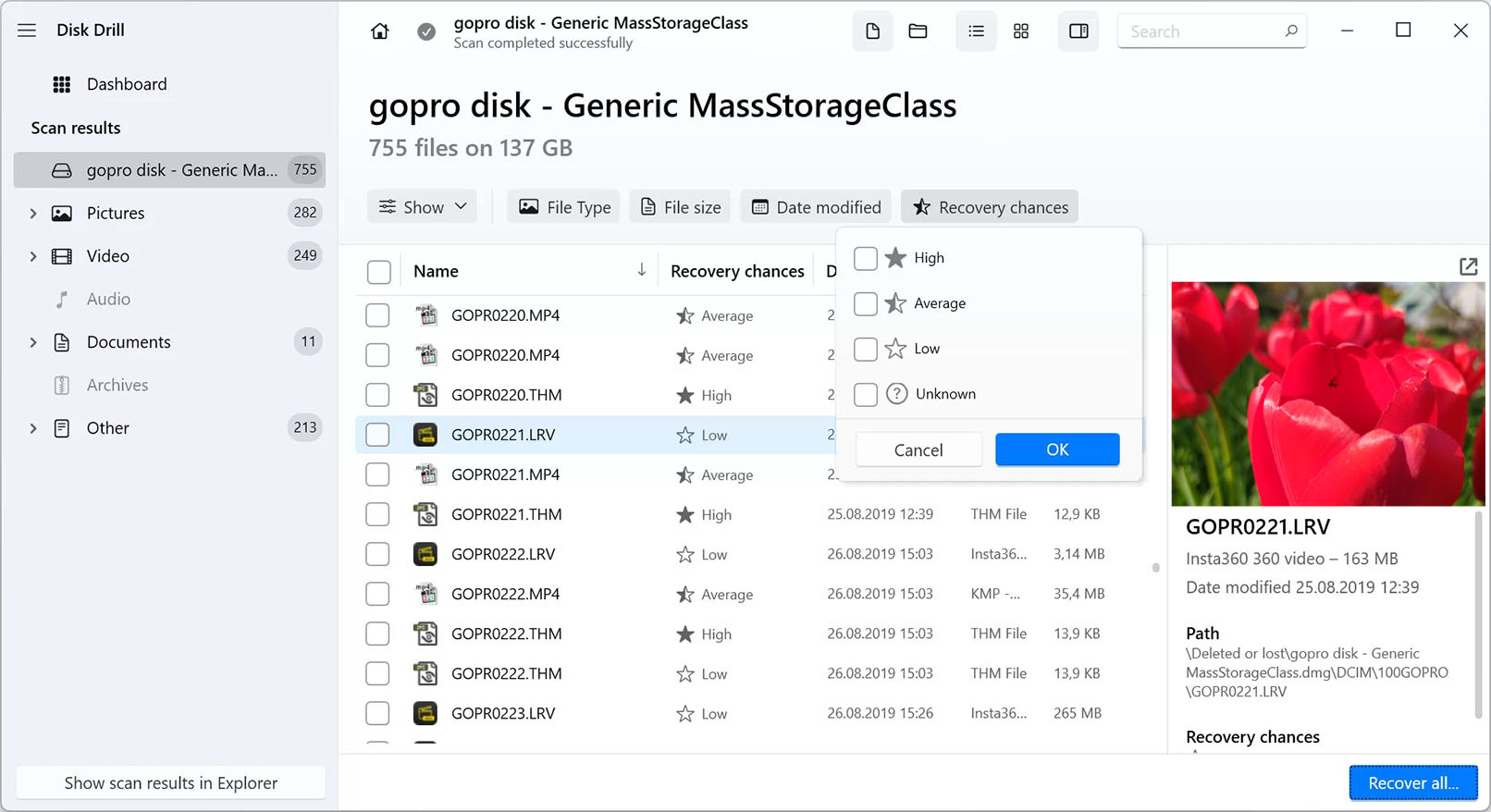
One PRO licence covers both macOS and Windows; decide between the yearly subscription and the lifetime licence at checkout.
Disk Drill makes sense if you have both a Mac and a Windows PC, because one PRO licence works on macOS and Windows and can be installed on up to three devices. Its scan results show an estimated recovery chance for each file, and it can make a byte-level backup of a failing drive so you scan a copy rather than stressing the original. The free Windows version recovers only 100MB and the free Mac version is mainly for scanning and previewing. CleverFiles states that PRO purchases are non-refundable except where the law requires, so test with the free edition first.
Pros
- ✓One licence for macOS and Windows
- ✓Recovery-chance rating for each file
- ✓Byte-level backup of failing drives
Cons
- ✗Small free allowance
- ✗Purchases generally non-refundable
Subscribe to our newsletter
Occasional updates and new releases — no spam.

Standard, Professional and Premium are separate editions, each sold as a 1-year or lifetime licence; compare features before buying.
Stellar Data Recovery is sold in tiers, and its entry Standard edition has the lowest-cost lifetime licence among the beginner-friendly tools here, at $99 on Windows. The free version recovers up to 1GB on Windows and Mac, which is enough to test it properly. Higher editions add features such as partition recovery and bootable media, and Premium adds photo and video repair, so check which edition covers your problem before buying. The number of editions can be confusing, and several features that other tools include come only in the pricier tiers.
Pros
- ✓Up to 1GB free recovery
- ✓Low-cost lifetime option
- ✓Each edition offered as 1-year or lifetime
Cons
- ✗Many editions to choose between
- ✗Repair and bootable tools cost extra
R-Studio (R-Tools Technology)
R-Studio NTFS and R-Studio FAT are cheaper but limited to those file systems; the full R-Studio covers them all.
R-Studio from R-Tools Technology is a professional-grade tool rather than a wizard. It runs on Windows, Mac and Linux, reads a wide range of file systems, rebuilds damaged RAID arrays, creates disk images, includes a hex editor and can recover data over a network. Licences are permanent and transferable, and the full Windows version costs $79.99, with cheaper editions limited to NTFS or FAT/exFAT. The demo only recovers files up to 1024KB, and the interface is technical enough that beginners are better served by the other four.
Pros
- ✓RAID, imaging and many file systems
- ✓Permanent, transferable licence
- ✓Windows, Mac and Linux versions
Cons
- ✗Technical interface for beginners
- ✗Demo recovers only files up to 1024KB
Before any software: stop, don't overwrite, recover to another drive
When a file is deleted or a card is quick-formatted, the data normally stays on the disk until new data is written over it. Every photo you take on the same SD card, every download to the same drive and even installing recovery software onto that drive can overwrite what you want back. Stop using the device as soon as you notice the loss, install the recovery program on a different drive, and always save recovered files to a different drive than the one you are scanning.
SSDs are harder. Most modern SSDs use TRIM, which lets the drive erase deleted blocks in the background, so files deleted from an internal SSD may be unrecoverable within minutes regardless of the software. SD cards, USB sticks and hard drives usually give you better odds.
Software cannot fix hardware. If a hard drive clicks, grinds or beeps, is not detected at all, or has been dropped or wet, switch it off and contact a professional data recovery service. Repeated scans can finish off a failing drive. If a drive is slow or throws read errors but still works, make a full disk image first — Disk Drill and R-Studio both offer this — and scan the image instead of the drive.
Use the free version to check before you pay
All five programs let you scan and preview found files before paying, and this is the most useful step in choosing one. If a photo or document previews correctly, it is very likely recoverable; if the preview is broken or empty, buying a licence will not change that.
The free recovery allowances differ a lot, according to the developers' own pages: EaseUS allows up to 2GB on Windows, Stellar up to 1GB on Windows and Mac, Recoverit up to 500MB on Windows, and Disk Drill 100MB on Windows, while its free Mac edition is mainly for scanning and previewing. R-Studio's demo only recovers files up to 1024KB, which covers documents but not most photos or videos. For a handful of lost documents, a free version may be all you need.
Guided wizard or expert tool: who each one suits
Recoverit, EaseUS, Stellar and Disk Drill are built for people who have never recovered a file before: pick a drive, scan, filter by file type, preview, recover. Recoverit and EaseUS add repair tools for corrupted photos and videos, which helps when files come back but will not open. Disk Drill shows an estimated recovery chance for each file, which makes large scan results easier to sort.
R-Studio is a different kind of tool. It supports a wide range of file systems across Windows, Mac and Linux, rebuilds RAID arrays, includes a hex editor and can recover over a network. It is powerful, but the interface assumes you know what a partition, a file system and a sector are. If those terms are unfamiliar, start with one of the others.
Monthly, yearly or lifetime: read what the licence covers
Most data loss is a one-off event, so a one-month licence is often the cheapest way to finish the job. Recoverit's monthly and annual plans renew automatically until cancelled, so cancel once you are done. EaseUS lists its one-month and one-year licences as having no renewal fees.
Lifetime licences are not all equal. Recoverit's perpetual plan covers the major version you bought, not future major versions, and its Windows licence activates on two PCs that cannot be changed later. EaseUS's lifetime option includes free upgrades but covers one computer. A Disk Drill PRO licence covers Mac and Windows on up to three devices, but CleverFiles states that purchases are non-refundable except where the law requires it. R-Studio sells permanent licences that can be transferred between your computers, and Stellar offers each edition as either a 1-year or lifetime licence.
Frequently asked questions
Can I recover files after emptying the Recycle Bin or Trash?▼
Can I recover photos from a formatted SD card?▼
Is free data recovery software enough?▼
Does data recovery software work on SSDs?▼
When should I use a professional recovery service instead?▼
Prices change. Check the retailer for the current price.
Comments & questions
Discussion happens on nattzy, our community forum. Sign in with Google to post — it takes a second.
Still deciding? Ask the community your own question — Post a question on nattzy ↗
Related articles

Best Project Management Software 2026: 5 Tools

Best HR Software 2026: 5 Platforms Ranked

Best Estate Planning Software 2026: 5 Will Tools Compared
Best Coffee Grinders 2026: Five mills side-by-side

Best Electric Toothbrush 2026: 5 models compared honestly
Best Air Purifier 2026: 5 models compared honestly