Best Kids Tablet 2026: 5 Picks for Learning and Play
WriterPickly Editorial
Updated 2026-06-12
A kids tablet is a parenting tool before it's a technology product — the hardware specs matter much less than whether you can actually control what your child accesses, how long they use it, and what they do while they're on it. Each approach has trade-offs around content depth, flexibility as the child grows, and the practical enforcement of time limits that matters at 2 a.m. when the rules say screen time is over.
Quick answer
For most families, the Amazon Fire HD 8 Kids Edition is the pick — the most complete package on the market, pairing an 8-inch HD display with the parental controls that actually decide whether a kids tablet works. LeapFrog's LeapPad Academy is the closed system for ages 3-8 with no browsing or app store, the iPad 9th Gen with Screen Time is the most capable long term, and the Galaxy Tab A8 is the largest Android screen.
📋How we compared
Tablets were evaluated on parental control robustness and ease of setup, educational content quality and library depth, hardware durability and case inclusion, price including mandatory accessories, and longevity of usefulness as the child grows. Guidelines from the American Academy of Pediatrics on screen time for ages 2-8 informed the evaluation framework.

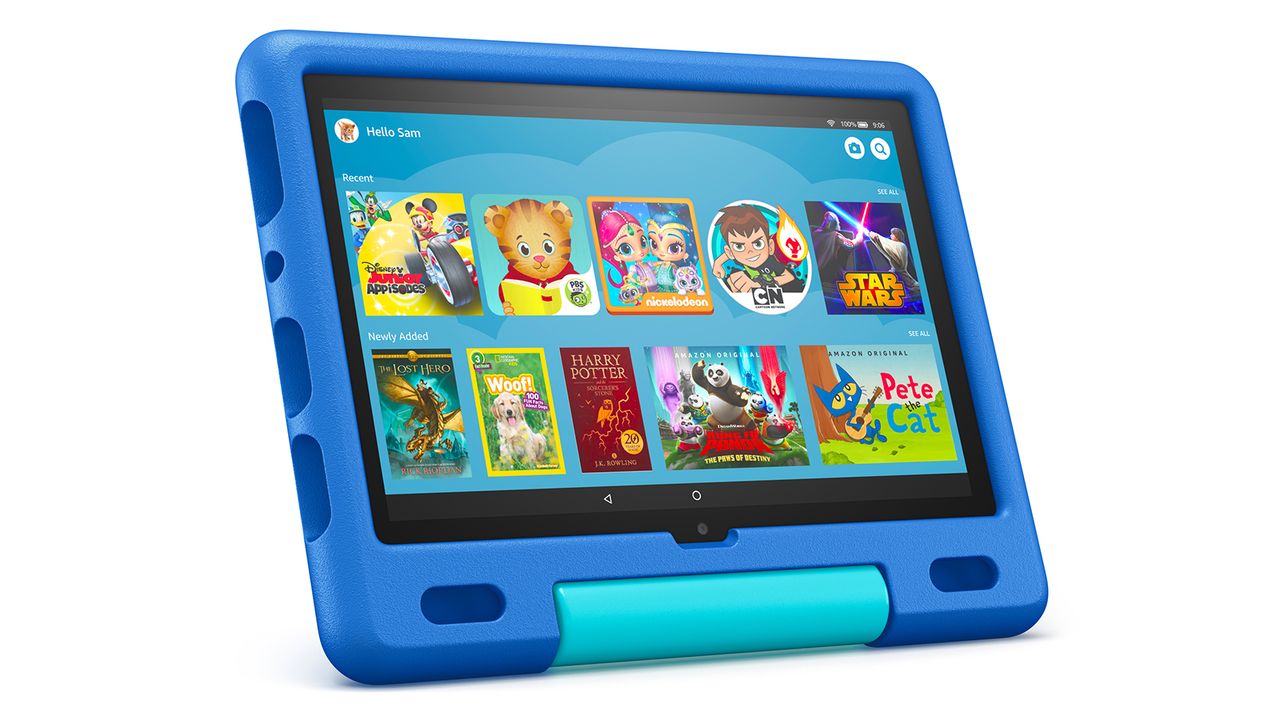
Best overall kids tablet: Amazon Fire HD 8 Kids Edition is the most complete kids tablet package on the market. The 8-inch HD display is large enough for comfortable viewing, the included rubber bumper case survives the drops that kids inevitably deliver, and the 2-year worry-free guarantee means Amazon replaces it with no questions asked if it breaks.
Top picks ↓This button opens Amazon search results, not a specific product page.
This button opens Amazon search results, not a specific product page.
Related articles


1★ Best PickA+Best overall kids tabletAmazon Fire HD 8 Kids Tablet
Amazon Fire HD 8 Kids Edition is the most complete kids tablet package on the market. The 8-inch HD display is large enough for comfortable viewing, the included rubber bumper case survives the drops that kids inevitably deliver, and the 2-year worry-free guarantee means Amazon replaces it with no questions asked if it breaks. The 1-year Kids+ subscription covers a curated library of apps, books, and videos with robust parental controls. At $120 the total package — tablet, case, guarantee, and year of content — is exceptional value.
Pros
- ✓2-year no-fault replacement guarantee
- ✓Includes protective case
- ✓1-year Amazon Kids+ subscription
Cons
- ✗Amazon ecosystem lock-in
- ✗Lower performance than iPad at similar price to bundles
- Screen
- 8" HD
- Storage
- 32GB
- Battery
- ~13 hours
- Price
- $120
2A-Best closed educational systemLeapfrog Leappad Academy

LeapFrog LeapPad Academy is purpose-built for ages 3-8 with a closed ecosystem that parents find reliably safe: no internet browsing, no app store, no external content. The 200+ included games and activities are developed with educational consultants aligned to kindergarten-grade 2 curriculum standards. At $99 it's well-priced for the intended use case. The camera, microphone, and stylus add physical interaction that many touchscreen-only tablets lack. The system ages out around 7-8 when the curriculum becomes repetitive.
Pros
- ✓Completely closed, safe ecosystem
- ✓200+ curriculum-aligned activities
- ✓Includes camera, mic, and stylus
Cons
- ✗Ages out around 7-8 years
- ✗No access to mainstream app stores
- Screen
- 7"
- Storage
- 8GB
- Content
- 200+ apps
- Price
- $99
3ABest for long-term valueApple Ipad Kids Edition
The Apple iPad 9th Gen running iOS with Screen Time enabled is the most capable kids tablet by raw performance and content quality. Apple Arcade, Khan Academy Kids, and thousands of genuinely educational apps are available with quality that budget Android tablets can't match. Screen Time parental controls are comprehensive when configured correctly. The investment pays off because an iPad purchased today remains useful through teenage years and beyond. At $329 (plus $30-50 case) the upfront cost is the barrier — the long-term value case is strong for committed Apple households.
Pros
- ✓7+ years software support
- ✓Best app ecosystem quality
- ✓Transitions from kids to adult device
Cons
- ✗Most expensive option by far
- ✗No case included
- ✗Requires parent configuration time
- Screen
- 10.2" Retina
- Storage
- 64GB
- Chip
- A13 Bionic
- Price
- $329
Subscribe to our newsletter
Occasional updates and new releases — no spam.
4B+Best Android alternativeSamsung Galaxy Tab A8 Kids

Samsung Galaxy Tab A8 with Samsung Kids mode is the strongest Android alternative to the Fire HD 8. The 10.5-inch screen is larger than any other pick here — a real advantage for educational apps and video content. Google Family Link provides parental controls across the Android ecosystem. Samsung Kids mode creates a child-safe launcher with age-appropriate pre-loaded content. At $200 it's priced between the Fire HD 8 and the iPad, and earns it with the larger screen and access to the full Google Play Store under Family Link supervision.
Pros
- ✓Largest screen in this comparison
- ✓Full Google Play access with Family Link
- ✓Strong build quality
Cons
- ✗No included case
- ✗Higher price without the guarantee of Fire HD 8
- Screen
- 10.5" TFT
- Storage
- 32GB
- Android version
- 11+
- Price
- $200
5BBest budget optionDragon Touch Kidoz Tablet

Dragon Touch KidzPad Y88X runs KIDOZ — a curated kids content launcher similar to Amazon Kids+ but at a lower price point. The $80 price makes it accessible for families who want a dedicated device without the Fire HD 8's ecosystem lock-in. The included bumper case and screen protector show Dragon Touch understanding their demographic. Performance is entry-level and won't satisfy demanding apps, but for YouTube Kids, basic educational apps, and ebooks the hardware is adequate.
Pros
- ✓Most affordable option with protective case
- ✓KIDOZ curated content
- ✓No Amazon account required
Cons
- ✗Entry-level performance
- ✗Shorter software support lifecycle
- ✗Smaller company support resources
- Screen
- 7"
- Storage
- 16GB
- OS
- Android
- Price
- $80
| Product | Battery | Content | Chip | Android version | OS | |||
|---|---|---|---|---|---|---|---|---|
| Amazon Fire HD 8 Kids Tablet | 8" HD | 32GB | ~13 hours | $120 | — | — | — | — |
| Leapfrog Leappad Academy | 7" | 8GB | — | $99 | 200+ apps | — | — | — |
| Apple Ipad Kids Edition | 10.2" Retina | 64GB | — | $329 | — | A13 Bionic | — | — |
| Samsung Galaxy Tab A8 Kids | 10.5" TFT | 32GB | — | $200 | — | — | 11+ | — |
| Dragon Touch Kidoz Tablet | 7" | 16GB | — | $80 | — | — | — | Android |
How to Choose a Kids Tablet: Parental Controls, Content Quality, and Growing with the Child
The tablet that's easiest for the parent to manage is often the right choice regardless of what the child prefers. Here's what to evaluate.
Purpose-Built Kids Tablet vs. Consumer Tablet with Kid Mode
Purpose-built systems (LeapFrog, Dragon Touch with KIDOZ) offer curated, closed ecosystems where every available app has been screened. The tradeoff is content depth — when the child outgrows the curated library, there's nowhere to go within the system. Consumer tablets with parental control layers (Amazon Kids+, Google Family Link, Apple Screen Time) have vastly more content but require more parental management to configure correctly. The age inflection point is around 7-8, where purpose-built systems start to feel limiting.
Parental Controls: What Actually Works
Time limits are the most important control — and the hardest to enforce at the hardware level on cheaper tablets. Amazon Fire Kids Edition's Freetime subscription enforces time limits even when children know the PIN (which they learn quickly). Apple Screen Time and Google Family Link require slightly more setup but work reliably on their respective platforms. LeapFrog's ecosystem is closed by default — no internet browsing is possible, which is the strongest content control available.
Durability: Cases and Drop Testing
Kids tablets get dropped — frequently and from unpredictable heights. The Amazon Fire HD 8 Kids ships with a rubber bumper case that covers every edge and corner. The iPad does not include a case, making $30-50 in a children's protective case a mandatory additional purchase. Evaluate total cost of ownership including protective case when comparing prices.
Content Quality vs. Entertainment Content
Educational content claims are common on kids tablets; actual educational content varies widely. Khan Academy Kids and PBS Kids are the gold standard for genuinely developmental content and are available across platforms. Amazon Kids+ includes both high-quality educational apps and significant entertainment content. LeapFrog's curriculum is the most purely educational but is narrower than open platforms.
Bottom line
Amazon Fire HD 8 Kids is the best overall kids tablet — the combination of robust parental controls, included case and 2-year guarantee, and Kids+ content library covers most parents' needs. LeapFrog LeapPad Academy is the right choice for ages 3-5 where a completely closed, safe ecosystem matters more than content breadth. Apple iPad is the right choice when longevity and content quality outweigh cost. Samsung Galaxy Tab A8 is a strong Android alternative for families already in the Samsung ecosystem. Dragon Touch KidzPad is the right pick when budget is the hard constraint.
Frequently asked questions
What age is appropriate for a first tablet?▼
Is an Amazon Fire HD 8 Kids worth the subscription cost?▼
How do I set up parental controls on a Fire HD 8?▼
Is an iPad worth $329 as a kids tablet?▼
Can a 2-year-old use a tablet independently?▼
Check the details of the products in this article
- Amazon Fire HD 8 Kids Tablet$120Reference price
- Leapfrog Leappad Academy$119.90Price as of 2026-10-19
- Apple Ipad Kids Edition$30〜$329Reference price
This button opens Amazon search results, not a specific product page.
- Samsung Galaxy Tab A8 Kids$200Reference price
This button opens Amazon search results, not a specific product page.
- Dragon Touch Kidoz Tablet$80Reference price
Prices change. Check the retailer for the current price.
Comments & questions
Discussion happens on nattzy, our community forum. Sign in with Google to post — it takes a second.
View the discussion thread on nattzy ↗
Still deciding? Ask the community your own question — Post a question on nattzy ↗