Beste mechanische Tastatur 2026: 5 Optionen verglichen
Fünf Tastaturen — die Gasket-montierte Keychron Q1 Pro, die HHKB Professional Hybrid Type-S mit Topre-Switches, die flache Logicool MX Keys S, die ultraschlanke Nuphy Air75 V2 und die Realforce R3 — verglichen nach Switch-Typ und Anschlaggefühl, Layout-Kompromissen, Montage-Akustik und Wireless-Latenz. Alltagskomfort und Verarbeitungsqualität überdauern jeden Datenblatt-Vorteil innerhalb eines Jahres.
Kurz gesagt
Für die meisten Schreibtische ist das Keychron Q1 Pro die erste Wahl: ein 75%-Layout mit Gasket-Mount in einem rund 2 kg schweren Vollaluminiumgehäuse, programmierbar per QMK/VIA, und damit das vollständigste Enthusiasten-Board zu einem vernünftigen Preis. Das HHKB Professional Hybrid Type-S ist der Topre-Kultklassiker für Programmierer, das Realforce R3 kombiniert elektrostatisch-kapazitive 45-g-Schalter mit japanischer Verarbeitung, das Air75 V2 von Nuphy ist die flache Gasket-Mount-Option, und die MX Keys S ist die Büro-Referenz mit Scherenschaltern.
Jedes Produkt wurde anhand dokumentierter Spezifikationen, unabhängiger Benchmarks und verifizierter Nutzerberichte bewertet. Wir vergaben Punkte für Funktionsumfang, Leistung, Verarbeitungsqualität, Ökosystem-Kompatibilität und Gesamtbetriebskosten.
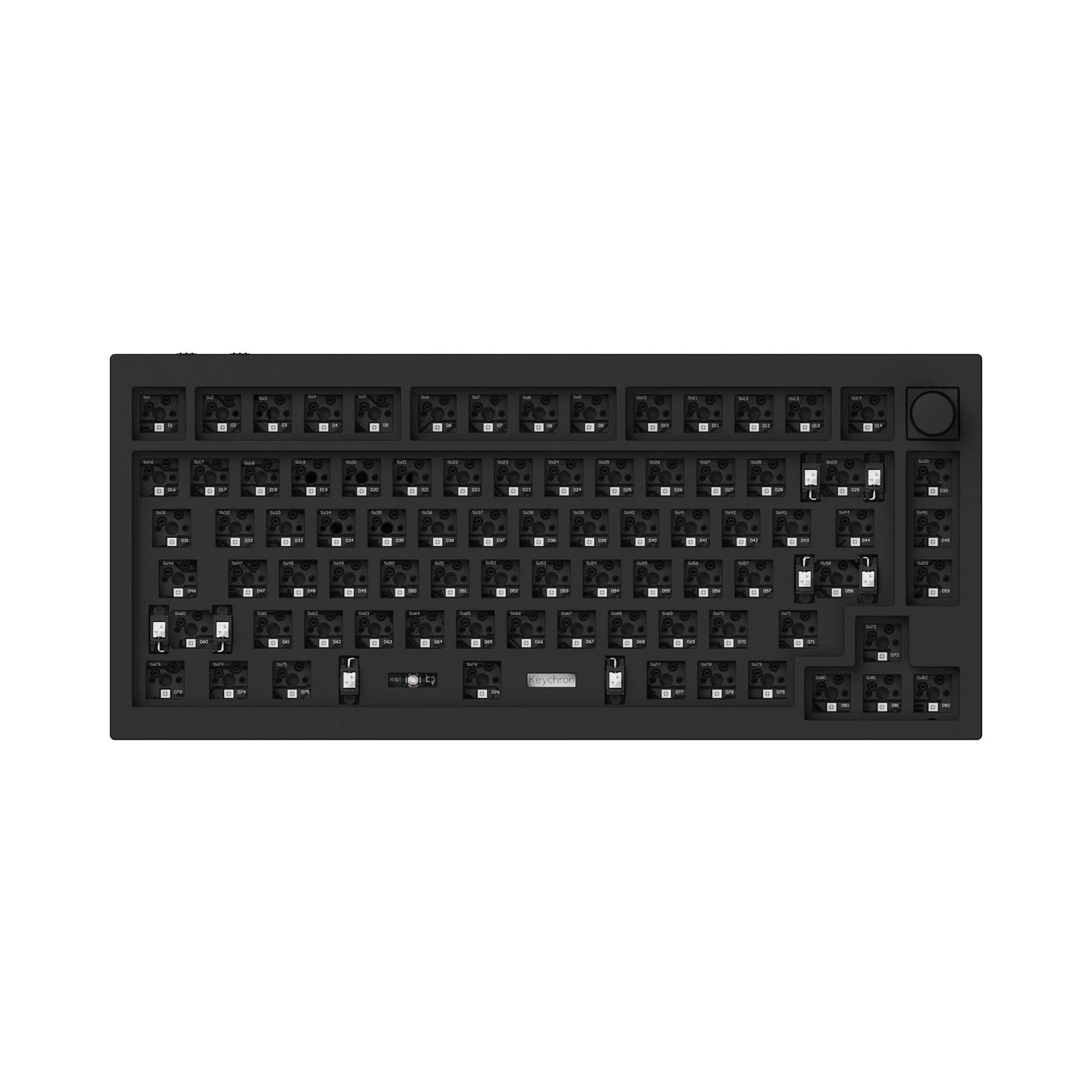
Beste Gesamtwahl: Die Keychron Q1 Pro ist die rundeste Enthusiasten-Tastatur fürs Homeoffice zu einem vertretbaren Preis. Gasket-Mount im 75-%-Layout, Vollaluminiumgehäuse (rund 2 kg), QMK/VIA-programmierbare Firmware, Hot-Swap-Sockel für MX-kompatible Switches, Bluetooth 5.1 plus 2,4-GHz-Funk und südwärts ausgerichtete RGB-Beleuchtung: Für dieses Paket musstest du vor drei Jahren noch in Boutique-Group-Buys zu Flaggschiff-Preisen einsteigen.
Kein Partnershop hier – dies öffnet eine Amazon-Suche.
| Produkt | Link |
|---|---|
Kein Partnershop hier – dies öffnet eine Amazon-Suche. | |
Unsere Empfehlungen
Verwandte Artikel


Keychron Q1 Pro
Keychron Q1 Pro — Gasket-montiertes 75%-Layout, Bluetooth 5.1 und 2.4GHz Wireless, programmierbares QMK/VIA-Firmware, vollständiger Aluminiumkorper (~2kg), RGB, Hot-Swap MX-kompatible Sockel, Mittelklasse-Preis. Das Gewicht von ~2kg macht es ungeeignet fur Reisen; der Lautstarkeregler fehlt auf dem Basismodell; QMK-Firmware-Konfiguration hat eine echte Lernkurve.
Die Keychron Q1 Pro ist die rundeste Enthusiasten-Tastatur fürs Homeoffice zu einem vertretbaren Preis. Gasket-Mount im 75-%-Layout, Vollaluminiumgehäuse (rund 2 kg), QMK/VIA-programmierbare Firmware, Hot-Swap-Sockel für MX-kompatible Switches, Bluetooth 5.1 plus 2,4-GHz-Funk und südwärts ausgerichtete RGB-Beleuchtung: Für dieses Paket musstest du vor drei Jahren noch in Boutique-Group-Buys zu Flaggschiff-Preisen einsteigen. Der Gasket-Mount klingt beim Tippen weicher und tiefer als Tray-Mount-Alternativen, und der 4000-mAh-Akku hält bei ausgeschalteter Beleuchtung mehrere Wochen. Für die mittlere Preisklasse ist das trotzdem eine bewusste Ausgabe. Die ehrlichen Kompromisse: Mit rund 2 kg fällt der Einsatz unterwegs flach, der Lautstärkeregler fehlt beim Basismodell und kostet als Knob-Variante Aufpreis, und QMK verlangt eine echte Einarbeitung, wenn du eigentlich Plug-and-Play willst.
Vorteile
- ✓Gasket-Mount im 75-%-Format, Aluminiumgehäuse mit Hot-Swap-MX-Sockeln
- ✓QMK/VIA-programmierbare Firmware für komplett freie Tastenbelegung
- ✓Bluetooth 5.1 plus 2,4-GHz-Funk mit Multi-Device-Kopplung
- ✓Südwärts gerichtete RGB-Beleuchtung und 4000-mAh-Akku für wochenlangen Betrieb ohne Backlight
Nachteile
- ✗Rund 2 kg Gewicht – für unterwegs oder auf dem Schoß ungeeignet
- ✗Lautstärkeregler nur in der teureren Knob-Variante
Kein Partnershop hier – dies öffnet eine Amazon-Suche.
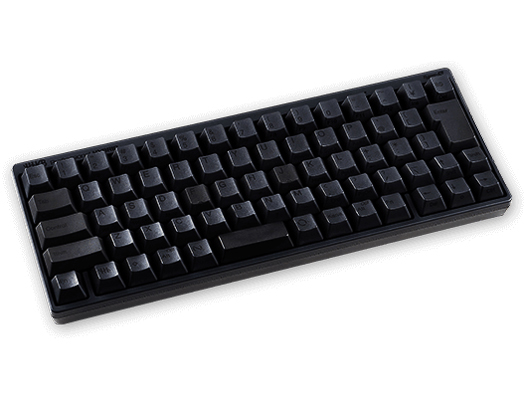
HHKB Professional Hybrid Type-S — elektrostatisch kapazitive Topre Switches mit stillen Kuppeln (Type-S Variante), ultra-leiser Betrieb, 60%-Layout, Bluetooth 4.2 und USB-C, Premium-Preis. Premium-Preis fur eine 60%-Tastatur ohne RGB, ohne QMK/VIA, ohne Hot-Swap und ohne 2.4GHz-Dongle-Option ist ein Wertversprechen, das vollständig vom Schatzen des Topre-Gefuhls abhangt.
Die HHKB Professional Hybrid Type-S ist die Kulttastatur der japanischen Software-Engineering-Szene: 1996 von Professor Eiiti Wada entworfen und um eine Layout-Philosophie herum gebaut, die Strg statt Feststelltaste setzt – genau das, was Unix- und Emacs-Nutzer suchen. Die Type-S-Variante nutzt gedämpfte kapazitive Topre-Domes und bleibt damit wirklich bürotauglich leise, unterstützt Bluetooth 4.2 plus USB-C und arbeitet mit Mac, Windows, iOS und Android zusammen. Das 45-g-Topre-Gefühl – ein weicher taktiler Punkt mit gedämpftem, „thocky" klingendem Anschlag – ist grundlegend anders als jeder MX-Switch und lässt sich schlicht nicht nachbauen. Der Preis liegt im Premiumbereich, und ob sich das lohnt, hängt ganz daran, ob Sie Topre mögen. Die ehrlichen Kompromisse: kein RGB, kein QMK/VIA, kein Hot-Swap, kein 2,4-GHz-Dongle – und der kleine Topre-Keycap-Markt begrenzt das Individualisieren.
Vorteile
- ✓Gedämpfte kapazitive Topre-Switches für leises Arbeiten im Büro
- ✓HHKB-Layout mit Strg statt Feststelltaste für Unix- und Emacs-Workflows
- ✓Bluetooth 4.2 plus USB-C mit Multi-Device-Kopplung
- ✓Verarbeitungsqualität von PFU, Kultstatus unter japanischen Entwicklern
Nachteile
- ✗Premiumpreis ohne RGB, ohne QMK/VIA, ohne Hot-Swap
- ✗Proprietärer Topre-Stem schränkt die Keycap-Auswahl stark ein
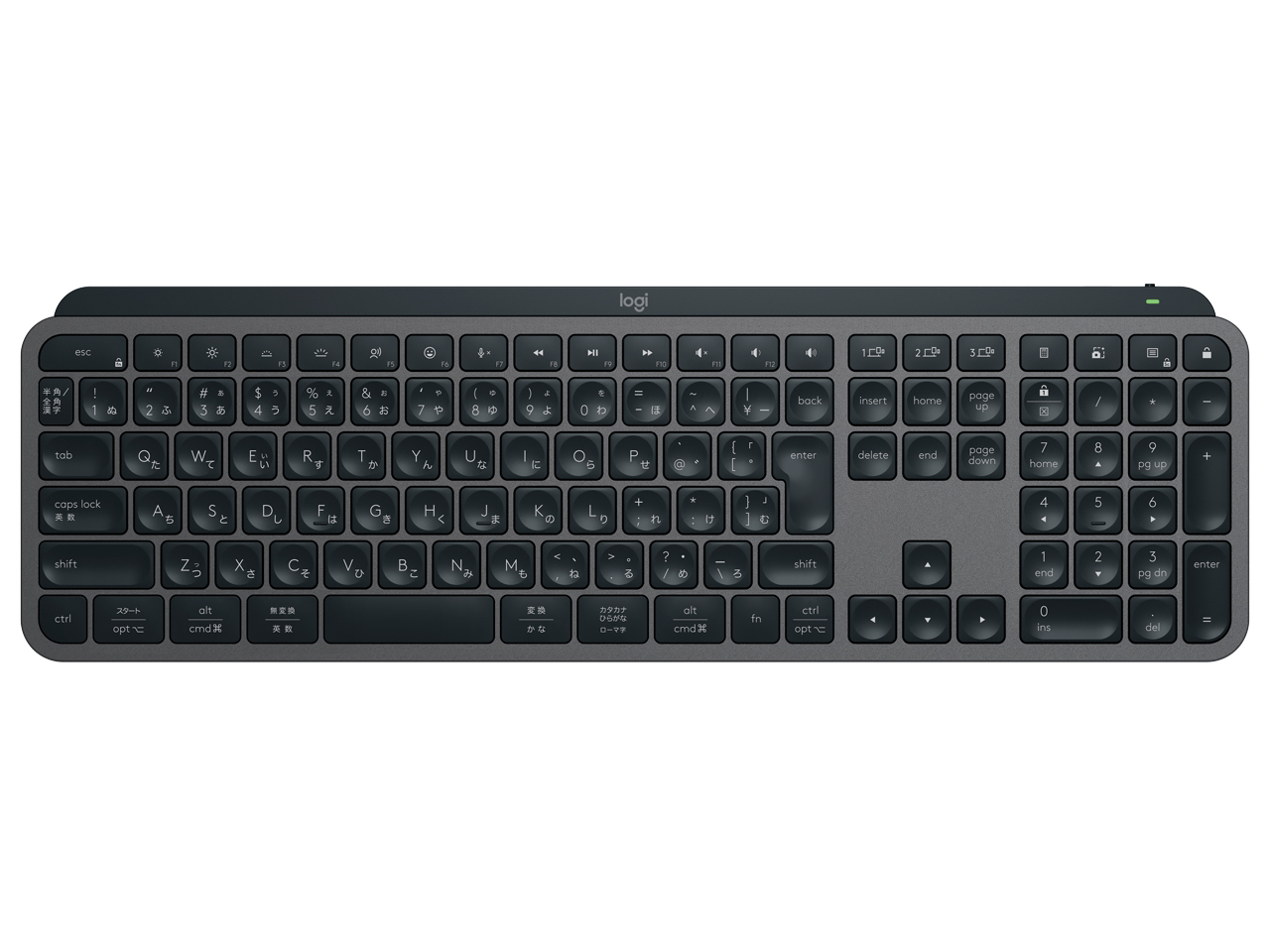
Logicool MX Keys S — Scherenmechanik (nicht mechanisch), Low-Profile, Bluetooth und Logi Bolt 2.4GHz Wireless, Einzeltasten-Hintergrundbeleuchtung, Flow Multi-Device-Umschaltung (bis zu drei Geräte), Mittelklasse-Preis. Es ist keine mechanische Tastatur — der Scherenmechanismus ist kategorisch anders als MX- oder Topre-Switches.
Die Logitech MX Keys S steht hier als ehrlicher Vergleichspunkt für den Büroalltag – eine mechanische Tastatur ist sie nämlich nicht. Die Scherenmechanik mit rund 1,8 mm Hub gehört in eine völlig andere Kategorie als MX- oder Topre-Switches, und wer mechanisches Feedback erwartet, wird enttäuscht. Ihre Stärke ist das Vielschreiben über mehrere Geräte hinweg: Bluetooth plus Logi-Bolt-Funk auf 2,4 GHz, Flow-Umschaltung zwischen bis zu drei Rechnern, eine Tastenbeleuchtung, die sich ans Umgebungslicht anpasst, und USB-C-Laden mit mehreren Wochen Laufzeit pro Ladung. In der Mittelklasse ist sie die ausgereifteste nicht-mechanische Option im Vergleich und die richtige Alltagstastatur für alle, denen Tippkomfort und geräteübergreifendes Arbeiten wichtiger sind als das Switch-Gefühl.
Vorteile
- ✓Leise, flache Scherenmechanik – passend fürs Großraumbüro
- ✓Flow-Umschaltung zwischen bis zu drei Rechnern
- ✓Tastenbeleuchtung, die sich ans Umgebungslicht anpasst
- ✓USB-C-Laden, ohne Beleuchtung bis zu fünf Monate Akkulaufzeit
Nachteile
- ✗Keine mechanische Tastatur – weder MX- noch Topre-Gefühl
- ✗Über Logi-Options+-Makros hinaus nicht programmierbar
Newsletter abonnieren
Gelegentliche Updates und Neuheiten – kein Spam.

Nuphy Air75 V2 — ultra-schlankes Gasket-montiertes 75%-Layout, Low-Profile mechanische Switches, Bluetooth 5.1 und 2.4GHz Wireless, Aluminium-Chassis, Hot-Swap MX Low-Profile kompatible Sockel, Einstiegsklasse-Preis. Low-Profile-Switches mit ~2,5–3mm Weg teilen die Benutzer-Meinung.
Die Nuphy Air75 V2 ist die flache Gasket-Mount-Variante im 75-%-Format – günstiger als die Keychron Q1 Pro. Die Low-Profile-Switches (Gateron oder Nuphys eigene Varianten) mit rund 2,5–3 mm Hub passen zu allen, denen die üblichen 4 mm MX-Hub unnötig tief sind, und das Aluminiumgehäuse mit Hot-Swap-Sockeln für MX-Low-Profile bleibt dabei bastelfreundlich. Bluetooth 5.1 plus 2,4-GHz-Dongle decken den Schreibtischbetrieb zuverlässig ab, und im Einstiegssegment ist das die günstigste Gasket-Mount-Alu-Tastatur im 75-%-Format in diesem Vergleich. Die ehrlichen Kompromisse: Low-Profile spaltet die Geister – wer den Standard-MX-Hub gewohnt ist, findet den Anschlag weniger befriedigend. Dazu ist die Modding-Community rund um Nuphy deutlich kleiner als die von Keychron, die Akkulaufzeit mit RGB fällt kürzer aus als bei der Q1 Pro, und Firmware-Updates kamen bisher langsamer und unregelmäßiger als bei Keychron.
Vorteile
- ✓Flache Gasket-Mount-Alutastatur im 75-%-Format zum Einstiegspreis
- ✓Mechanische Low-Profile-Switches mit Hot-Swap-Sockeln (MX Low Profile)
- ✓Bluetooth 5.1 plus 2,4-GHz-Dongle
- ✓Kompakte Stellfläche für enge Schreibtische
Nachteile
- ✗Low-Profile-Hub von 2,5–3 mm ist Geschmackssache gegenüber Standard-MX
- ✗Kleinere Modding-Community und seltenere Firmware-Updates
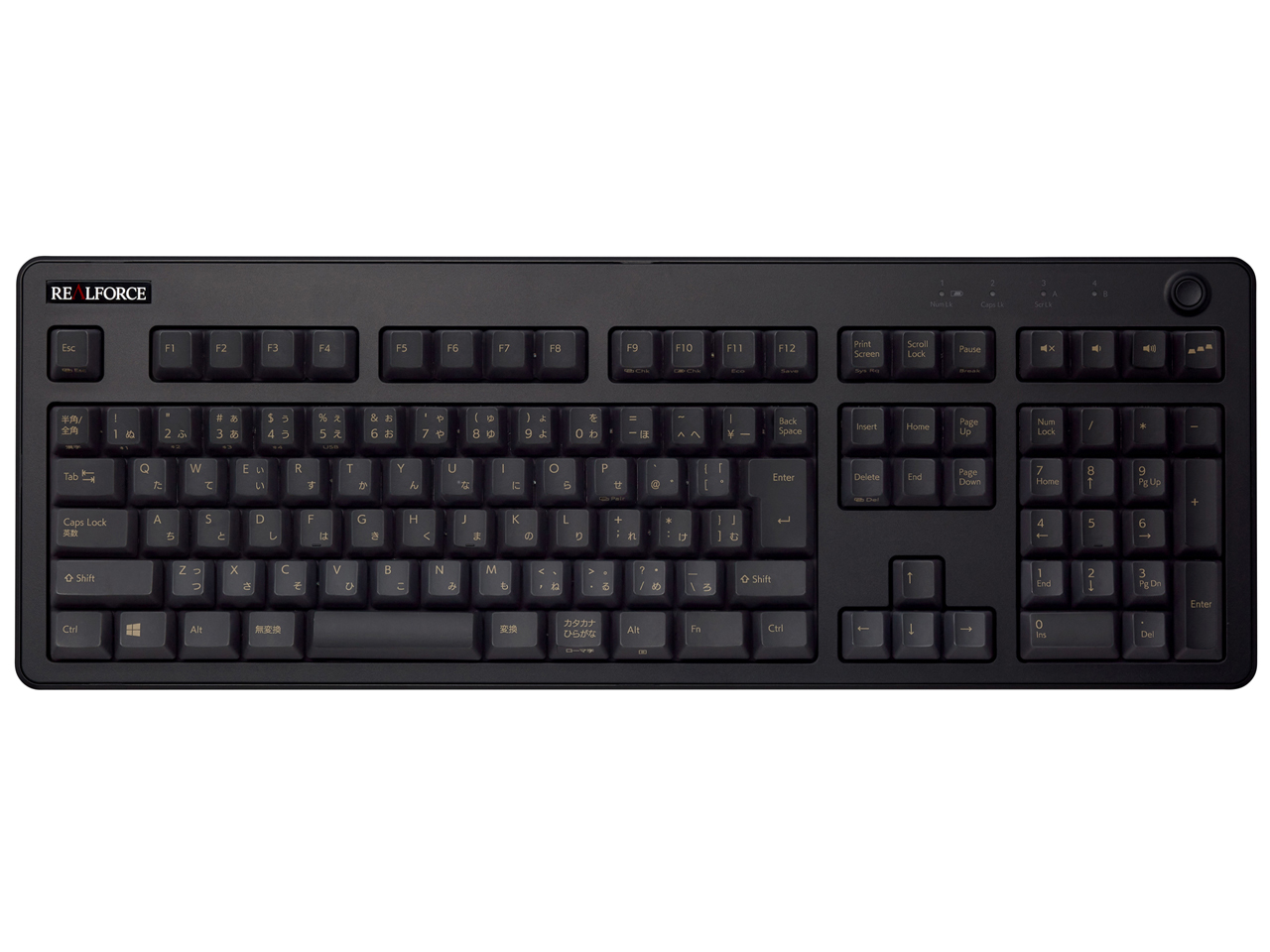
Realforce R3 — elektrostatisch kapazitiver Topre-Mechanismus, Vollgrose (104-Tasten) und TKL (87-Tasten) Varianten, Betatigungs-Punkt-Versteller (APC) einstellbar von 1,5mm bis 3mm, in Japan von Topre Corporation hergestellt, Spitzenklasse-Preis fur Vollgrose.
Die Realforce R3 ist die professionelle Topre-Tastatur in Vollformat und als TKL, gefertigt in Japan von der Topre Corporation. Die kapazitive 45-g-Mechanik ist mit einem Actuation Point Changer (APC) kombiniert, der sich von 1,5 mm bis 3 mm einstellen lässt – tastenweise, was keine andere Tastatur in diesem Vergleich bietet. PBT-Keycaps sind Standard, es gibt sowohl JIS- als auch US-ANSI-Layout, und die Vollformat-Variante bedient die zahlenlastige Dateneingabe, wie sie in Unternehmen, im Finanzwesen und in der Verwaltung üblich ist. Für die Vollformat-Version ruft Topre einen Flaggschiff-Preis auf – Premium für eine kabelgebundene Tastatur ohne RGB. Die ehrlichen Kompromisse: Die meisten R3-Varianten sind reine Kabelmodelle (nur die R3S bietet in ausgewählten Konfigurationen Bluetooth), das Vollformat schränkt die Mausfläche ein, und beim Keycap-Ökosystem gelten dieselben Topre-Grenzen wie bei der HHKB.
Vorteile
- ✓In Japan gefertigte kapazitive Topre-Mechanik
- ✓APC: Auslösepunkt je Taste von 1,5 mm bis 3 mm einstellbar
- ✓Vollformat- und TKL-Varianten in JIS- und US-ANSI-Layout
- ✓PBT-Keycaps serienmäßig, Verarbeitung auf Unternehmensniveau
Nachteile
- ✗Die meisten Varianten nur kabelgebunden und ohne RGB-Beleuchtung
- ✗Proprietärer Topre-Stem schränkt die Keycap-Auswahl stark ein
Für wen geeignet?
Fürs Enthusiasten-Homeoffice mit Funk und freier Programmierbarkeit
Keychron Q1 Pro
Gasket-Mount-Alu im 75-%-Format mit QMK/VIA, Hot-Swap und doppelter Funkanbindung – die vollständigste Ausstattung zum Mittelklassepreis.
Für Programmierer, die auf Topre und das HHKB-Layout setzen
HHKB Professional Hybrid Type-S
Gedämpfte Topre-Domes und Strg statt Feststelltaste bedienen Unix- und Emacs-Workflows so, wie es keine MX-Tastatur nachbildet.
Für Vielschreiber im Büro mit mehreren Geräten und ohne Anspruch auf Mechanik
Logicool MX Keys S
Leise Scherenmechanik, Flow-Umschaltung über drei Rechner und adaptive Tastenbeleuchtung passen zum ganzen Bürotag.
Für flache Schreibtisch-Setups, denen die Q1 Pro zu schwer ist
Nuphy Air75 V2
Flache Gasket-Mount-Alutastatur im 75-%-Format mit Low-Profile-Switches zum Einstiegspreis – gut für enge Tische und puristische Setups.
Für den professionellen Einsatz in Vollformat oder TKL
Realforce R3
In Japan gefertigtes Topre mit einstellbarem APC-Auslösepunkt und verfügbarem JIS-Layout passt in Finanz- und Verwaltungsumgebungen.
Unsere Vergleichsmethodik
Wir haben keine unabhangigen Tastenbetatigungs-Kraftmessungen unter kontrollierten Bedingungen durchgefuhrt. Wir haben keine Lautstarkemessungen mit kalibriertem Schallmesskopf vorgenommen. Wir haben Polling-Rate oder Wireless-Latenz nicht mit Hochgeschwindigkeitskameras oder Signalanalysatoren gemessen. Stattdessen haben wir Hersteller-Spezifikationen und veroffentlichte Switch-Datenblaetter ausgewertet und Langzeit-Nutzerbewertungen aggregiert.
Stattdessen stützt sich dieser Vergleich auf Hersteller-Spezifikationen und veröffentlichte Switch-Datenblätter — insbesondere Gaterons veröffentlichte Betätigungs-Kraftkurven für die Switches im Keychron Q1 Pro und Nuphy Air75 V2, Topre Corporations veröffentlichte Spezifikationen für den 45g elektrostatisch kapazitiven Mechanismus im HHKB Professional Hybrid Type-S und Realforce R3 sowie Logicools Spezifikationen für den Scherenmechanismus im MX Keys S.
Ein Rahmenpunkt vor den Produkten: Dieser Vergleich erstreckt sich über zwei verschiedene Switch-Technologien — mechanisch (Keychron Q1 Pro, Nuphy Air75 V2), elektrostatisch kapazitiv (HHKB, Realforce) und Schere (MX Keys S). Diese sind nicht direkt auf derselben taktilen oder akustischen Achse vergleichbar.
Switch-Typen erklart — mechanisch vs Topre vs Schere
MX-kompatible mechanische Switches — die Kategorie, die Gateron, Cherry, Kailh sowie die Switches im Keychron Q1 Pro und Nuphy Air75 V2 umfasst — funktionieren durch physisches Schliessen eines elektrischen Stromkreises, wenn ein Stiel eine Feder bis zu einem Kontaktpunkt niederdrupft. Lineare Switches (Red, Yellow, Speed Silver Varianten) haben keinen taktilen Bump oder hoorbares Klicken. Taktile Switches (Brown, Clear) erzeugen einen physischen Bump am Betatigungs-Punkt. Klicky-Switches (Blue, Green) erzeugen sowohl einen taktilen Bump als auch ein hoorbares Klicken.
Topre elektrostatisch kapazitive Switches — verwendet im HHKB Professional Hybrid Type-S und Realforce R3 — funktionieren nach einem vollig anderen Mechanismus. Eine konische Gummikappe sitzt über einer Feder und einem kapazitiven Sensor; beim Drucken der Taste komprimiert die Kappe, die Feder verformt sich und die Kapazitatsanderung wird als Tastendruck registriert, ohne physischen Metall-zu-Metall-Kontakt.
Scherenmechanik-Switches — im Logicool MX Keys S — sind keine mechanischen Tastaturen im traditionellen Hobbyisten-Sinn. Der MX Keys S ist in diesem Vergleich enthalten, weil er denselben Anwendungsfall als tägliche Büro-Tastatur erfüllt, aber die Einordnung gehört klar benannt: Er ist keine mechanische Tastatur.
Layout-Entscheidungen — 60% vs 75% vs TKL vs Vollgrose
Das Tastatur-Layout bestimmt, welche physischen Tasten vorhanden sind und gestaltet die Tischflache, Mausplatzierung und Arbeitsablauf-Reibung fur den täglichen Einsatz. Vollgrose (100%) enthalt alle Tasten — Nummernblock, Funktionsreihe, Navigations-Cluster und Pfeiltasten. TKL (~87%) entfernt den Nummernblock. 75% (wie Keychron Q1 Pro und Nuphy Air75 V2) komprimiert Navigations-Cluster und Funktionsreihe in ein engeres Raster. 60% (HHKB) entfernt die Funktionsreihe und den Navigations-Cluster vollständig.
Für Buroumgebungen ist Vollgrose der Standard — der Nummernblock wird intensiv fur die numerische Dateneingabe in Buchfuhrungs-, Verwaltungs- und Einzelhandels-Workflows eingesetzt. Der Realforce R3 zielt auf diesen Kontext ab.
60%-Tastaturen wie das HHKB erfordern eine gedankliche Umstellung. Funktions- und Navigationstasten werden durch Ebenenwechsel über die Fn-Taste aufgerufen. Das ist ein nicht-triviales Anpassungsfenster von ein bis drei Wochen, bevor das Muskelgedachtnis es automatisiert.
Gasket-Montage vs Tablett-Montage — was der Tipp-Fuhlung unterschied ist
Der Montagestil beschreibt, wie die interne Platte der Tastatur — die Struktur, an der die Switches befestigt sind — mit dem Aussengehause verbunden ist. Tablett-Montage befestigt die Platte oder PCB direkt mit Schrauben am Untergehause. Das Ergebnis ist eine starre, solide Struktur ohne Flex.
Gasket-Montage (verwendet im Keychron Q1 Pro und Nuphy Air75 V2) suspendiert die Platte auf Silikon- oder Gummidichtungen statt starrer Schrauben. Wenn eine Taste gedruppt wird, hat die Platte einen kleinen Weg und Flex, bevor der Boden des Gehauses sie stoppt. Der praktische Unterschied: Tastendrucke fulen sich weicher an, haben ein subtiles Federn, und die Akustik verschiebt sich zu einem tieferen Ton.
Der akustische Unterschied zwischen Gasket- und Tablett-Montage ist real und in Sound-Tests der Enthusiasten-Community messbar — aber der Grad hangt stark von der Switch-Wahl, den Keycaps und eventuell installiertem Dampfungsschaum ab.
Wireless-Latenz — ist sie real?
Wireless-Tastatur-Latenz ist eine legitime Frage mit einer nuancierten Antwort, die vom Wireless-Protokoll abhangt. Bluetooth-Latenz lag historisch zwischen 20ms und 100ms je nach Implementierung, Gerät und Interferenzumgebung — deutlich hoher als verdrahtetes USB-Polling bei 1–8ms.
2.4GHz-Dongle-Wireless — verwendet im Keychron Q1 Pro, Nuphy Air75 V2 und Logicool MX Keys S (Logi Bolt) — arbeitet mit Latenzen von etwa 1–8ms in der Praxis, was fur alle Tipp-Zwecke aquivalent zu verkabeltem USB ist.
Das HHKB Professional Hybrid Type-S verwendet nur Bluetooth — keine 2.4GHz-Dongle-Option. Der Realforce R3 ist auf den meisten Varianten nur verkabelt, was Wireless-Latenz vollständig eliminiert, auf Kosten des Kabelmanagements.
Japan-spezifisch: JIS vs US-Layout, Topre-Kult-Status
Das JIS-Tastatur-Layout (Japanischer Industriestandard) unterscheidet sich vom US ANSI-Layout auf mehrere in der Praxis wichtige Weisen. JIS-Tastaturen haben zusätzliche Tasten fur die Kana-Eingabe-Umschaltung (無変換 / 変換 flankieren die Leertaste), eine kleinere Leertaste, eine andere Enter-Taste-Form und physische Kana-Zeichen auf den Keycap-Legenden neben dem Romaji.
Alle fünf Produkte in diesem Vergleich sind auf dem japanischen Markt in JIS- oder US ANSI-Varianten erhaltlich, mit variierender Verfugbarkeit. Die HHKB-Wahl ist bedeutend, da HHKB-Keycaps Nicht-Standard-Topre-Stiele haben und schwer zu ersetzen sind.
Der Topre-Kult-Status in japanischen Ingenieur- und Programmer-Gemeinschaften ist real und hat eine spezifische Geschichte. Das HHKB — Happy Hacking Keyboard — wurde 1996 von Professor Eiiti Wada der Universitat Tokio entworfen und von PFU Limited hergestellt. Es entwickelte den Ruf, nicht nur als fahige Tastatur, sondern als kulturelles Artefakt, das mit ernsthaften Programmierern verbunden ist.
Was sich 2026 geandert hat
Gasket-montiertes 75% ist jetzt der Mainstream-Sweetspot. Vor drei Jahren bedeutete Gasket-Montage zu einem vernunftigen Preis Spitzenklasse-Preise fur Boutique-Group-Buy-Boards. 2026 haben Keychron Q1 Pro und Nuphy Air75 V2 Gasket-Montage-Aluminium-Konstruktion in den Bereich von Einstiegsklasse bis Mittelklasse mit Wireless als Standard gebracht.
Hot-Swap ist oberhalb des Einstiegsniveaus zur Standard-Erwartung geworden. 2024 waren Hot-Swap-Sockel ein Premium-Feature. 2026 werden sie auf jedem Board oberhalb des Einstiegsniveaus erwartet.
Die Wireless-Qualitaetslucke zu verkabelt hat sich fur Tipp-Anwendungsfalle geschlossen. Bedenken über 2.4GHz- und Bluetooth-Zuverlassigkeit, die 2020–2022 legitim waren, haben sich in den aktuellen Generationsimplementierungen erheblich verbessert.
Wo jedes Gerät passt
Enthusiasten-Home-Office, Gasket-Montage 75%, Wireless, QMK/VIA-Programmierbarkeit, Hot-Swap, vollständige Aluminium-Konstruktion, RGB: Keychron Q1 Pro. Die Kombination aus Wireless-Flexibilitat, programmierbarer Firmware und Gasket-Montage-Konstruktion in der Mittelklasse stellt das vollstandigste Feature-Set fur einen Home-Office-Tipper dar.
Programmierzentrierter 60%-Workflow, elektrostatisch kapazitives Switch-Gefuhl, ultra-leiser Buro-Betrieb, Bluetooth Multi-Device, japanische Ingenieur-Herkunft: HHKB Professional Hybrid Type-S. Für Nutzer, die Zeit mit Topre-Switches verbracht haben und das spezifische Gefuhl kapazitiver elektrostatischer Betastigung schatzen, repliziert nichts in diesem Vergleich es.
Buro-Produktivitat, Multi-Device-Wireless, Einzeltasten-Hintergrundbeleuchtung, Low-Profile-Gefuhl, Flow Multi-Device: Logicool MX Keys S. Für Nutzer, die Buro-Tippkomfort und Multi-Device-Workflow über mechanisches Switch-Gefuhl stellen.
Low-Profile-Wireless, schlanke Tisch-Asthetik, Gasket-Montage 75%, budgetfreundlicher Einstieg in Aluminium-Konstruktion: Nuphy Air75 V2. Für Nutzer, die Gasket-Montage-Wireless in einem schlankeren Paket als das Keychron Q1 Pro zu einem niedrigeren Preis wunschen.
Unternehmens- oder professionelles Umfeld — Finanzdienstleistungen, Verwaltung, Forschungsinstitution — wo Vollgrose oder TKL mit professioneller Bauqualitat und Made-in-Japan-Herkunft wichtig ist: Realforce R3.
Fazit
Für einen Home-Office-Enthusiasten, der Wireless, Programmierbarkeit, Hot-Swap-Flexibilitat und Gasket-Montage-Konstruktion zu einem einzigen vernunftigen Preis mochte: Keychron Q1 Pro. Das Gewicht von ~2kg und die QMK-Lernkurve sind zu akzeptieren.
Für einen Programmierer oder Software-Ingenieur, der Zeit mit Topre verbracht hat und den stillsten möglichen Betrieb mit der HHKB-Layout-Philosophie wunscht: HHKB Professional Hybrid Type-S. Nicht kaufen, um Topre zum ersten Mal auszuprobieren — der Preis ist zu hoch fur ein Praferenz-Experiment.
Für einen Multi-Device-Buroarbeiter, der den ganzen Tag tippt und kein mechanisches Switch-Gefuhl braucht: Logicool MX Keys S. Es ist keine mechanische Tastatur und gibt vor, keine zu sein.
Für ein kompaktes, schlankes Tisch-Setup, bei dem Gewicht und Flache des Keychron Q1 Pro ein Problem sind: Nuphy Air75 V2.
Für ein Unternehmens- oder professionelles Umfeld, wo Vollgrose oder TKL mit professioneller Bauqualitat wichtig ist: Realforce R3.
Eine Anmerkung gilt fur alle fünf: Keine Tastatur korrigiert eine schlechte Tipphalting oder falsche Tisch-Stuhl-Hohe. Handgelenksbeschwerden aus langen Tipp-Sitzungen sind primar ein Ergonomie-Problem — nicht ein Switch-Gefuhl-Problem.
Häufige Fragen
Welchen Switch-Typ sollte ein Anfanger wahlen — linear, taktil oder clicky?▼
Ist Hot-Swap notwendig, oder kann ich mich auf einen Switch-Typ festlegen?▼
Ist eine mechanische Tastatur fur ein geteiltes Buro geeignet?▼
Sollte ich JIS- oder US ANSI-Layout in Japan wahlen?▼
Sind Topre-Keycaps mit MX-Switches kompatibel und umgekehrt?▼
Was ist die realistische Akkulaufzeit fur Wireless-Tastaturen im täglichen Einsatz?▼
Kommentare & Fragen
Die Diskussion findet in unserem Forum nattzy statt. Mit Google anmelden und mitreden.
Diskussionsthread auf nattzy ansehen ↗
Noch unentschlossen? Stell der Community deine eigene Frage — Frage auf nattzy stellen ↗
Verwandte Artikel

JP-Hoster 2026: 5 Anbieter im Ranking
Beste Noise-Cancelling-Kopfhörer 2026: 5 im Vergleich
Beste LED-Gesichtsmasken 2026: 3 Geräte im Vergleich
Die besten Saugroboter 2026: 5 Modelle im Vergleich
Beste Haartrockner 2026: 5 High-End-Modelle im Vergleich
Küche
Die besten Reiskocher 2026: 5 Top-Modelle im Vergleich
Die besten Reiskocher 2026: 5 Top-Modelle im Vergleich