Best Pet Camera 2026: 4 Compared
WriterPickly Editorial
Updated 2026-10-31
A pet camera does two jobs: let you see your pet, and — on the pet-specific models — let you interact with treats or your voice. The bigger differences are less visible on the box: whether recording needs a monthly plan, whether you can store video locally on a microSD card, and each brand's privacy record. This comparison lines the four up on those points from maker pages, with the cameras' weaknesses spelled out.
Quick answer
Decide first whether you want treat-tossing or just reliable video. The Furbo 360 is the dog-focused pick: 1080p video, a 360° rotating view, and a treat tosser that holds up to 100 treats — live view, treat tossing and barking alerts work without a subscription, while recording and advanced alerts need Furbo Nanny. If you only need to see your pet, the Eufy Indoor Cam 2K Pan & Tilt (now sold as Indoor Cam E220) records 2K video to a microSD card without a subscription. Check what each camera's plan gates before you buy, because that recurring cost adds up over the years you use it.
📋How we compared
Desk research: each camera's resolution, view, treat hardware, storage, Wi-Fi band and subscription terms were taken from maker pages in October 2026, and the security history from public reporting. Pickly did not test these products.
Best Overall: The Furbo 360 is the dog-focused pick: 1080p video, a 360° rotating view with 4x digital zoom, night vision, two-way audio and a treat tosser that holds up to 100 treats, according to Furbo. Live view, treat tossing and barking alerts work without a subscription; recordings, advanced alerts and AI features need the Furbo Nanny plan.
This button opens Amazon search results, not a specific product page.
This button opens Amazon search results, not a specific product page.
This button opens Amazon search results, not a specific product page.
This button opens Amazon search results, not a specific product page.
Which one is right for you?
Related articles


1★ Best PickA+Best OverallFurbo 360° Dog Camera
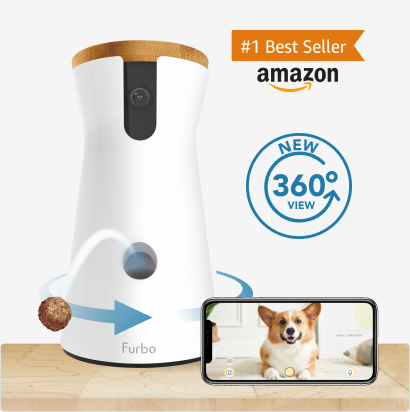
Dog-focused treat camera — 1080p video, 360° rotating view with 4x digital zoom, night vision, two-way audio, and a treat tosser that holds up to 100 treats, per Furbo. Live view, treat tossing and barking alerts work without a subscription; recording, advanced alerts and AI features need Furbo Nanny. No local storage is listed, and the treat tosser has to be kept clean.
The Furbo 360 is the dog-focused pick: 1080p video, a 360° rotating view with 4x digital zoom, night vision, two-way audio and a treat tosser that holds up to 100 treats, according to Furbo. Live view, treat tossing and barking alerts work without a subscription; recordings, advanced alerts and AI features need the Furbo Nanny plan.
Pros
- ✓360° rotating view with 4x digital zoom
- ✓Treat tosser holds up to 100 treats
- ✓Barking alerts and live view work without a subscription
Cons
- ✗Recording and advanced alerts require Furbo Nanny; no local storage listed
Specifications
- Resolution
- 1080p
- View
- 360° rotation, 4x zoom
- Night vision
- Yes
- Treat dispense
- Yes (up to 100 treats)
- Recording without subscription
- No (Furbo Nanny)
- Wi-Fi band
- —
- Smart home
- —
- Resolution
- 1080p
- View
- 360° rotation, 4x zoom
- Night vision
- Yes
- Treat dispense
- Yes (up to 100 treats)
- Recording without subscription
- No (Furbo Nanny)
- Wi-Fi band
- —
- Smart home
- —
This button opens Amazon search results, not a specific product page.
2ABest Affordable Pet CamPetcube Cam

Simple pet camera — 1080p, 110° view, 8x digital zoom, night vision up to 30 feet and two-way audio, per Petcube. No treat tosser or laser. Requires 2.4 GHz Wi-Fi. Without Petcube Care you cannot store video or get smart alerts; Care also adds online vet chat. It does not pan, so placement matters.
The Petcube Cam is a simple pet camera: 1080p video, a 110° view, 8x digital zoom, night vision up to 30 feet and two-way audio, according to Petcube. It has no treat tosser or laser, needs 2.4 GHz Wi-Fi, and stores video and sends smart alerts only with a Petcube Care plan.
Pros
- ✓1080p with 8x digital zoom
- ✓Night vision up to 30 feet
- ✓Small, simple camera — Care adds online vet chat
Cons
- ✗No treat tosser or laser; fixed 110° view; recording and smart alerts need Petcube Care
Specifications
- Resolution
- 1080p
- View
- 110°, 8x zoom
- Night vision
- Yes (up to 30 ft)
- Treat dispense
- No
- Recording without subscription
- No (Petcube Care)
- Wi-Fi band
- 2.4 GHz
- Smart home
- —
- Resolution
- 1080p
- View
- 110°, 8x zoom
- Night vision
- Yes (up to 30 ft)
- Treat dispense
- No
- Recording without subscription
- No (Petcube Care)
- Wi-Fi band
- 2.4 GHz
- Smart home
- —
This button opens Amazon search results, not a specific product page.
3B-Best Budget Security CamWyze Cam v3

Budget general camera — not pet-specific and no treat tosser. We could not load Wyze's product pages in October 2026 to confirm its current specs or Cam Plus terms. The brand had a 2019 data leak and feed-exposure incidents in September 2023 and February 2024; read the reporting before buying.
The Wyze Cam v3 is a low-cost general camera rather than a pet camera — no treat tosser or dog-focused alerts. We could not load Wyze's pages in October 2026 to confirm its current specs. Wyze's record includes a 2019 data leak and feed-exposure incidents in September 2023 and February 2024; read the reporting before choosing it.
Pros
- ✓Low price per camera for covering several rooms
- ✓General camera that also works indoors for pets
Cons
- ✗Not pet-specific; brand incident history; current specs not confirmed from Wyze this month
Specifications
- Resolution
- —
- View
- —
- Night vision
- —
- Treat dispense
- No
- Recording without subscription
- —
- Wi-Fi band
- —
- Smart home
- —
- Resolution
- —
- View
- —
- Night vision
- —
- Treat dispense
- No
- Recording without subscription
- —
- Wi-Fi band
- —
- Smart home
- —
Subscribe to our newsletter
Occasional updates and new releases — no spam.
4B+Best No-Subscription Pickeufy Indoor Cam E220 (Indoor Cam 2K Pan & Tilt)

No-subscription indoor camera, now sold as eufy Indoor Cam E220 — 2K (2304 × 1296), 360° pan and 96° tilt, on-device detection of humans, pets and crying, two-way audio, microSD recording without a subscription (card not included), 2.4 GHz Wi-Fi, and Apple HomeKit, Alexa and Google Assistant support, per eufy. Not pet-specific: no treat tosser. eufy was found in 2022 to upload thumbnails to its cloud despite local-storage marketing.
The Eufy Indoor Cam 2K Pan & Tilt, now sold as the eufy Indoor Cam E220, records 2K (2304 × 1296) video to a microSD card with no subscription required, pans 360° and tilts 96°, and detects humans, pets and crying on the device, according to eufy. The trade-off is no treat tosser and no dog-focused alerts.
Pros
- ✓2K video with microSD recording and no required subscription
- ✓360° pan and 96° tilt to follow pets
- ✓Works with Apple HomeKit, Alexa and Google Assistant
Cons
- ✗No treat tosser or dog-focused alerts; microSD card not included
Specifications
- Resolution
- 2K (2304×1296)
- View
- 360° pan / 96° tilt
- Night vision
- —
- Treat dispense
- No
- Recording without subscription
- Yes (microSD)
- Wi-Fi band
- 2.4 GHz
- Smart home
- HomeKit, Alexa, Google
- Resolution
- 2K (2304×1296)
- View
- 360° pan / 96° tilt
- Night vision
- —
- Treat dispense
- No
- Recording without subscription
- Yes (microSD)
- Wi-Fi band
- 2.4 GHz
- Smart home
- HomeKit, Alexa, Google
This button opens Amazon search results, not a specific product page.
Side-by-side on the same scale
| Product | Night vision | Treat dispense | Recording without subscription | Wi-Fi band | Smart home | ||
|---|---|---|---|---|---|---|---|
| Furbo 360° Dog Camera | 1080p | 360° rotation, 4x zoom | Yes | Yes (up to 100 treats) | No (Furbo Nanny) | — | — |
| Petcube Cam | 1080p | 110°, 8x zoom | Yes (up to 30 ft) | No | No (Petcube Care) | 2.4 GHz | — |
| Wyze Cam v3 | — | — | — | No | — | — | — |
| eufy Indoor Cam E220 (Indoor Cam 2K Pan & Tilt) | 2K (2304×1296) | 360° pan / 96° tilt | — | No | Yes (microSD) | 2.4 GHz | HomeKit, Alexa, Google |
How to read this table: values come from each maker's official product pages and help pages, checked in October 2026. "—" means the value could not be confirmed from those sources (the Wyze page could not be loaded this month). Pickly did not test these products.
Table checked 2026-10-31
How we compared
This comparison is desk research. Pickly did not test these cameras: we did not measure latency, audio quality or alert accuracy, and we did not run security testing. We read each maker's product and help pages (Furbo's comparison page and Furbo Nanny help articles, Petcube's Cam page, eufy's Indoor Cam E220 page) in October 2026, and used public reporting for the brands' security history.
Five things decide most purchases in this category: whether you want pet-specific features (treat tossing, barking alerts) or a general indoor camera; what the subscription unlocks; whether video can be stored locally; the Wi-Fi band the camera needs; and the brand's privacy record. The table above covers the first four with the same keys for every camera, and the sections below explain each.
Pet-specific vs generic security cam — the real tradeoff
Furbo 360 and Petcube Cam are sold as pet cameras. Furbo's model adds a treat tosser (up to 100 treats) and a 360° rotating view with 4x digital zoom; Petcube Cam is a fixed 110° camera with 8x digital zoom and no treat or laser hardware — Petcube says it does not include a laser. Both centre their apps and paid plans on pet alerts.
The Eufy Indoor Cam 2K Pan & Tilt and the Wyze Cam v3 are general indoor security cameras that also work for watching pets. eufy's page says its on-device AI detects humans, pets and crying, and the camera pans 360° and tilts 96°. These cameras have no treat hardware, and they usually cost less per room than the pet-specific models.
The tradeoff in practice: if treat tossing or dog-focused alerts are the reason you are buying, a pet-specific camera is the fit. If you mainly want to check that a quiet cat or a relaxed dog is fine, a general indoor camera covers that job, and covering several rooms costs less.
Treat dispense, laser, two-way audio — when each actually helps
Treat tossing lets you send a treat from the app while you watch. It is a way to interact during the day, not a training plan on its own. Furbo 360 holds up to 100 treats according to Furbo; the smaller Furbo Mini 360 holds about 10. Check the maker's guidance on treat size and shape, because the tosser is a mechanical part that has to be kept clean and fed with suitable treats.
Laser play is not part of any camera on our table — Petcube says its Cam does not include a laser. If you add laser play by other means, many trainers suggest ending with a toy your pet can actually catch.
Two-way audio is on Furbo 360, Petcube Cam and the eufy E220 according to their makers. A familiar voice can be a calm check-in for some pets, while others may be confused by a voice with no person in the room. Watch how your pet reacts in the first sessions and stop if it seems stressed.
In short: buy a treat camera if treat tossing is something you will use, and judge the rest on video, storage and subscription.
Subscriptions are the real cost
Furbo: Furbo's help centre says live view, treat tossing and barking alerts work without Furbo Nanny, while video recording, advanced alerts and AI features are part of the paid plan. Petcube: Petcube's Cam page says that without Petcube Care you cannot store video or get smart alerts; Care adds smart alerts, video history and online vet chat. eufy: the E220 page says recording to a microSD card requires no subscription, with optional paid cloud plans. Wyze sells an optional Cam Plus plan; we could not load Wyze's pages this month to confirm its current terms.
Run your own math: multiply the monthly fee by the number of years you expect to use the camera and add it to the box price. For a camera you plan to use for several years, the plan can cost more than the camera itself. A camera that records to microSD without a plan (eufy) is the closest to a one-time purchase in this lineup.
Plan prices and what each tier includes can change after you buy. Treat the price you see today as a starting point, not a guarantee.
Privacy and camera hacking — the cloud-camera reality
Cloud-connected cameras have a public incident record. In December 2019, hackers accessed a number of Ring cameras and used their speakers to talk to households; Ring made two-factor authentication mandatory on February 18, 2020. Wyze disclosed a server leak in December 2019 that exposed details of about 2.4 million customers; in 2022 Bitdefender reported that Wyze had discontinued the Wyze Cam v1 over a flaw reported three years earlier; and in September 2023 and February 2024 some users were shown other customers' camera feeds (about 13,000 users in the 2024 case). eufy, which marketed local storage, was found in November 2022 to upload camera thumbnails to its cloud servers, and it then changed its privacy page.
What you can do: turn on two-factor authentication for the camera account; use a unique password; put the camera on a separate guest Wi-Fi network so a compromised camera cannot reach your other devices; and keep firmware updated.
Local storage reduces how much video sits in the cloud, but it does not remove the cloud entirely — the eufy case shows that a local-storage camera can still send some data to servers. Read each brand's current privacy page before buying.
Placement matters too. Do not aim the camera at a window facing a public street or into bedrooms and bathrooms, and unplug it when you want the feed to be verifiably off.
What changed in 2026
eufy now sells the Indoor Cam 2K Pan & Tilt as the "eufy Indoor Cam E220". Its page lists 2K (2304 × 1296) video, 360° pan and 96° tilt, on-device detection of humans, pets and crying, 2.4 GHz Wi-Fi, and support for Apple HomeKit, Amazon Alexa and Google Assistant.
Furbo's comparison page now lists the Furbo Mini 360 next to the Furbo 360: the Mini has 2K video and 8x digital zoom but holds about 10 treats, versus 100 on the Furbo 360 with its 1080p video and 4x zoom.
Petcube Care now bundles online chat with veterinarians alongside smart alerts and video history, according to Petcube's Cam page.
Wyze's February 2024 feed-exposure incident is the most recent one in the brand's record above; read the current reporting before choosing Wyze.
How to choose: apartment cat, anxious dog, multi-pet home, budget
Apartment cat. A cat that mostly sleeps does not need treat hardware. The Eufy Indoor Cam 2K Pan & Tilt (E220) fits: 2K video, 360° pan to find the cat, microSD recording without a subscription, and pet detection on the device. Skip the Furbo 360 here — its treat tosser and dog-focused design add cost a cat will not use.
Dog that struggles when left alone. A camera does not treat separation anxiety; if your dog is distressed when alone, talk to your vet or a qualified behaviour professional. Within a plan they recommend, the Furbo 360's barking alerts (free) and treat tosser can help you see when episodes start and check in. Add Furbo Nanny only if you want recordings and advanced alerts.
Several rooms or several pets. Pet-specific cameras get expensive per room. Two or three general indoor cameras such as the eufy E220 cost less per room and record locally; the Wyze Cam v3 is the other budget option, if you are comfortable with its incident history.
Simple pet-focused viewing. Petcube Cam is a small fixed camera with 1080p video, a 110° view and night vision up to 30 feet. It does not pan, so place it where your pet spends time, and plan on Petcube Care if you want recordings and smart alerts. Skip it if you need to cover a whole room from one corner.
Wi-Fi check for every pick: Petcube Cam and the eufy E220 need 2.4 GHz Wi-Fi according to their makers. Make sure your router offers a 2.4 GHz network that reaches the room.
Verdict
For a dog owner who wants treat tossing, the Furbo 360 is the pick: 1080p, a 360° rotating view, up to 100 treats, and barking alerts that work without a subscription. The trade: recordings and advanced alerts need Furbo Nanny, and video is stored in the cloud rather than on a card.
Choose the Eufy Indoor Cam 2K Pan & Tilt (E220) for 2K video with microSD recording and no required subscription. Choose Petcube Cam for a simple pet camera if you accept that recording needs Petcube Care. Consider Wyze Cam v3 for the lowest cost per room after reading its security history.
Pickly did not test these cameras. The recommendations rest on maker pages and public reporting, and the right pick depends on your pet, how many rooms you need to cover, and how you feel about cloud storage.
Frequently asked questions
Does my cat actually need a pet camera, or is a generic indoor cam fine?▼
Will a pet camera actually reduce my dog's separation anxiety?▼
Do I really need the Furbo Nanny subscription, or is the box-only purchase usable?▼
What WiFi do I need for a pet camera?▼
Is the treat-dispenser hygienic? How often do I need to clean it?▼
Can I use a regular security camera as a pet camera?▼
What's the difference between Furbo and Petcube?▼
Can a pet camera record without a subscription?▼
Check the details of the products in this article
This button opens Amazon search results, not a specific product page.
- Petcube Cam$29.99Reference price
This button opens Amazon search results, not a specific product page.
- Wyze Cam v3$32.98Price as of 2026-11-10
- eufy Indoor Cam E220 (Indoor Cam 2K Pan & Tilt)$54.99Reference price
This button opens Amazon search results, not a specific product page.
Prices change. Check the retailer for the current price.
Comments & questions
Discussion happens on nattzy, our community forum. Sign in with Google to post — it takes a second.
View the discussion thread on nattzy ↗
Still deciding? Ask the community your own question — Post a question on nattzy ↗