Best Gaming Laptop 2026: 5 Picks from ASUS and Razer
WriterPickly Editorial
Updated 2026-10-05
A gaming laptop is a graphics chip, a screen and a cooling system in a box you can carry. Every model here is sold in several configurations, so the name on the lid tells you the chassis and the screen. The graphics chip inside is the thing you choose at checkout.
Quick answer
The ASUS TUF Gaming A16 is the gaming laptop to start with for most buyers: a 16-inch 2560 x 1600 165Hz screen, graphics up to an RTX 5070 and a listed weight of 2.20 kg. The ROG Strix G16 is the step up, with a 240Hz screen and graphics up to an RTX 5080. For travel, the ROG Zephyrus G14 lists 1.58 kg and the Razer Blade 14 lists 1.63 kg, both with 14-inch OLED screens. The Razer Blade 16 is the thin high-end pick, at $3,499.99 and up for the configurations we could price.
We did not run our own testing on these laptops. Measuring frame rates, fan noise and battery life needs each machine on a bench, and we have not done that. What we did instead: took the display, graphics options, processor and weight from Razer's and ASUS's own product pages, checked prices on October 4, 2026, and read owner reviews in volume. We could confirm prices only for the two Razer models. ASUS prices depend on the configuration and the retailer, and we do not quote them.
🏆 Best for most buyers: ASUS lists the TUF Gaming A16 with a 16-inch 2560 x 1600 IPS-level screen at 165Hz with G-Sync, graphics up to an RTX 5070, and a weight of 2.20 kg. The TUF line sits below ROG in ASUS's range, so it is usually the lower-priced route to a 16-inch screen.
Top picks ↓Related articles



1★ Best Pick🏆 Best for most buyersASUS TUF Gaming A16
Sold in several configurations. Check the graphics chip and memory on the listing.
ASUS lists the TUF Gaming A16 with a 16-inch 2560 x 1600 IPS-level screen at 165Hz with G-Sync, graphics up to an RTX 5070, and a weight of 2.20 kg. The TUF line sits below ROG in ASUS's range, so it is usually the lower-priced route to a 16-inch screen. We could not confirm a current price. It is the heaviest laptop on this page and the screen is not OLED.
Pros
- ✓16-inch 165Hz screen
- ✓Graphics up to RTX 5070
- ✓Lower tier of the ASUS range
Cons
- ✗2.20 kg
- ✗Price not confirmed
ASUS TUF Gaming A16
Product details →2⚡ Best 16-inch performanceASUS ROG Strix G16
Configurations run from RTX 5060 to RTX 5080. Check the listing.
The Strix G16 pairs a 16-inch 2.5K 240Hz screen, listed at 500 nits and 3ms, with an Intel Core Ultra 9 275HX and graphics from an RTX 5060 up to an RTX 5080 at up to 175W. That is the highest GPU power figure listed for any laptop on this page. We could not confirm its weight or a current price.
Pros
- ✓240Hz 2.5K screen
- ✓Up to RTX 5080 at 175W
- ✓Core Ultra 9 275HX
Cons
- ✗Weight not confirmed
- ✗Price not confirmed
ASUS ROG Strix G16
Product details →3🎒 Best for travelASUS ROG Zephyrus G14
Check the model year and graphics chip on the listing.
ASUS lists the Zephyrus G14 at 1.58 kg, the lightest laptop here, with a 14-inch 3K OLED screen at 120Hz, a 0.2ms response time and full DCI-P3 coverage. Graphics go up to an RTX 5070 Ti with 12GB of memory. A 14-inch chassis has less room for cooling than a 16-inch one. We could not confirm a current price.
Pros
- ✓1.58 kg
- ✓14-inch 3K OLED
- ✓Up to RTX 5070 Ti
Cons
- ✗Smaller screen
- ✗Price not confirmed
ASUS ROG Zephyrus G14
Product details →Subscribe to our newsletter
Occasional updates and new releases — no spam.
4💎 Best 14-inch buildRazer Blade 14

From $2,299.99 with an RTX 5060 on razer.com.
The Blade 14 has a 14-inch 2880 x 1800 OLED screen at 120Hz in a 15.8mm aluminum body that Razer lists at 1.63 kg, with a 72Wh battery. It uses an AMD Ryzen AI 9 365 and graphics up to an RTX 5070 at 115W. It starts at $2,299.99 with an RTX 5060. Memory is fixed, so choose the amount at purchase. Storage can be expanded up to 4TB.
Pros
- ✓15.8mm aluminum body
- ✓2880 x 1800 OLED
- ✓Storage expandable to 4TB
Cons
- ✗From $2,299.99
- ✗Memory is fixed
5👑 Best high-endRazer Blade 16
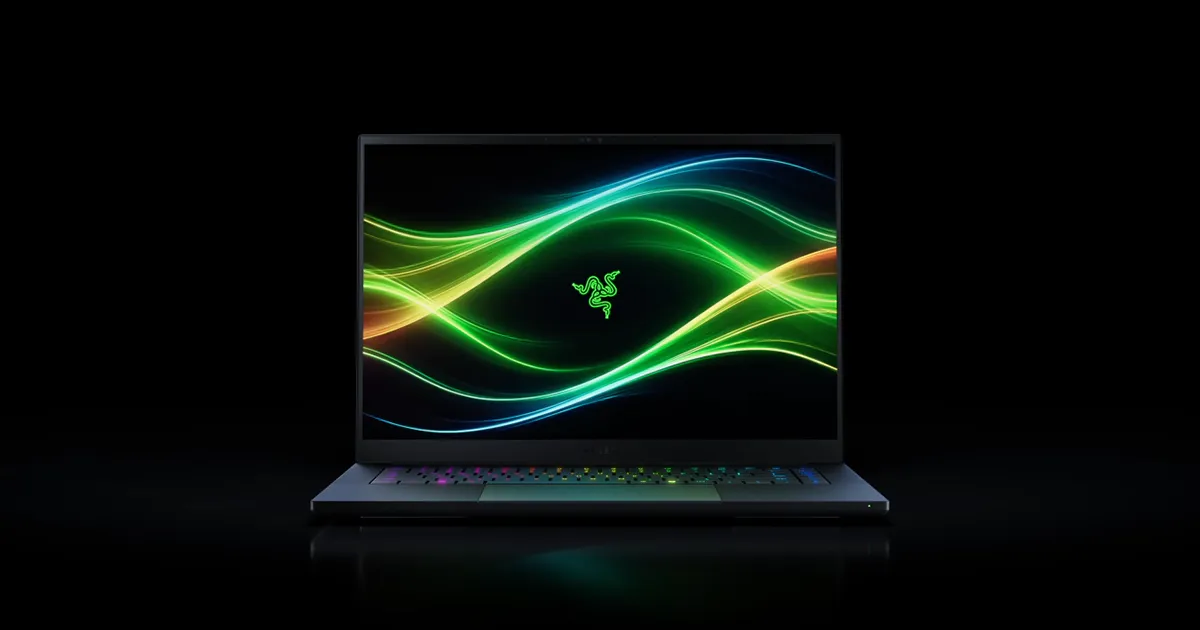
$3,499.99 with an RTX 5070 Ti on razer.com. Check the model year on the listing.
The 2026 Blade 16 is 14.9mm thick and weighs about 2.14 kg, with a 16-inch 2560 x 1600 OLED screen at 240Hz that Razer lists at up to 1,100 nits. It uses an Intel Core Ultra 9 386H and graphics up to an RTX 5090 at up to 165W. Razer lists $3,499.99 with an RTX 5070 Ti, $3,999.99 with an RTX 5080 and $4,899.99 with an RTX 5090. Lower configurations exist, and we could not confirm their prices.
Pros
- ✓14.9mm thick
- ✓240Hz OLED up to 1,100 nits
- ✓Up to RTX 5090
Cons
- ✗$3,499.99 and up as priced
- ✗2.14 kg
The graphics chip decides what you can play
The graphics chip, or GPU, sets frame rates far more than the processor does. In the current NVIDIA laptop range the steps run RTX 5060, 5070, 5070 Ti, 5080 and 5090. For 1080p and 1440p gaming at high settings, the 5060 and 5070 are the common choices. The 5070 Ti and above are for high settings at the full 2560 x 1600 resolution of these screens with frame rates to match a 240Hz panel.
The same chip does not run equally in every laptop. Makers set a power limit for the GPU, and a thicker chassis with more cooling can allow a higher one. ASUS lists up to 175W for the RTX 5080 in the Strix G16. Razer lists 115W for the RTX 5070 in the Blade 14 and up to 165W for the RTX 5090 in the Blade 16.
The table shows the makers' figures. Prices are from razer.com on October 4, 2026.
| Laptop | Screen | Graphics up to | Listed weight |
|---|---|---|---|
| ASUS TUF Gaming A16 | 16 in, 2560 x 1600, 165Hz IPS-level | RTX 5070 | 2.20 kg (4.85 lb) |
| ASUS ROG Strix G16 | 16 in, 2.5K, 240Hz | RTX 5080 | Not confirmed |
| ASUS ROG Zephyrus G14 | 14 in, 3K, 120Hz OLED | RTX 5070 Ti | 1.58 kg (3.48 lb) |
| Razer Blade 14 | 14 in, 2880 x 1800, 120Hz OLED | RTX 5070 | 1.63 kg (3.59 lb) |
| Razer Blade 16 | 16 in, 2560 x 1600, 240Hz OLED | RTX 5090 | 2.14 kg (4.71 lb) |
Weights are for the laptop alone. The power adapter adds to what you carry, and makers rarely put its weight on the main product page.
Screen, size and weight
A 16-inch laptop gives more screen and more room for cooling. A 14-inch one fits a small bag and an airline tray table. The 14-inch models here weigh about 0.5 to 0.6 kg less than the 16-inch ones.
OLED screens show true black and strong contrast, and respond quickly. IPS-type screens cost less and carry no risk of burn-in from static images. Razer lists the Blade 16 panel at up to 1,100 nits with DisplayHDR True Black 1000 certification. ASUS lists the Strix G16's 240Hz panel at 500 nits with a 3ms response time.
Refresh rate matters only if the GPU can feed it. A 240Hz panel paired with an RTX 5060 will rarely reach 240 frames per second in new games at full resolution. In lighter competitive games it can.
Memory, storage and upgrades
Sixteen gigabytes of memory is the working minimum for current games, and 32GB leaves room for a browser and a stream alongside. Check whether memory is soldered. Razer lists the Blade 14's memory as fixed, at up to 64GB, so buy the amount you will want later.
Games are large. A 1TB drive holds a handful of big titles. Razer lists an expandable M.2 slot on the Blade 14 that supports up to 4TB.
Battery life while gaming is short on every gaming laptop, usually one to two hours. Plan to play plugged in. Away from the wall, these machines work as ordinary laptops for longer.
How these picks were chosen
We chose current models with published specifications from two makers, covering a lower-priced 16-inch, a faster 16-inch, two 14-inch travel models and a thin high-end 16-inch. Lenovo, Acer, MSI, HP and Dell make strong gaming laptops too. They are not covered here, and that is a limit of this page, not a judgment on them.
Recommendations are editorial. No brand paid for placement, and the links on this page are affiliate links that may earn Pickly a commission at no extra cost to you.
Frequently asked questions
Which graphics chip do I need in a gaming laptop?▼
Is 16GB of memory enough?▼
Is an OLED laptop screen good for gaming?▼
Can a gaming laptop be used for work or school?▼
How long does the battery last?▼
Why are no ASUS prices listed?▼
Is a gaming laptop better than a desktop?▼
Check the details of the products in this article
- Razer Blade 14$2,299.99Reference price
- Razer Blade 16$3,499.99Reference price
Prices change. Check the retailer for the current price.
Comments & questions
Discussion happens on nattzy, our community forum. Sign in with Google to post — it takes a second.
Still deciding? Ask the community your own question — Post a question on nattzy ↗
Related articles

Best Gaming Headset 2026: 5 options compared

Best Laptop Sleeves 2026: tomtoc vs Bellroy vs Native Union
Best Laptop Stand 2026: 5 options compared
Best Capture Card 2026: 5 Picks from $129.99 to $249.99
Best Racing Wheel 2026: 5 Wheels from Logitech to MOZA
Best VR Headset 2026: 5 Headsets from $349.99 to $1,299